Cloud Backup Services for Off-Site Data Synchronization

File Synchronization Services

There are several low-cost data backup solutions available that provide real-time file synchronization. Services like Box.com and Dropbox.com are primarily for file synchronization and sharing.

Having your files synchronized with these services is similar to having a real-time mirrored backup. However, the local client for these services requires that you put your synchronized files into the Box or Dropbox folder. It’s not possible to have other folders backed up. This makes setup and usage difficult if you want to continue using your default system/user folders for photos, videos, music, and documents.

Cloud Backup Services

Services like BlackBlaze, Carbonite, CrashPlan, iDrive and Mozy are primarily designed to provide cloud backup rather than file synchronization and collaborative file sharing.

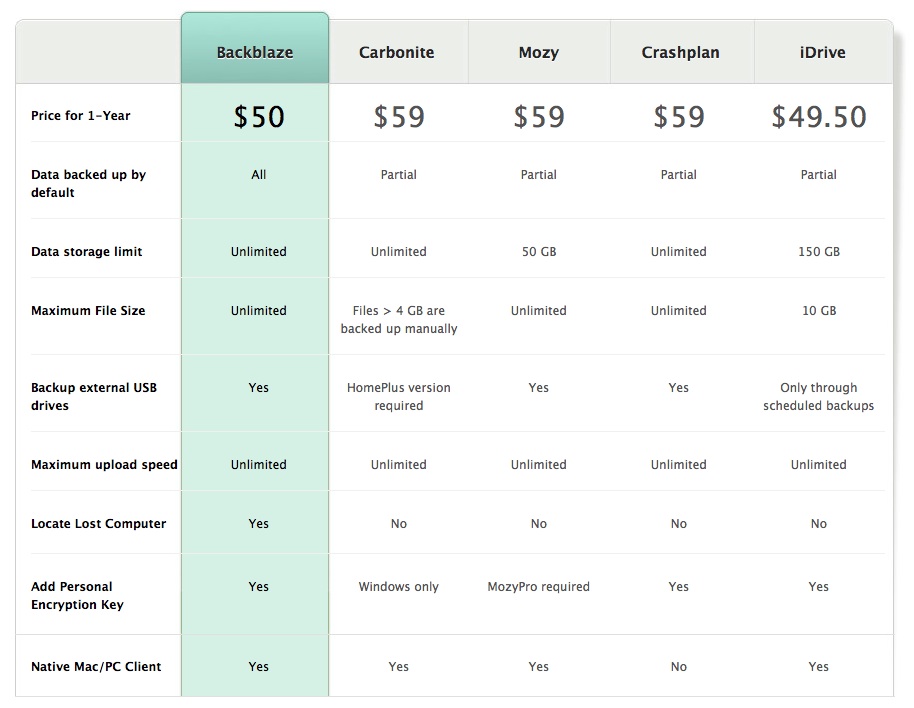
The chart below (provided by BlackBlaze) compares several backup services. It offers a helpful rundown of what to look for in a backup service. Click the image for a larger view.

20140827we-blackblaze-carbonite-mozy-crashplan-idrive

Because the chart was created by BlackBlaze, it’s not surprising that the features highlighted present their backup service in a favorable light.

The Locate Lost Computer feature is a nice addition, and it’s exclusive to BlackBlaze, but it’s already included with iCloud on Apple computers, and easily available from other sources such as PREYProject.com for other platforms.

The service most similar to BlackBlaze in features and benefits seems to be CrashPlan. However, the CrashPlan client software for desktop computers runs on top of Java which potentially introduces one more layer of complexity and security vulnerability.

CrashPlan Concerns

Here are some comments from CrashPlan users. (source)

  • “They’re relying on a bundled Java 7 JRE hidden inside their app bundle. Whether or not it’s worth installing now depends on why you’re avoiding it now. If you’re concerned about security issues with a full install of Java on your Mac, this should avoid that. If you’re concerned about performance, not much is different from how things were a year or so ago.” (Jonathan, 18 April 2014)
  • “CrashPlan caused my Mac grief and performance issues on a i7 iMac with SSD. Couldn’t imagine what it would be like on older Macs.” (SCrossman, 19 April 2014)
  • “I’m also waiting for a native client. I had to add that weird Java hack a while back to increase the memory used by Crashplan’s client so it wouldn’t crash all the time with my (large) dataset, but now of course it consumes quite a bit of memory idling around. If I had to do it over again, I’d probably have gone with Backblaze.” (Brad Oliver, 21 April 2014)

CrashPlan Benefits

  • “The problem with Backblaze is, they delete any files they haven’t seen for 30 days. To my understanding, this means if you have a rarely attached external drive (a drive archiving older files, for instance), you can’t really back it up there. Crashplan doesn’t have this limitation. You can hook up an ‘archive’ drive, let it back up, and those files will be retained indefinitely.” (ZnU, 21 April 2014)
  • More benefits can be found in the Tim Fisher CrashPlan review.

Cloud Backup Limitations

  • For people with multiple terabytes of data, such as huge photo collections or videos, it can take days or weeks to get all your files backed up.
  • With large database files that are constantly being updated, such as a large Outlook PST file, the current will repeatedly be perceived as having changed and be in perpetual need of being backed up.
  • People working with video files will always be days behind on having their data backed up.
  • Cloud backups aren’t ideal for those needing a quick and complete system recovery, including all operating system files and settings.

Benefits of Local Backups

  • Local backups are fast and instantly available.
  • Large files can be quickly backed up or mirrored.

20140827we-cloud-backup-672x372

AMD Radeon R9 285 Gaming Computer Video Card Launch on 2 September 2014

Introduction

AMD is celebrating 30 years of gaming and graphics innovation, and to coincide with this landmark event they are releasing a powerful and economical video gaming card, the AMD Radeon R9 285 2GB. With video cards costing as much as $3000, the R9 285 is powerful yet priced at about $249 to make it accessible to entry-level gamers. Click here to view all R9 series cards on Amazon. Click here to read more about the 30-year anniversary news. Thanks to M.J. for providing the lead to this story.

Specifications

Below are the specifications for the R9 285. More information can be found on the AMD R9 285 product page.

20140824su-amd-radeon-r9-285

Comparison

The chart below compares the R9 285 with other video cards in the R9 series.

20140824su-amd-radeon-r9-285-compared-series

Photos

Below are images of the R9 285.


Ultimate Windows Workstation and Gaming Computer from Amazon

Suggested System Combination

The matched components shown here are the suggested system configuration. Other components found further down this page. The foundation of the system is an 8-core AMD processor. Click here for the New Egg product listing.

Photos

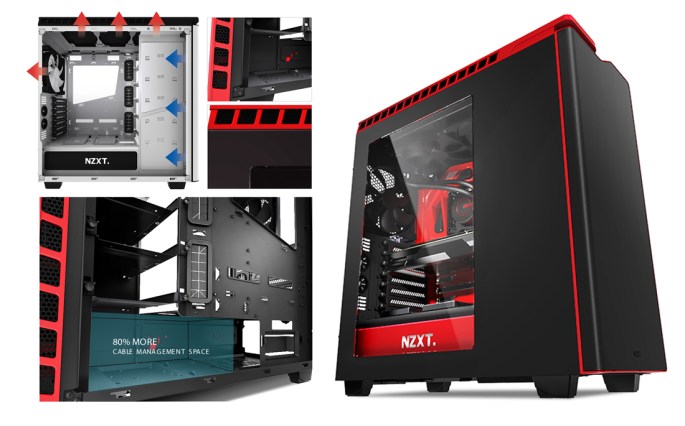
The ultimate Windows workstation and gaming computer is configured using the Black NZXT computer case with red accent trim as shown below. All components fit neatly inside the case. Credit to T.P. for helping configure this system. Click any image below for a larger gallery view.


Black NZXT Computer Case with Red Trim

Summary

The ultimate Windows workstation and gaming computer is configured using the Black NZXT computer case (shown below) with red accent trim as shown below. All components fit neatly inside the case. Credit to T.P. for helping configure this system. Click any image below for a larger gallery view.

Next Generation Green Computer Case Design by Razer and NZXT

Introduction

Razer had joined with NZXT in developing a next generation computer case that could serve as a high-end workstation or gaming machine. This green design is what makes the case unique from the standard NZXT H440 design. Below are photos of the case.


Ultimate Windows Workstation and Gaming Computer from New Egg

Suggested System Combination

The matched components shown here are the suggested system configuration. Other components found further down this page.

The foundation of the system is an 8-core AMD processor. Links shown here are direct non-affiliate links to New Egg. Thanks to T.P. for helping configure this system. Click here for the Amazon product listing.

Alternative Equipment & Components

Below are some alternative options for equipment and components.

Computer Cases

CPU Cooling Fan

Hard Drives

Motherboards (Must Match Processor)

Power Supply

Processors (Must Have Compatible Motherboard)

RAM

Video Card

Other System Combos

The ultimate Windows workstation and gaming computer is configured using the Black NZXT computer case with red accent trim as shown below. All components fit neatly inside the case. Credit to T.P. for helping configure this system. Click any image below for a larger gallery view.


How to Force Quit a Program on an Apple Mac Computer

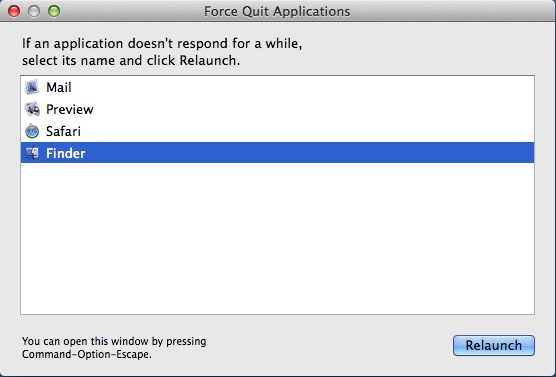
The chart below shows how to force quit a program on an Apple Mac computer. There are two primary ways to do this. You can choose Force Quit from the Apple Menu found in the upper left corner. Or, you can press the alt/option + command + esc keys on the keyboard to bring up the Force Quit menu. Click the image for a larger view.

20140823sa-force-quit-apple-mac-960x540

Apple Mac Force Quit Menu

The Force Quit menu is shown below.

20140823sa-apple-mac-force-quit-menu

Using Coinbase API for Bitcoin, Intuit Mint and Other Services

20140802sa-coinbase-bitcoin-financial-services-onlin-1132x646

To make a secure connection between your Coinbase Bitcoin account and third-party services such as Intuit Mint, you’ll need to configure an API (Application programming interface).

Each API you create can have different levels of access to your Coinbase account. This is similar to when you authorize Facebook or similar services to have limit access to other services you use.

The following steps assume you already have setup your Coinbase account.

  1. Visit the Coinbase API Settings page.
  2. Click on the +New API Key button.
  3. Before creating an API, you’ll need to provide a secondary method of authentication either by SMS message, phone verification, or an authenticator token (using the Authy.com app for your mobile device).
  4. When creating the new API Key, choose the following options:
    • Type: HMAC (Key+Secret)
    • Accounts: My Wallet (Primary)
    • Permissions: balance, transactions, transfers, user.
  5. Then click the Create button.
  6. You’ll need to enable the new API. An email will be sent to your account on file. Click the link to enable the API.
  7. The API use/access by third parties requires a Key and a Secret password. To view these, click on the blue text under the Key heading. You’ll be asked to authenticate again.  Then  the Key and Secret will be revealed. Provide these to the third party when asked.

IMPORTANT: Because the API key gives someone else limited access to your account, be careful to only use an API with a trusted third party service provider.

Iowa City Internet and Television Options and Issues: Mediacom, CenturyLink, Hulu Plus, Netflix, Amazon Prime, Vimeo, YouTube

20140626th-iowa-city-area-internet-television-options-issues-640x300

Introduction

With the high cost of cable or dish services, more people are watching their favorite television shows and movies through online service providers for a nominal monthly fee or for free. Many of the best content providers, like Comedy Central, are offering their programming for free online with minimal commercial interruption. Combined with a public library card, a person can get many hours of programming beyond the time they have available to enjoy it.

Two Choices: Mediacom and CenturyLink

In the Iowa City area, we have two primary service providers for Internet: Mediacom and CenturyLink. Others exist, but their cost, speed, quality, and reliability make them less attractive unless you live in a rural area. The extreme minimalists might consider using a tablet device for all Internet browsing and video viewing, with service provided from a wireless carrier such as AT&T, Verizon, or Sprint.

Cost and Special Offers

You can get deals like $19 a month for one year, or possibly a longer contract. However, once the deal is over, you might pay $49 or more for the same service from either provider. That might be the time to switch to another provider. It’s possible that when  you call your company and indicate your interest in canceling service, they will offer you a deal to keep you as a customer.

Internet Quality and Customer Service

For those wanting a faster hard-wired connection, Mediacom and CenturyLink are your best choices. You’ll hear varied and strong opinions about both of these providers. Some people are very pleased with one or the other, while other people have had very bad experiences with one or the other. This varies depending on personal experience, where you live, the equipment you may have been using, and the randomness of what customer service person you got on a given day.

I know of one person using CenturyLink who is paying for 3 Mbps service but is getting less than 1Mbps. They are told that’s the best the company can offer in their area and that the 3 Mb per second guarantee is only a promise of what the best outcome might be for that service package. I’ve heard similar stories from Mediacom customers. It’s not too difficult to switch from one service provider to another, and in fact it may get you special deals that are half-price or below what you been paying. Make sure you’re not breaking any contracts or losing out on a special grandfathered pricing package.

Traditionally phone service providers like CenturyLink seemed more compelled to keep services running since the hard wired landline phones are linked to 911 emergency services. Providers like Mediacom understandably don’t have the same sense of urgency and timeliness when fixing a television signal or Internet connection. However, this is changing since more people are getting their phones and other important systems onto Internet connections.

Choose an Independent Email Provider

If you’ve not done so already I would suggest not having your email account dependent upon a specific ISP (Internet service provider). Instead, use something like Google Gmail, Microsoft Outlook (their new free online email accounts), Yahoo, or other service. That way, you can switch around your Internet service provider without having it impact your email workflow. In other words, don’t become dependent upon an MCHSI.com, or Q.com, email address.

Pay for Higher Speed / Bandwidth

One mistake people make is paying for less speed/bandwidth than they really need. Most providers don’t guarantee an actual speed, they just promise that your performance should be close or up to a certain speed, and usually is is, but sometimes it can drop. With Mediacom, if you pay for the 50Mbps service, the equipment used in your home and connecting into their grid is on a different network than the lower speed service. So, this can help get you a more reliable fast connection. In some areas, CenturyLink doesn’t offer the higher speeds that Mediacom offers (such as 50 or 100 Mbps). If you have several devices in your home using the Internet, and if they are installing automatic updates, or there are multiple people watching videos, this can place a load on the service.

Virus Impact on Speed / Bandwidth

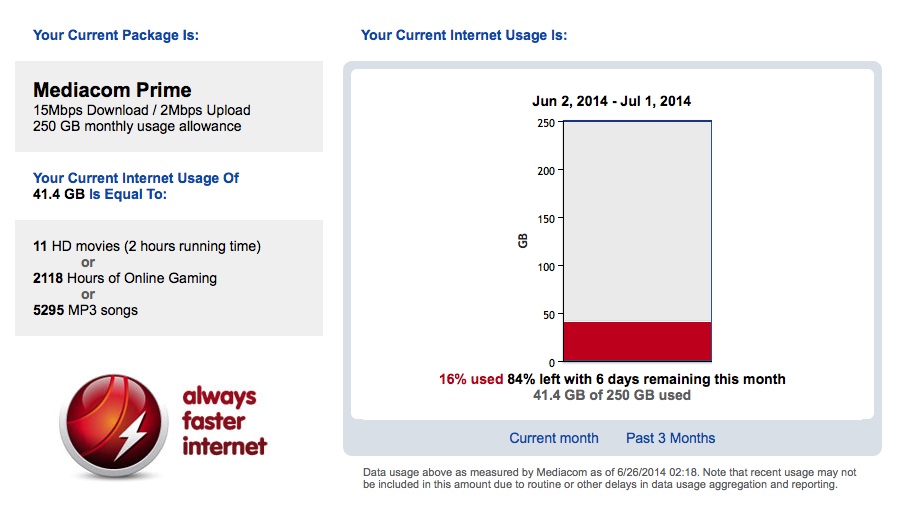
With a slow Internet connection, services like Netflix, Hulu Plus, Amazon Prime, YouTube, and Vimeo won’t work as well. If you’ve noticed a recent increase in problems in your video playback quality (on the computer) for such services, it could be a virus. I recently worked on someone’s computer and they told me that Mediacom warned them about being over the limit on downloads. We went to the user’s Mediacom Usage Meter account page and their accumulated download usage was maxed out. Turns out that a virus had turned their computer into a server and Mediacom had reduced their speed as a result. There are other things to check as well that might be causing a problem (such as unnecessary programs, malware, spyware, adware, etc.). Below is an example of a healthy Mediacom Usage Meter report. Click the image for a larger view.

20140626th-mediacom-usage-meter-example

Wireless Impact on Speed

When you’re farther away from your wireless router, the signal strength and quality typically diminish. This will cause the speed to drop considerably. Even when you have a strong signal, if the quality of that strong signal is poor, the Internet speed will be poor. Things that cause poor signal quality could be walls, wires, or other obstacles (particularly metal). Some electronics and certainly other wireless networks in the area can compete with your wireless signal. Software like WiFi Explorer for $2.99 (on Apple Mac computers) can help test your area for possible interference. The screen shot below shows how the software can identify all the wireless networks in your area, and also show the channel they are on (which can cause the overlap and interference). Click the image for a larger view.
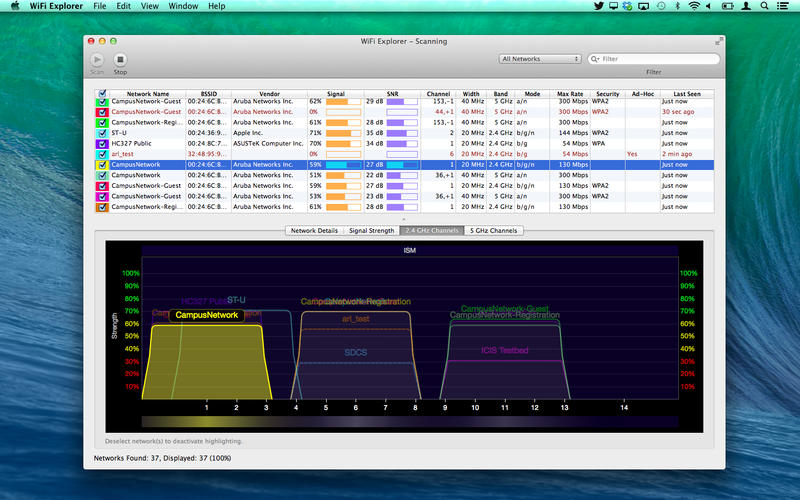
20140626th-wifi-explorer-screen800x500

Check Your Internet Speed

Some people are paying for a certain level of Internet speed, but not getting it. This may be because of an equipment or calibration issue which is the responsibility of the provider. Sometimes just restarting your router can fix speed problems. It could also be a result of inside wiring issues (see below).

Weather Can Impact Service Quality

If you’ve had a thunderstorm, lots of rain, or lots of rain, or very cold weather, at least with Mediacom, these conditions can impact signal quality and Internet speed. Sometimes problems go away after a simple reboot of the router. In other cases, a technician may need to be called out.

Check Your Inside Wiring

Cabling and y-adapters (splitters) that once worked well can be compromised for a variety of reasons such as an electrical surge or just general wear. Having a provider technician come out and test your signal strength and quality is essential.

You may be paying for, and receiving, high-quality/high-speed Internet delivered to your home, but may have some internal cable or splitter that has gone bad. That happened to us. The signal out of the wall was degraded. We replaced the splitter in the wall that had previously worked fine with a new one and the problem was solved. For those wondering, a splitter in the wall is often used when a cable jack is on either side of the wall serving two adjacent rooms.

Use the Provider’s Equipment

It never fails. You’ll call your service provider to complain about a speed problem or other issue, and they will tell you that the problem is being caused by your equipment and there’s nothing they can do about it. If you’re using  your own cable or DSL modem, and/or a separate router, then you may be on your own with regard to diagnostics. However, if you pay the nominal $5 to $8 per month fee to rent the provider’s equipment, then they can diagnose equipment problems remotely all the way to and through your router. This alone is worth it.

Internet Issues That Impact Video Quality

I was helping someone recently who lives north of Iowa City and has Southslope. They could get to the Internet just fine and when I used SpeedTest it seemed their bandwidth was quite good. However, for some reason, Apple FaceTime video would not work properly. After some diagnosing and getting the people at Southslope involved it was discovered that the problem related to timing and how their equipment was configured to deliver the service. What was happening is that packets of data were delivered very quickly. However, there might be gaps of time when packets weren’t being delivered. So, the problem was not noticeable with software updates/downloads, checking email, or browsing the web. I think partly it depends on where you live and what equipment is delivering the service. In the above situation, I believe there were some microwave towers involved in getting the signal to their rural location.

Change Your Viewing Habits

For your “television viewing,” if you can switch your viewing habits to content that’s available through other sources than cable or dish you can save a lot of money. Hulu Plus, Netflix, and Amazon prime would collectively cost you about $30-$40 a month and you would have a wide array of on-demand movies and TV shows. There’s also a lot of good content for free on YouTube and Vimeo. A small investment in a television antenna would get you many of the local stations for local news. I don’t know what the cost is for basic cable these days but switching to that might be a big cost savings.

eBay Tells Users to Change Passwords

20140428mo-computer-security-news-675x300

(Source: http://www.ebay.com/reset)

Important Password Update

Keeping Our Buyers and Sellers Safe and Secure on eBay

On Wednesday, we announced that we are asking all eBay users to change their password. This is because of a cyberattack that compromised our eBay user database, which contained your encrypted password.

Because your password is encrypted (even we don’t know what it is), we believe your eBay account is secure. But we don’t want to take any chances. We take security on eBay very seriously, and we want to ensure that you feel safe and secure buying and selling on eBay. So we think it’s the right thing to do to have you change your password. And we want to remind you that it’s a good idea to always use different passwords for different sites and accounts. If you used your eBay password on other sites, we are encouraging you to change those passwords, too.

Here’s what we recommend you do the next time you visit eBay:

  • Take a moment to change your password. You can do this in the “My eBay” section under account settings. This will help further protect you; it’s always a good practice to periodically update your password. Millions of eBay users already have updated their passwords.
  • Remember to always use different passwords on different sites and accounts. So if you haven’t done this yet, take the time to do so.

Meanwhile, our team is committed to making eBay as safe and secure as possible. So we are looking at other ways to strengthen security on eBay. In the coming days and weeks we may be introducing new security features. We’ll keep you updated as we do.

Thanks for your support and cooperation. eBay is your marketplace, and we are committed to keeping it one of the world’s safest places to buy and sell.

Devin Wenig

President, eBay Marketplaces