Ransomware Malware Virus Prevention, Protection, and Recovery

About Ransomware

Ransomware malware viruses infect a computer and make the user’s files inaccessible by encrypting them. In some cases the computer is left only partially usable. The user is given some instructions on how to get their files back. Usually this involves communicating directly with someone who will ask you for money before they will let you have access to your files again. They may also promise to fix the computer so that it will function again.

It is estimated that there are presently over 250,000 kinds of ransomware viruses. In 2013, just one of these viruses alone resulted in the extortion of an accumulated $3 million from all its victims before it was taken down by authorities. (source)

Ransomware Prevention

Some antivirus software providers, such as Kaspersky, promise that their software can protect against ransomware. This statement is on the Kaspersky website:

“To protect your computer from ransom malware, download and install Kaspersky Internet Security 2015. The application provides high-level protection against ransom malware.” (source)

Avoid Pop-Up Messages. Another important prevention measure is to be very careful with any unusual pop-up messages. Avoid clicking until you can be certain that the message is legitimate, or simply shut down the computer and restart.

Take Email Precautions. One way of getting ransomware is clicking on links in spam emails. Services like Gmail from Google examine all emails flowing through their system and monitor for malicious activity. So, for example, let’s say there is a fake message claiming to be from FedEx about a package that couldn’t be delivered. Google would likely identify that email as not having authentically been sent from Federal Express. So, it would end up in your spam folder with a notice, “We couldn’t verify that this message was really from the claimed sender” or “We’ve identified other messages like this one that are malicious.”

Use AntiVirus Software. Most antivirus software should prevent virus-like activity even from viruses that were previously unknown. Comprehensive Antivirus software can warn you of known malicious websites. In this way, they make browsing the web safer.

Use an Apple Computer. There are currently over 17 million known Windows computer viruses. The current number of Apple viruses are currently very limited. Apple computers are susceptible to security problems found in Adobe Flash and Java, so it’s important to stay updated. There have been a few fake Apple programs people have been deceived into installing, such as Mac Defender. A report of Apple viruses over the past 10 years is only a few pages long. (source) So, while Apple computers are not completely immune to viruses, they may be a better choice for security minded people.

Ransomware Protection

As described above, there are some preventative measures you can take. Ransomware protection are measures you can take to protect and limit the potential damage of a Ransomware attack.

Backups. Some backup programs run daily to maintain a backup of all your files. This is helpful, except in cases where your files have become corrupted or maliciously encrypted. In some cases, a good backup can be overwritten by a bad one. Also, a connected backup drive is accessible to viruses that might try to erase or encrypt files. In these cases, it may be best to maintain a separate manual backup of your files on a drive that remains disconnected from your computer in a safe place.

Cloud Synchronization. If you use a service like Dropbox to maintain a synchronized cloud copy of your files, make sure you have the ability to access previous versions of your files in the event they get damaged.

Ransomware Recovery

The most recent update about ransomware is an article from Sophos on 30 January 2015. (source) The article states:

Crypto-Ransomware is a family of malware that takes files on a PC or network storage, encrypts them, and then extorts money to unlock the files. … These encryptor malwares will encrypt pictures, documents, and videos, and then leave a ransom note in each directory after encrypting at least one file in that directory. They also typically attempt to do this to mapped network drives [or attached backup drives] as well. … Ransomware-encrypted files for most variants cannot be recovered at all. The encryption keys are not stored on the system. There is one variant which can be recovered, which is discussed below. … W32/VirRnsm-A infects files and changes them to .exe files, including the virus code. It still allows the file to open initially so it has a chance to spread. After a while it locks out the files. The good news is that these files, unlike most ransomware, can be recovered and cleaned by Sophos. A full system scan will fix and recover your files.” (source)

With so many variations of ransomware, it’s unlikely that encrypted files could be recovered unless they happen to be the result of the W32/VirRnsm-A variant.

Yet, some tools from Kaspersky (listed below) suggest that decryption may be possible if you have an original file that’s not encrypted and can compare this to an encrypted file.

Further Reading

Below are ransomware information pages from various sources.

Software Tools

Here are some software tools that might help with removal and/or recovery of files.

  • Kaspersky WindowsUnlocker – The Kaspersky WindowsUnlocker utility is designed to disinfect registries of all operating systems installed on the computer (including operating systems installed on different partitions or in different folders on one partition) and disinfect user registry trees. Kaspersky WindowsUnlocker does not perform any actions with files (in order to disinfect files you can use Kaspersky Rescue Disk).
  • RakhniDecryptor – utility for removing Trojan-Ransom.Win32.Rakhni
  • RannohDecryptor –  If the system is infected by a malicious program of the family Trojan-Ransom.Win32.Rannoh, Trojan-Ransom.Win32.AutoIt, Trojan-Ransom.Win32.Fury, or Trojan-Ransom.Win32.Cryakl, all files on the computer will be encrypted. To decrypt files affected by Trojan-Ransom.Win32.Rannoh, Trojan-Ransom.Win32.AutoIt, Trojan-Ransom.Win32.Fury, Trojan-Ransom.Win32.Crybola or Trojan-Ransom.Win32.Cryakl, use the RannohDecryptor utility.
  • RectorDecryptor – Kaspersky Lab specialists have developed a special utility for decrypting the data encrypted by Trojan-Ransom.Win32.Rector. Cybercriminals use Trojan-Ransom.Win32.Rector for disrupting normal performance of computers and for unauthorized modification of data making it unusable. Once the data has been “taken hostage” (blocked), its owner (user) receives a ransom demand. The victim is supposed to deliver the ransom in exchange for pirate’s promise to send a utility that would restore the data or repair the PC.
  • XoristDecryptor – There is a utility to confront malware of the family Trojan-Ransom.Win32.Xorist, Trojan-Ransom.MSIL.Vandev – XoristDecryptor. Malware of the family Trojan-Ransom.Win32.Xorist, Trojan-Ransom.MSIL.Vandev is designed for unauthorized modification of data on a victim computer. It makes computers uncontrollable or blocks its normal performance. After taking the data as a “hostage” (blocking it), a ransom is demanded from the user. The victim is supposed to deliver the ransom to the pirate, who is promising to send in return a program which would release the data or restore normal performance of the computer.

Instructional Videos

These videos refer to variants of ransomware. They may not be specific to your own experience, but the general information presented should be helpful. These videos provide an insight into the variety of ransomware and what the recovery solutions might be.

[youtube https://www.youtube.com/watch?v=_dKBXeoLIFo] [youtube https://www.youtube.com/watch?v=w_7wUXzhRD8] [youtube https://www.youtube.com/watch?v=WJagR2txHJU] [youtube https://www.youtube.com/watch?v=LKy9X–ffw8] [youtube https://www.youtube.com/watch?v=Zcj9RKO3e38]
On Facebook Use Caution When Approving Friend Requests

Today I received a friend request from someone on Facebook. Usually I would just click “Approve” and move on.

Yet, we only had one friend in common, and upon checking this person’s Facebook profile, it showed that they had only one post on their timeline (a poor quality profile pic), yet they were adding friends on Facebook at a furious rate. I couldn’t really find anything from a Google search on this person. It was as if they didn’t exist.

Many of the people who he friended are from my community — people I know, although we’re not Friends on Facebook.

I thought I’d spend a few minutes investigating this a bit, so I contacted some of the people (dozens added in the last hour) who had recently friended him.

Turns out none of these people really know anything about him.

Potential Harm

Here’s the danger in accepting friend requests too quickly:

  1. The person controlling the fake user account (a troll) gets access to your entire friend list.
  2. The troll or potential hacker sees your private timeline posts as if they are your friend or family member. They see things about you that you’ve set as not public and only viewable to friends or friends of friends.
  3. Because of your supposed friendship with this fictitious person, the troll then gains the trust of your friends, so when the friend request appears, your friends think they are a trusted and known individual. So, they accept the friend request, and the troll returns to step 1 above to become friends with everyone that person knows, and so on.

The goal of these people is to quickly build up a huge friends list on Facebook which can grow exponentially. These accounts are typically built up over time and then sold on the black market to spammers, advertisers, and hackers who attempt to use reverse social engineering to hack into Facebook accounts (and your other accounts) based on what they gather from your personal information online.

What You Can Do

While Facebook is usually a fun and safe online environment, it’s still important to be cautious.

  • Alert Your Friends. If you suspect some suspicious activity, let your friends know — the friends who have already friended a troll using a fake account.
  • Alert Others. Look at the list of people the fake account has friended. Some of them will be people you’re not friends with, but you have dozens of friends in common. In other words, they are likely legitimate users. You could also consider notifying them.
  • Notify Facebook. You can also contact Facebook about suspicious activity. Go to the profile of the person you suspect is fraudulently using Facebook. Click on the dots to the right of the Message button and choose Report to report the person. You can also Block them.

It’s everyone’s responsibility to help keep Facebook safe and secure through each person being careful about who they connect with.

UPDATE #1

Several hours ago, there was no Google image match on the Internet for the profile image that had been posted by the fictitious user. None. Now, a few hours later, that same image is showing up for multiple user accounts under different names on Twitter and other websites. On those sites, he’s also posted little or nothing, but building friend networks.

UPDATE #2

Facebook took down the fraudulent user’s account within a few more hours of this post. Another victory.

Cisco AnyConnect Web Security Not Compatible with Avast Apple Mac

If you attempt to install Avast Antivirus on your Apple Mac computer, you may get the following error message:

Incompatible software detected. The Web Security module of Cisco has been detected, which is not compatible with Avast. To install the Avast product, please uninstall the incompatible module first.

When you click the Close button, the installation will immediately quit.

Follow these instructions to fix this problem:

  1. If you have a direct license with Cisco, you can visit the Cisco Software Download Page and download the AnyConnect Secure Mobility Client. Navigate to the AnyConnect Secure Mobility Client v3.x download page and look for the download called Standalone DMG package for Mac OS X “Intel” platforms.
  2. For many people, you will need to go to your organization or employer software download page and download the version provided.
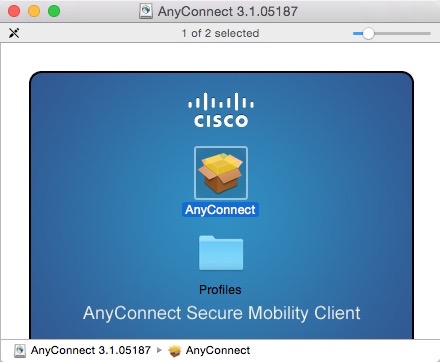
  3. Follow the installation instructions, and remember not to select the Web Security module (see below). This will configure the software so that Avast can be installed.

These are the installation screens. Click any image for a larger gallery view.

Bash Shellshock Bug Vulnerability Exploit Patch

Summary

Some people are calling the Bash Shellshock Bug the worst thing since the Heartbleed Virus. Others are saying that the vulnerability isn’t as bad as reported since it won’t directly effect most users. The truth is probably somewhere in between. This document offers an introduction into what the Bash exploit is and what you can do about it.

Bash Facts

Here are a few facts about Bash.

  • “Bash or the Bourne again shell, is a UNIX-like shell, which is perhaps one of the most installed utilities on any Linux system. From its creation in 1980, Bash has evolved from a simple terminal based command interpreter to many other fancy uses. In Linux, environment variables provide a way to influence the behavior of software on the system. They typically consists of a name which has a value assigned to it. The same is true of the Bash shell. It is common for a lot of programs to run Bash shell in the background. It is often used to provide a shell to a remote user (via ssh, telnet, for example), provide a parser for CGI scripts (Apache, etc) or even provide limited command execution support (git, etc)” (source)
  • “Bash is present on every Linux distribution, almost every UNIX system, many Android phones, thousands upon thousands of embedded OS versions on hardware devices — and on every version of Mac OS X ever shipped.” (source)
  • “This patch doesn’t even BEGIN to solve the underlying shellshock problem. This patch just continues the ‘whack-a-mole’ job of fixing parsing errors that began with the first patch. Bash’s parser is certain have many many many other vulnerabilities; it was never designed to be security-relevant.” (source)

Quick Test for Bash Vulnerability

Using Terminal, you can enter the following commands to test for Bash vulnerability.

  • env x='() { :;}; echo vulnerable’ bash -c “echo this is a test”

If you type that, and only get the message “this is a test” then your system is most likely not vulnerable (other exploits are currently being evaluated, so don’t assume you’re completely protected). However, if you also see the word “vulnerable” generated, then your system is vulnerable.

If you run the above example with the patched version of Bash, you should get an output similar to:

bash: warning: x: ignoring function definition attempt
bash: error importing function definition for `x’
this is a test

Ubuntu Users

If you’re a user of the latest version of Ubuntu (14) and have been installing system updates regularly, your computer has likely already been patched.

Resources

Rather than recreating here what has already been posted elsewhere, the following resources have been gathered to provide the information you need and save you from searching the web through thousands of articles.

20140928su-computer-security-news-672x372

Android Has Over 400 Security Vulnerabilities and Leaks Data Almost 100 Times Per Hour

A cryptography firm has identified over 400 security vulnerabilities in the Android operating system widely used in smart phones and tablets. They also identified data leaving Android devices going to various unknown destinations at a rate of about 80 to 90 times per hour. These security concerns are compounded by the fact that rogue cell phone towers (like malicious routers) can take control over devices. Popular Science reports, “Every smart phone has a secondary OS, which can be hijacked by high-tech hackers.”

Read more: “Mysterious Phony Cell Towers Could Be Intercepting Your Calls,” Popular Science 27 August 2014.

20140903we-technology-shutterstock_73347661-2

Microsoft Office 2011 Mac Security Vulnerabilities Update

20140410th-microsoft-office-2011-mac-security-update

Introduction

This update resolves vulnerabilities in Microsoft Office that could allow remote code execution if a specially crafted file is opened in an affected version of Microsoft Office.

What You Need To Do

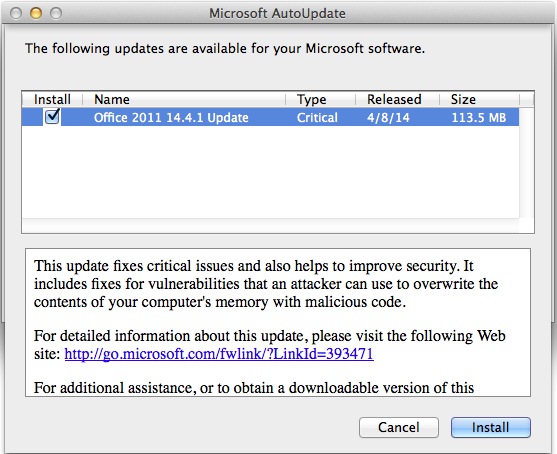
To install this update, simply start one of the Microsoft Office applications, such as Word, and the update dialog (shown above) should appear. Click Install and follow the instructions. The rest of this document goes into more details about the update.

Summary

Microsoft has released security bulletin MS14-017. This security bulletin contains all the relevant information about the security update for Microsoft Office for Mac 2011. To view the complete security bulletin, go to the following Microsoft website:

https://technet.microsoft.com/security/bulletin/MS14-017

In addition to the application improvements that are mentioned here, Office for Mac 2011 is now available as a subscription offering. For more information about subscription, see Frequently Asked Questions.

Details

This update provides the latest fixes for Office for Mac 2011. These include the following:

  • Improves synchronization of blocked senders for Microsoft Exchange Server 2013 and Microsoft Exchange Online accounts in Microsoft Outlook for MacThis update fixes an issue that causes the blocked sender list not to synchronize with the Exchange server when a message is moved immediately after you use the Block Sender action.
  • Improves the ability to recover from certain network errors when you connect by using POP in Outlook for MacThis update fixes an issue that causes Outlook for Mac to re-download the contents of the inbox for POP accounts for certain connection errors.
  • Improves the ability to recover from errors when you try to update the Offline Address Book in Outlook for MacThis update fixes an issue that causes Outlook for Mac not to download the Offline Address Book when certain errors are detected.
  • Improves synchronization of folder hierarchies added by using “Open Other User’s Folder” in Outlook for MacThis update fixes an issue that causes Outlook for Mac to synchronize the folder hierarchies that were added by usingOpen Other User’s Folder too frequently.
  • Increases the data validation control capabilities in Excel for MacThis fix increases the data validation control capabilities from 1,024 entries to 2,048 entries.
  • Improves the ability to respond and recover from certain Exchange server errors in Outlook for MacThis update fixes an issue that causes Outlook for Mac to send too many Exchange server requests when Outlook for Mac receives certain errors from the server.
  • Improves the ability to manage responses for meetings that are sent to distribution lists in Outlook for MacThis update fixes an issue that causes meetings that are sent to distribution lists in which the Request Responses option is not selected to display response options when attendees view meetings in the Calendar view.
  • Improves the ability to create Microsoft Lync for Mac online meetings in Outlook for MacThis update fixes an issue that causes Outlook for Mac to stop responding when you try to schedule an online meeting by using Lync for Mac. This issue occurs when certain information, such as a toll-free number, is missing from the dial-in conference settings.
  • Improves Microsoft Word pointer displayThis update fixes an issue that causes mouse pointers to disappear in sections of documents.
  • Improves the experience for sending encrypted messages in Outlook for MacThis update fixes an issue that causes Outlook for Mac to check Active Directory Domain Services every time for certificates when the application sends encrypted messages in OS X Mavericks, instead of first checking locally cached certificates in the OS X Keychain.

Prerequisites

Before you install the Office for Mac 2011 14.4.1 update, make sure that you have Office for Mac 2011 14.1.0 or a later version installed on your computer. Also, make sure that the computer is running Mac OS X v10.5.8 or a later version of the Mac OS X operating system.

To verify that the computer meets this prerequisite, click About This Mac on the Apple menu.

To verify that Office for Mac 2011 14.1.0 or a later version is installed on your computer, follow these steps:

  1. On the Go menu, click Applications.
  2. Open the Microsoft Office 2011 folder, and then start any Office application. For example, start Word.
  3. On the application menu, click About <application>.
  4. In the About <application> dialog box, notice the version number that is displayed there. It should be 14.1.0 or a later version number.

How to obtain the update

The following file is available for download from the Microsoft Download Center:

Download

Download the Microsoft Office for Mac 14.4.1 Update package now.

Release Date: April 8, 2014

For more information about how to download Microsoft support files, click the following article number to view the article in the Microsoft Knowledge Base:

119591 How to obtain Microsoft support files from online services

Microsoft scanned this file for viruses. Microsoft used the most current virus-detection software that was available on the date that the file was posted. The file is stored on security-enhanced servers that help prevent any unauthorized changes to the file.

Updated files

For a complete list of the files that this update adds or changes, double-click the update installer, and then, on the File menu, click Show Files.

Notes

The Office for Mac 14.4.1 Update is also available from Microsoft AutoUpdate. AutoUpdate is a program that automatically keeps Microsoft software up-to-date. 

To use AutoUpdate, start a Microsoft Office program. Then, on the Help menu, click Check for Updates.

Learn about the resources for Office for Mac 2011

(Source: http://support.microsoft.com/kb/2939132)