

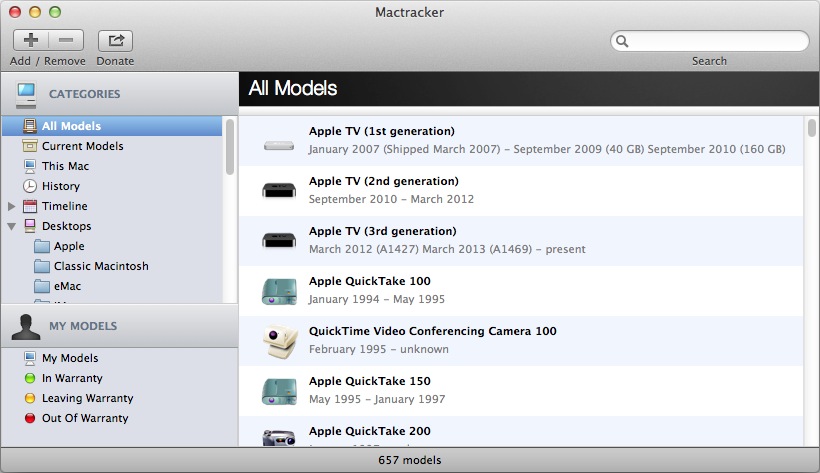
The Mactracker software runs on OSX and iOS platforms, and provides a helpful listing of hardware specifications as well as operating system information. Here’s a description from the developer’s website:
“Mactracker provides detailed information on every Apple Macintosh computer ever made, including items such as processor speed, memory, optical drives, graphic cards, supported OS versions, and expansion options. Also included is information on early Apple systems, Apple mice, keyboards, displays, printers, scanners, speakers, cameras, iPod, Apple TV, iPhone, iPad, Wi-Fi products, Newton, iOS, Mac OS, and OS X versions.”
The latest release, version 7.3.4, has the feature enhancements listed below. Previous versions are also listed.
Please note that this release requires OS X 10.6.8 Snow Leopard or later. Download version compatible with OS X 10.5.8 Leopard.
Version 7.3.4
- Adds iPhone 6 and iPhone 6 Plus
- Adds iOS 8
- Updates Support Status for Apple’s latest Vintage and Obsolete products
- Other minor changes and additions
Version 7.3.3
- Adds MacBook Pro (Retina, 13-inch, Mid 2014) and MacBook Pro (Retina, 15-inch, Mid 2014)
- Adds iMac (21.5-inch, Mid 2014)
- Adds Apple Lisa and Apple Lisa 2
- Adds 16 GB configuration to iPod touch (5th generation)
- Adds details on latest OS X and iOS releases
- Updates Support Status for Apple’s latest Vintage and Obsolete products
- Other minor changes and additions
Version 7.3.2
- Adds MacBook Air (11-inch, Early 2014) and MacBook Air (13-inch, Early 2014)
- Adds details on latest iOS releases
- Adds second Wi-Fi ID field to “My Models” for dual-band Wi‑Fi devices
- Other minor changes and additions
Version 7.3.1
- Updates iPad (4th generation) and iPhone 5c with latest configurations
- Adds details on latest OS X and iOS releases
- Updates Support Status for Apple’s latest Vintage and Obsolete products
- Other minor changes and additions
Version 7.3
- Adds Apple I, Apple II, Apple II Plus, Apple III / Apple III Plus, Apple IIe / Apple IIe Enhanced, Apple IIc, Apple IIGS, Apple IIe Platinum, and Apple IIc Plus
- Adds Apple Monitor III, Apple Monitor II, Apple Monitor IIc, Apple IIc Flat Panel Display, AppleColor Monitor 100, ColorMonitor IIe/IIc and AppleColor Composite Monitor IIe/IIc, AppleColor Composite Monitor, AppleColor RGB Monitor, Apple Monochrome Monitor, and Apple Monochrome Monitor IIe
- Adds Apple Mouse / Apple Mouse IIc and Apple Mouse II / Apple Mouse IIe
- Adds typical acoustical performance, where available, to MacBook, MacBook Air, and MacBook Pro models
- Fixes issue with importing system overview reports created by Apple Remote Desktop to “My Models”
- Other minor changes and additions
Version 7.2.3
- Fixes an issue that could cause Mactracker to crash on OS X 10.6.8 Snow Leopard
- Updates Support Status for Apple’s latest Vintage and Obsolete products
Version 7.2.2
- Adds Mac Pro (Late 2013)
- Adds the ability to import system overview reports from Apple Remote Desktop to “My Models”
- Adds Thunderbolt and 4K display support information to recent Mac models
- Adds typical acoustical performance, where available, to Mac mini, iMac, and Mac Pro models
- Fixes issue with importing reports created by System Profiler to “My Models”
- Other minor changes and additions
Version 7.2.1
- Adds details on latest iOS releases
- Other minor changes and additions
Version 7.2
- Adds MacBook Pro (Retina, 15-inch, Late 2013) and MacBook Pro (Retina, 13-inch, Late 2013)
- Adds iMac (21.5-inch, Late 2013) and iMac (27-inch, Late 2013)
- Adds iPad Air (Wi-Fi) and iPad Air (Wi-Fi + Cellular)
- Adds iPad mini (2nd generation) (Wi-Fi) and iPad mini (2nd generation) (Wi-Fi + Cellular)
- Adds iPhone 5s and iPhone 5c
- Adds iOS 7
- Adds OS X 10.9 Mavericks and OS X Server 3.0
- Adds additional information on early Mac OS releases
- Adds case color details to Classic Macintosh, Macintosh Performa, Power Macintosh, and Power Mac G3/G4/G5 models
- Adds Maximum Battery Cycle Count information to MacBook, MacBook Pro, and MacBook Air models
- Adds Intelligent Assistant and Processor Architecture information to iPhone and iPad models
- Adds support for OS X 10.9 Mavericks
- Updates Support Status for Apple’s latest Vintage and Obsolete products
- Other minor changes and additions
Version 7.1.5
- Updates Support Status for Apple’s latest Vintage and Obsolete products
- Other minor changes and additions
Version 7.1.4
- Adds MacBook Air (11-inch, Mid 2013) and MacBook Air (13-inch, Mid 2013)
- Adds AirPort Extreme 802.11ac and AirPort Time Capsule 802.11ac
- Adds iPod touch 16GB (5th generation)
- Other minor changes and additions
Version 7.1.3
- Adds entry to indicate if Power Nap is supported on a particular model
- Updates name of iPad (4th generation) and iPad mini for consistency with iPhone 5
- Updates iMac (Late 2012) and iMac (Early 2013) models with new configure-to-order options
- Fixes an issue where benchmarks were not displayed in Compare
- Other minor changes and additions
Version 7.1.2
- Adds iMac (21.5-inch, Early 2013) (Education only model)
- Includes improvements to “My Models” functionality
- Adds system requirements to iPod, iPhone, and iPad models
- Updates Support Status for Apple’s latest Vintage and Obsolete products
- Other minor changes and additions
Version 7.1.1
- Updates iPod shuffle (4th generation) with 2012 color lineup
- Adds pixel density information to Cinema and Thunderbolt display models
- Fixes an issue that caused Mactracker to crash on launch for some users
- Fixes an issue with exporting entries in “My Models”
- Other minor changes and additions
Version 7.1
- Adds MacBook Pro (Retina, 13-inch, Early 2013) and MacBook Pro (Retina, 15-inch, Early 2013)
- Adds AppleDesign Powered Speakers, AppleDesign Powered Speakers II, Apple Pro Speakers, and iPod Hi-Fi
- Updates iPad (4th generation) models with 128 GB configuration
- Updates Apple TV (3rd generation) with component refresh details
- Adds the ability to search by serial number for recent models
- Adds Electromagnetic compatibility (EMC) number for recent models
- Adds information on maximum number of connected Thunderbolt displays
- Updates functionality for providing feedback
- Updates Support Status for Apple’s latest Vintage and Obsolete products
- Other minor changes and additions
Version 7.0.1
- Adds iMac (21.5-inch, Late 2012) and iMac (27-inch, Late 2012)
- System requirements updated to OS X 10.6.8 or later
- Other minor changes and additions
Version 7.0
- Adds MacBook Pro (Retina, 13-inch, Late 2012)
- Adds Mac mini (Late 2012) and Mac mini Server (Late 2012)
- Adds iPad (4th generation) (Wi-Fi), iPad (4th generation) (Wi-Fi + Cellular) and iPad (4th generation) (Wi-Fi + Cellular Sprint + Verizon)
- Adds iPad mini (Wi-Fi), iPad mini (Wi-Fi + Cellular) and iPad mini (Wi-Fi + Cellular Sprint + Verizon)
- Adds iPhone 5 (GSM North America), iPhone 5 (GSM International) and iPhone 5 (CDMA)
- Adds iPod nano (7th generation) and iPod touch (5th generation)
- Adds iOS 6
- Optimized for Retina displays
- Mactracker is now built with the Cocoa framework
- Adds marketing tagline, where available, for recent models
- Adds separate entry for Subscriber Identity Module (SIM) information to iPad and iPhone models
- Adds environmental requirements to iPad, iPhone and iPod models
- Fixes an issue that could cause Mactracker to crash on OS X 10.8 Mountain Lion
- System requirements updated to OS X 10.7 or later
- Updates Support Status for Apple’s latest Vintage and Obsolete products
- Other minor changes and additions



 Iowa City Technology Services