News Feed

goTenna Personal Long-Range Public Mesh Network

A new product called goTenna lets two or more people create a publicly owned wide area phone network for text messaging.

Even without access to mobile services, the goTenna network will operate as a mesh multi-node peer-to-peer network.

You can visit the GoTenna website, and support the product by purchasing two devices for half price.

“goTenna pairs wirelessly with your smartphone, enabling you to text and share your location with anyone who has the device even if you don’t have service. No towers, routers or satellites required!”

20140718fr-gotenna-mesh-personal-public-wide-area-network

Iowa City Internet and Television Options and Issues: Mediacom, CenturyLink, Hulu Plus, Netflix, Amazon Prime, Vimeo, YouTube

20140626th-iowa-city-area-internet-television-options-issues-640x300

Introduction

With the high cost of cable or dish services, more people are watching their favorite television shows and movies through online service providers for a nominal monthly fee or for free. Many of the best content providers, like Comedy Central, are offering their programming for free online with minimal commercial interruption. Combined with a public library card, a person can get many hours of programming beyond the time they have available to enjoy it.

Two Choices: Mediacom and CenturyLink

In the Iowa City area, we have two primary service providers for Internet: Mediacom and CenturyLink. Others exist, but their cost, speed, quality, and reliability make them less attractive unless you live in a rural area. The extreme minimalists might consider using a tablet device for all Internet browsing and video viewing, with service provided from a wireless carrier such as AT&T, Verizon, or Sprint.

Cost and Special Offers

You can get deals like $19 a month for one year, or possibly a longer contract. However, once the deal is over, you might pay $49 or more for the same service from either provider. That might be the time to switch to another provider. It’s possible that when  you call your company and indicate your interest in canceling service, they will offer you a deal to keep you as a customer.

Internet Quality and Customer Service

For those wanting a faster hard-wired connection, Mediacom and CenturyLink are your best choices. You’ll hear varied and strong opinions about both of these providers. Some people are very pleased with one or the other, while other people have had very bad experiences with one or the other. This varies depending on personal experience, where you live, the equipment you may have been using, and the randomness of what customer service person you got on a given day.

I know of one person using CenturyLink who is paying for 3 Mbps service but is getting less than 1Mbps. They are told that’s the best the company can offer in their area and that the 3 Mb per second guarantee is only a promise of what the best outcome might be for that service package. I’ve heard similar stories from Mediacom customers. It’s not too difficult to switch from one service provider to another, and in fact it may get you special deals that are half-price or below what you been paying. Make sure you’re not breaking any contracts or losing out on a special grandfathered pricing package.

Traditionally phone service providers like CenturyLink seemed more compelled to keep services running since the hard wired landline phones are linked to 911 emergency services. Providers like Mediacom understandably don’t have the same sense of urgency and timeliness when fixing a television signal or Internet connection. However, this is changing since more people are getting their phones and other important systems onto Internet connections.

Choose an Independent Email Provider

If you’ve not done so already I would suggest not having your email account dependent upon a specific ISP (Internet service provider). Instead, use something like Google Gmail, Microsoft Outlook (their new free online email accounts), Yahoo, or other service. That way, you can switch around your Internet service provider without having it impact your email workflow. In other words, don’t become dependent upon an MCHSI.com, or Q.com, email address.

Pay for Higher Speed / Bandwidth

One mistake people make is paying for less speed/bandwidth than they really need. Most providers don’t guarantee an actual speed, they just promise that your performance should be close or up to a certain speed, and usually is is, but sometimes it can drop. With Mediacom, if you pay for the 50Mbps service, the equipment used in your home and connecting into their grid is on a different network than the lower speed service. So, this can help get you a more reliable fast connection. In some areas, CenturyLink doesn’t offer the higher speeds that Mediacom offers (such as 50 or 100 Mbps). If you have several devices in your home using the Internet, and if they are installing automatic updates, or there are multiple people watching videos, this can place a load on the service.

Virus Impact on Speed / Bandwidth

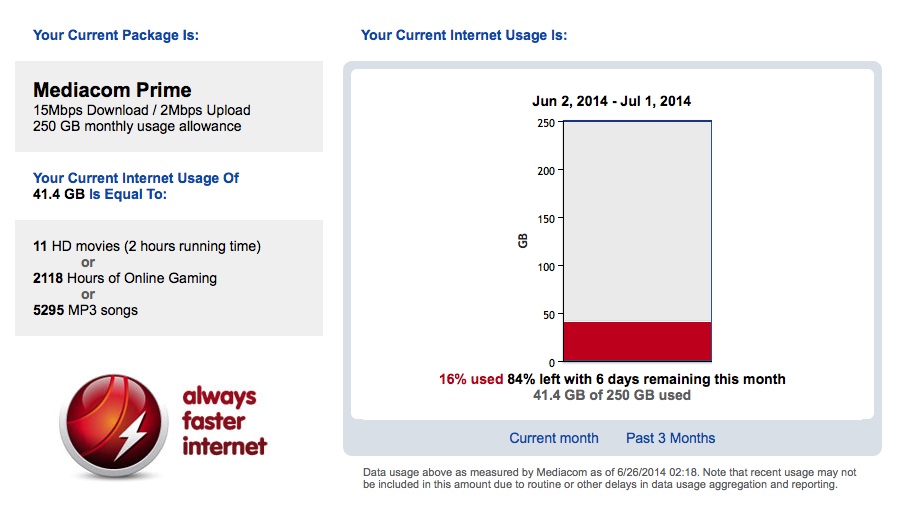
With a slow Internet connection, services like Netflix, Hulu Plus, Amazon Prime, YouTube, and Vimeo won’t work as well. If you’ve noticed a recent increase in problems in your video playback quality (on the computer) for such services, it could be a virus. I recently worked on someone’s computer and they told me that Mediacom warned them about being over the limit on downloads. We went to the user’s Mediacom Usage Meter account page and their accumulated download usage was maxed out. Turns out that a virus had turned their computer into a server and Mediacom had reduced their speed as a result. There are other things to check as well that might be causing a problem (such as unnecessary programs, malware, spyware, adware, etc.). Below is an example of a healthy Mediacom Usage Meter report. Click the image for a larger view.

20140626th-mediacom-usage-meter-example

Wireless Impact on Speed

When you’re farther away from your wireless router, the signal strength and quality typically diminish. This will cause the speed to drop considerably. Even when you have a strong signal, if the quality of that strong signal is poor, the Internet speed will be poor. Things that cause poor signal quality could be walls, wires, or other obstacles (particularly metal). Some electronics and certainly other wireless networks in the area can compete with your wireless signal. Software like WiFi Explorer for $2.99 (on Apple Mac computers) can help test your area for possible interference. The screen shot below shows how the software can identify all the wireless networks in your area, and also show the channel they are on (which can cause the overlap and interference). Click the image for a larger view.
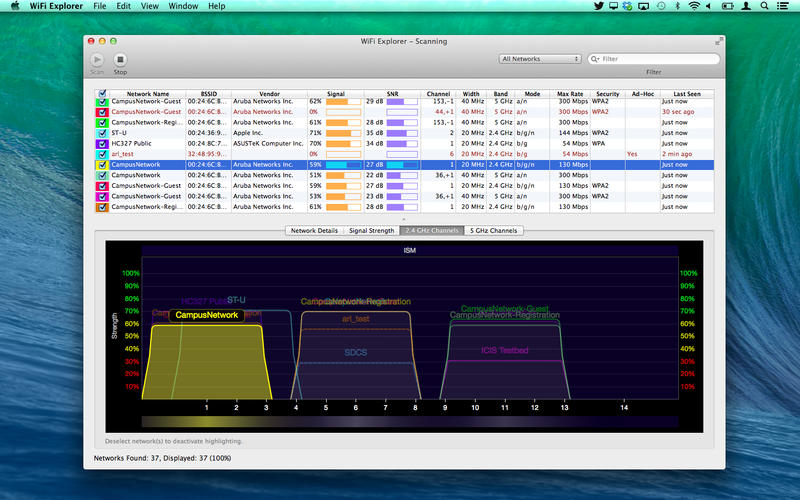
20140626th-wifi-explorer-screen800x500

Check Your Internet Speed

Some people are paying for a certain level of Internet speed, but not getting it. This may be because of an equipment or calibration issue which is the responsibility of the provider. Sometimes just restarting your router can fix speed problems. It could also be a result of inside wiring issues (see below).

Weather Can Impact Service Quality

If you’ve had a thunderstorm, lots of rain, or lots of rain, or very cold weather, at least with Mediacom, these conditions can impact signal quality and Internet speed. Sometimes problems go away after a simple reboot of the router. In other cases, a technician may need to be called out.

Check Your Inside Wiring

Cabling and y-adapters (splitters) that once worked well can be compromised for a variety of reasons such as an electrical surge or just general wear. Having a provider technician come out and test your signal strength and quality is essential.

You may be paying for, and receiving, high-quality/high-speed Internet delivered to your home, but may have some internal cable or splitter that has gone bad. That happened to us. The signal out of the wall was degraded. We replaced the splitter in the wall that had previously worked fine with a new one and the problem was solved. For those wondering, a splitter in the wall is often used when a cable jack is on either side of the wall serving two adjacent rooms.

Use the Provider’s Equipment

It never fails. You’ll call your service provider to complain about a speed problem or other issue, and they will tell you that the problem is being caused by your equipment and there’s nothing they can do about it. If you’re using  your own cable or DSL modem, and/or a separate router, then you may be on your own with regard to diagnostics. However, if you pay the nominal $5 to $8 per month fee to rent the provider’s equipment, then they can diagnose equipment problems remotely all the way to and through your router. This alone is worth it.

Internet Issues That Impact Video Quality

I was helping someone recently who lives north of Iowa City and has Southslope. They could get to the Internet just fine and when I used SpeedTest it seemed their bandwidth was quite good. However, for some reason, Apple FaceTime video would not work properly. After some diagnosing and getting the people at Southslope involved it was discovered that the problem related to timing and how their equipment was configured to deliver the service. What was happening is that packets of data were delivered very quickly. However, there might be gaps of time when packets weren’t being delivered. So, the problem was not noticeable with software updates/downloads, checking email, or browsing the web. I think partly it depends on where you live and what equipment is delivering the service. In the above situation, I believe there were some microwave towers involved in getting the signal to their rural location.

Change Your Viewing Habits

For your “television viewing,” if you can switch your viewing habits to content that’s available through other sources than cable or dish you can save a lot of money. Hulu Plus, Netflix, and Amazon prime would collectively cost you about $30-$40 a month and you would have a wide array of on-demand movies and TV shows. There’s also a lot of good content for free on YouTube and Vimeo. A small investment in a television antenna would get you many of the local stations for local news. I don’t know what the cost is for basic cable these days but switching to that might be a big cost savings.


eBay Tells Users to Change Passwords

20140428mo-computer-security-news-675x300

(Source: http://www.ebay.com/reset)

Important Password Update

Keeping Our Buyers and Sellers Safe and Secure on eBay

On Wednesday, we announced that we are asking all eBay users to change their password. This is because of a cyberattack that compromised our eBay user database, which contained your encrypted password.

Because your password is encrypted (even we don’t know what it is), we believe your eBay account is secure. But we don’t want to take any chances. We take security on eBay very seriously, and we want to ensure that you feel safe and secure buying and selling on eBay. So we think it’s the right thing to do to have you change your password. And we want to remind you that it’s a good idea to always use different passwords for different sites and accounts. If you used your eBay password on other sites, we are encouraging you to change those passwords, too.

Here’s what we recommend you do the next time you visit eBay:

  • Take a moment to change your password. You can do this in the “My eBay” section under account settings. This will help further protect you; it’s always a good practice to periodically update your password. Millions of eBay users already have updated their passwords.
  • Remember to always use different passwords on different sites and accounts. So if you haven’t done this yet, take the time to do so.

Meanwhile, our team is committed to making eBay as safe and secure as possible. So we are looking at other ways to strengthen security on eBay. In the coming days and weeks we may be introducing new security features. We’ll keep you updated as we do.

Thanks for your support and cooperation. eBay is your marketplace, and we are committed to keeping it one of the world’s safest places to buy and sell.

Devin Wenig

President, eBay Marketplaces

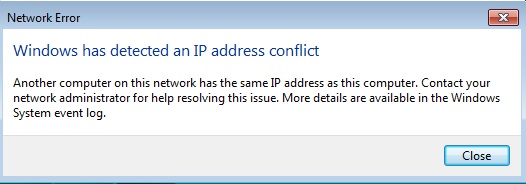
Windows IP Address Conflict Error – “Another computer on this network has the same IP address as this computer.”

20140509fr-windows-network-ip-conflict-

If you get a message similar to the one above, it means that the network (wired and/or wireless) has mistakenly issued the same IP address to two devices.

This can happen when one device goes to sleep, and the router releases that IP address for use again by another device. Then the original computer (or mobile device) attempts to grab the same IP address. The error message will appear.

The problem can also happen if any of the devices on your network have fixed IP addresses. If the device with a fixed IP address wakes up or is turned on, and requests it’s internally defined fixed IP number, but that number is in use by another device, the error will appear.

The best solution is to turn the device off and then back on (restart). In most cases, this will cause the automatic process of requesting and being assigned the next available IP address (DHCP) to fix the problem.

For a server or other device that has a fixed IP address, you may need to turn those devices on first. Let them get their fixed IP addresses assigned. Then turn on other devices.

Apple MacBook iMac Left Mouse Button Not Working Mountain Lion Mavericks

20140226we-apple-support-tips-500x500

If the left mouse button for your Apple computer stops working or suddenly becomes non responsive for no apparent reason, try this trick to possibly fix the problem.

  1. Using the right mouse button, navigate from the Apple (icon) menu to System Preferences and click on Mouse.
  2. Under “Primary mouse button” switch to the Right mouse button and then switch back to the Left. Try this a couple times (keeping in mind that the alternate button will be primary), and return to Left as the primary (or your preferred button).

This may restore the proper function of the left mouse button.

Microsoft Internet Explorer Security Warning from the U.S. Department of Homeland Security

20140428mo-computer-security-news-675x300

First Response – Alternative Browsers

As you’ll read in the article below, the U.S. Department of Homeland security is recommending that people use alternative browsers until Microsoft provides a security update for Internet Explorer. Here are some alternative browsers:

Note: In our Windows Setup checklist, we recommend the installation of several browsers when setting up a new computer — for security reasons and also because some websites are not properly viewed with some browsers. If a browser is ‘hijacked’ by malware, it is sometimes possible to switch to another browser and begin the process of cleaning up the computer.

Further Reading

The USA Today news coverage of this story is below. Further reading can be found in the following articles.

USA Today News Story

Below is a new story from USA Today about this security vulnerability. (Source: “Homeland Security: Don’t use IE due to bug,” USA Today, 28 April 2014)

* * *

SAN FRANCISCO – The U.S. Department of Homeland security is advising Americans not to use the Internet Explorer Web browser until a fix is found for a serious security flaw that came to light over the weekend.

The bug was announced on Saturday by FireEye Research Labs, an Internet security software company based in Milpitas, Calif.

“We are currently unaware of a practical solution to this problem,” the Department of Homeland Security’s United States Computer Emergency Readiness Team said in a post Monday morning.

It recommended that users and administrators “consider employing an alternative Web browser until an official update is available.”

The security flaw allows malicious hackers to get around security protections in the Windows operating system. They then can be infected when visiting a compromised website.

Because the hack uses a corrupted Adobe Flash file to attack the victim’s computer, users can avoid it by turning off Adobe Flash.

“The attack will not work without Adobe Flash,” FireEye said. “Disabling the Flash plugin within IE will prevent the exploit from functioning.”

While the bug affects all versions of Internet Explorer six through 10 it is currently targeting IE9 and IE10, FireEye stated.

The attacks do not appear to be widespread at this time. Microsoft said it was “aware of limited, targeted attacks that attempt to exploit” the vulnerability.

These are called “watering hole attacks,” said Satnam Narang, a threat researcher with computer security company Symantec in Mountain View, Calif..

Rather than directly reach out to a victim, the hackers inject their code into a “normal, everyday website” that the victim visits, he said. Code hidden on the site then infects their computers.

“It’s called a watering hole attack because if you’re a lion, you go to the watering hole because you know that’s where the animals go to drink.”

FireEye said the hackers exploiting the bug are calling their campaign “Operation Clandestine Fox.”

Microsoft confirmed Saturday that it is working to fix the code that allows Internet Explorer versions six through 11 to be exploited by the vulnerability. As of Monday morning, no fix had been posted.

Microsoft typically releases security patches on the first Tuesday of each month, what’s known as Patch Tuesday. The next oneis Tuesday, May 6. Whether the company will release a patch for this vulnerability before that isn’t known.

About 55% of PC computers run one of those versions of Internet Explorer, according to the technology research firm NetMarketShare. About 25% run either IE9 or IE10.

Computer users who are running the Windows XP operating system are out of luck. Microsoft discontinued support of the system on April 8.

Symantec is offering XP users tools to protect themselves, which it has made available on its blog.

Microsoft Security Advisory 2963983: Vulnerability in Internet Explorer Could Allow Remote Code Execution

20140428mo-computer-security-news-675x300

(Source: Microsoft Security Advisory 2963983)

Executive Summary

Microsoft is aware of limited, targeted attacks that attempt to exploit a vulnerability in Internet Explorer 6, Internet Explorer 7, Internet Explorer 8, Internet Explorer 9, Internet Explorer 10, and Internet Explorer 11.

The vulnerability is a remote code execution vulnerability. The vulnerability exists in the way that Internet Explorer accesses an object in memory that has been deleted or has not been properly allocated. The vulnerability may corrupt memory in a way that could allow an attacker to execute arbitrary code in the context of the current user within Internet Explorer. An attacker could host a specially crafted website that is designed to exploit this vulnerability through Internet Explorer and then convince a user to view the website.

On completion of this investigation, Microsoft will take the appropriate action to protect our customers, which may include providing a solution through our monthly security update release process, or an out-of-cycle security update, depending on customer needs.

We are actively working with partners in our Microsoft Active Protections Program (MAPP) to provide information that they can use to provide broader protections to customers. For information about protections released by MAPP partners, see MAPP Partners with Updated Protections.

Microsoft continues to encourage customers to follow the guidance in the Microsoft Safety & Security Center of enabling a firewall, applying all software updates, and installing antimalware software.

Mitigating Factors:

  • By default, Internet Explorer on Windows Server 2003, Windows Server 2008, Windows Server 2008 R2, Windows Server 2012, and Windows Server 2012 R2 runs in a restricted mode that is known as Enhanced Security Configuration. This mode mitigates this vulnerability.
  • By default, all supported versions of Microsoft Outlook, Microsoft Outlook Express, and Windows Mail open HTML email messages in the Restricted sites zone. The Restricted sites zone, which disables script and ActiveX controls, helps reduce the risk of an attacker being able to use this vulnerability to execute malicious code. If a user clicks a link in an email message, the user could still be vulnerable to exploitation of this vulnerability through the web-based attack scenario.
  • An attacker who successfully exploited this vulnerability could gain the same user rights as the current user. Users whose accounts are configured to have fewer user rights on the system could be less impacted than users who operate with administrative user rights.
  • In a web-based attack scenario, an attacker could host a website that contains a webpage that is used to exploit this vulnerability. In addition, compromised websites and websites that accept or host user-provided content or advertisements could contain specially crafted content that could exploit this vulnerability. In all cases, however, an attacker would have no way to force users to visit these websites. Instead, an attacker would have to convince users to visit the website, typically by getting them to click a link in an email message or Instant Messenger message that takes users to the attacker’s website.

Free Download of Microsoft Office Professional Plus 2013 Evaluation

20140426sa-microsoft-office-2013-logo-icons

Office Professional Plus 2013 is the future of productivity. Office Professional Plus 2013 includes Word, PowerPoint, Excel, Outlook, OneNote, Access, Publisher, and Lync.

Click here for instructions on how to obtain the download.

Job Opening: Senior Database Administrator at the University of Iowa Public Policy Center

20131212th-technology-support-job-listing-960x540

There is an opening for a full-time Senior Database Administrator at the University of Iowa Public Policy Center. This position is responsible for data processing, extraction, and integration as well as database development and maintenance of new and existing databases. Successful candidates will have significant experience with SQL databases and strong interpersonal skills.

More information can be found online:

https://jobs.uiowa.edu/pands/view/64245

Fitbit Responds to Heartbleed Vulnerability

20140428mo-computer-security-news-675x300

(Source: Fitbit Website Article, 22 April 2014)

How is Fitbit keeping my data secure in light of Heartbleed?

LAST UPDATED: APR 22, 2014 02:51PM
On Monday, April 7, 2014, information was made public regarding a major vulnerability in the OpenSSL technology that encrypts much of the internet’s traffic. More information about this vulnerability is available at The Wire.

After patching our servers, we now require all customers to log in again. The next time you visit the web site or mobile application, you will see the login page. If you can’t remember your password, please follow the instructions at How do I reset or change my fitbit.com password?

In addition we strongly encourage all customers to change their fitbit.com passwords after logging in by visiting https://www.fitbit.com/user/profile/edit.

Note that if you change your password on a third-party account that is linked to your Fitbit account (such as Twitter, Facebook, Runkeeper, and other partners), you may need to relink that account with your Fitbit account.
You can review the third-party applications you’ve authorized by visiting https://www.fitbit.com/user/profile/apps.

The nature of the vulnerability makes it difficult to detect malicious behavior that would indicate any customer data or passwords have been compromised. However, we believe these steps are in our customers’ best interests.

More information

Fitbit, like many others, was using an affected version of OpenSSL. We updated all of our severs by 11:00 am (PDT) on April 8th and we are no longer vulnerable. By 5:00 pm (PDT) on the same day, we had also reissued all our certificates with new keys. This is a best-practice safeguard against the possibility of having had our key compromised by this vulnerability.

Note that Fitbit has long configured our servers to utilize forward secrecy whenever possible, further reducing the potential damage that the Heartbleed bug could cause.

Behind the scenes, we have also been busy auditing all of our partner integrations and changing our access keys for any partner that was potentially vulnerable.