Apple Cinema Display Brightness Control Missing Not Working

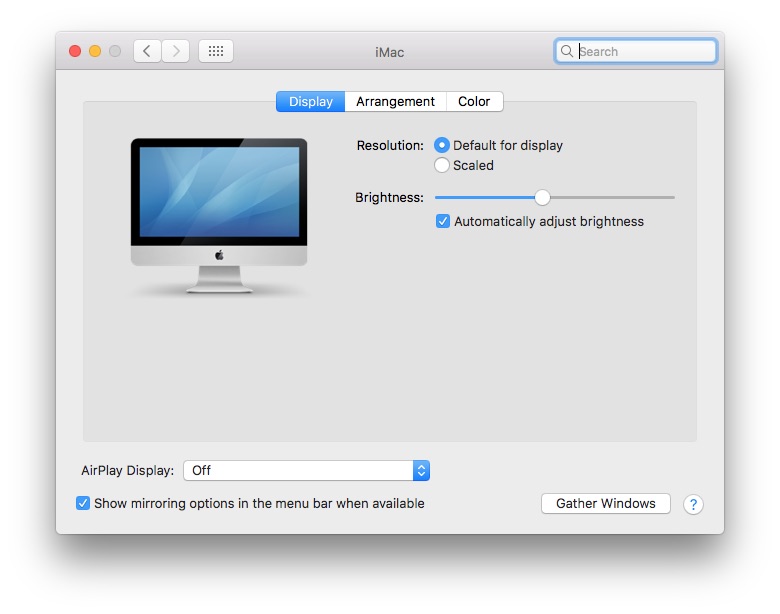
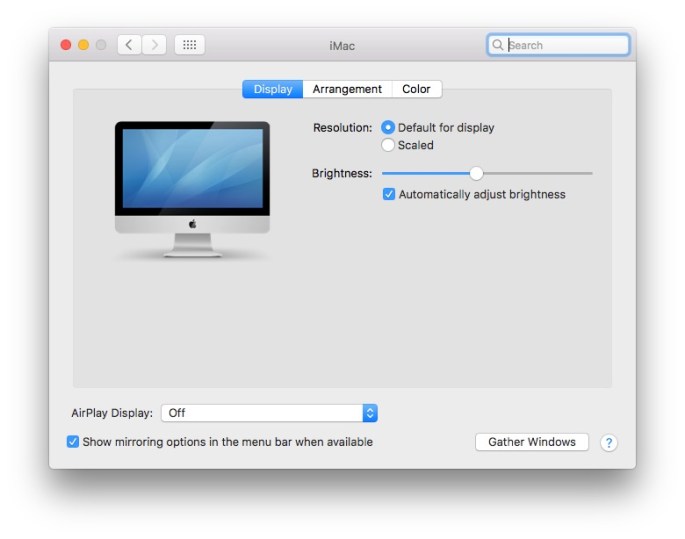
If you’re using an Apple Cinema Display as a secondary monitor for your MacBook laptop computer or iMac, you may have noticed that sometimes the brightness control is missing from System Preferences > Displays.

There may be a variety of reasons for this, but one cause is easy to fix. If the USB cable from the display isn’t attached to your computer, the brightness slider will be missing. The display will continue displaying the brightness that it last had until you connect the USB and change the brightness level again.

This was tested and documented using a 2008 era 24″ Apple Cinema Display connected to an Apple iMac (21.5-inch, Late 2013). The issue likely impacts other system configurations.

20161107mo2103-apple-cinema-display-brightness-control-missing-not-working-broken-780x614

Apple Mac: Legacy Java SE 6 Runtime and Java Command-Line Tool JDK Alert Messages

Update 30 August 2017

After three years working with various scenarios, a pattern of success is emerging. Today, on a computer running OS X 10.11 El Capitan, the above error message was appearing when trying to run SPSS. After installing Java SE 6 Runtime, SPSS ran without a problem. So, that simple installation seemed to resolve the problem and may work to resolve the issue for other software and other versions of OS X. You can get the Java SE 6 Runtime installation file here.

Background

In 2009, we reported on a problem with Java on Apple Mac computers. Similar Java problems continued over the years, and we reported again in 2012, 2014, and 2015. The problem we reported and posted about back in 2014, that continued to 2015, still exists in macOS Sierra in 2016. There doesn’t seem to be a simple removal tool or utility to fix the problem. Since the problem hasn’t changed much from our previous articles, we’ll offer an update here of what we’ve learned.

Overview

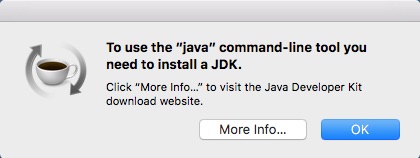
You may get an error similar to the ones shown below. This indicates that you have an older software program on your computer that is trying to run on a version of Java that Apple has since removed for security reasons.

20161027th1244-apple-mac-java-open-need-to-instal-the-legacy-java-se-6-runtime

20161027th1252-apple-mac-java-command-line-tool-need-jdk

These messages look similar, but notice the first one refers to a specific application and the second one generally refers to the java command-line tool. In either case, there is software trying to launch at startup and at other times which is requiring Java.

What You Need to Do

By removing the old software you can get rid of these messages. Software like Clean My Mac can help in removing programs along with the many system and configuration files that are not removed by dragging the application icon to the trash.

Or, you can try to manually find left over application files if you’ve already removed the older software. For example, if you right click on the Finder icon (usually found in the lower left corner on a Mac) you can use the Go to Folder option to go to ~/Library/LaunchAgents and look for files that may have been used by the older software, but be careful because you could also negatively impact currently installed software.

In the case of Adobe Creative Suite 4 (CS4) and Creative Suite 5 (CS5) you should consider upgrading to the latest Adobe Creative Cloud products and plans. An installation of the latest software would presumably remove the older software. If not, use the Clean My Mac utility software mentioned above to remove the old Adobe configuration files.

If you’re committed to running the older software on your computer, you could try (at your own risk) some of the options below to install legacy versions of Java.

Oracle is essentially saying it’s not their fault you have older software installed on your computer and that you need to contact Apple for support. Apple is stating that they are not able to support Java and programs that depend on it so they are sending people to Oracle for support.

Oracle Suggests Contacting Apple

According to Oracle, the developers of Java, the error message is due to an older software program installed on your Apple computer. Their website states:

This is most commonly because an application requires the legacy Java 6 provided by Apple. For the solution to this issue, see http://support.apple.com/kb/DL1572.


So, Oracle is sending people to Apple

Apple Suggests Contacting Oracle

If you follow the link to Apple’s website you’ll see the following notice.

Java for OS X 2015-001 installs the legacy Java 6 runtime for OS X 10.11 El Capitan, OS X 10.10 Yosemite, OS X 10.9 Mavericks, OS X 10.8 Mountain Lion, and OS X 10.7 Lion.

This package is exclusively intended for support of legacy software and installs the same deprecated version of Java 6 included in the 2014-001 and 2013-005 releases.

Quit any Java applications before installing this update.

See http://support.apple.com/kb/HT6133  for more details about this update.

See http://support.apple.com/kb/HT1222 for information about the security content of this update.

Keep your software up to date. If you need Java, download the latest version of Java for OS X directly from Oracle https://www.java.com

NOTE: Older versions may be found at:  http://support.apple.com/kb/DL1829

If you follow that last link to the older versions, you’ll arrive at a page with this information.

Java for OS X 2014-001 includes installation improvements, and supersedes all previous versions of Java for OS X. This package installs the same version of Java 6 included in Java for OS X 2013-005.

Please quit any Java applications before installing this update.

See http://support.apple.com/kb/HT6133  for more details about this update.

See http://support.apple.com/kb/HT1222 for information about the security content of this update.

Keep your software up to date. If you need Java, download the latest version of Java for OS X directly from Oracle https://www.java.com

So, essentially, that last suggestion is that ultimately you should “If you need Java, download the latest version of Java for OS X directly from Oracle.”

If you follow those last two knowledge base articles above, the first link takes you to a page that states:

This article is about older, unsupported Java software. Download the latest version of Java for OS X directly from Oracle.

The second link takes you to a generic Apple page on security, which when searched does not contain the word Java on the entire page.

Read iPhone App Update Notes Before Proceeding to Avoid Data Loss

When you update your iPhone apps you’ll notice under each app there’s an option to read “What’s New” to find out what has been introduced with this new update.

It’s good to read those notes for the following reason:

  • New Features. Sometimes it’s the only way you’ll learn of a useful new feature.
  • Critical Warning. Developers will sometimes put an important message in those notes such as “We’ve received feedback that this update will cause your phone to crash. We’ll get a revised one out soon.” That was a message recently with an app update.
  • Update Advice. There may be some advice from the app developer regarding the update. Some updates may require a backup of your data. See the example below.

It doesn’t take long to read the update notes, and most of the time it’s worth it because you’ll learn about some important new features and bug fixes.

For this reason, you may want to disable any automatic updates not just on your phone, but on your other devices and computers so you can be fully informed about the updates and make sure there are no known problems associated with the updates.

iPhone Updates – Screen Shots

Below you can see an example of how important update information isn’t visible until you tap “What’s New” to reveal it. In the example below, the app developer suggests users make a backup of their data before updating.

20161020th0927-iphone-update-notes-1024x768


DreamHost IMAP Email Client Server Settings

Most email services will automatically configure when using email clients such as Outlook, Apple Mail, or Mozilla Thunderbird. However, DreamHost email does not automatically configure so you’ll need to use the manual settings configuration.

Here are the general settings you’ll need to use for your email client:

  • Name. Your full name or the name you’d like to use as the sender name.
  • Email. Your email.
  • Account Type. IMAP
  • Incoming Mail Server. mail.yourwebsite.com
  • Outgoing Mail Server. mail.yourwebsite.com
  • User Name. your full email address
  • Password. your email password
  • Secure Password Authentication. Yes, require logon using Secure Password Authentication (SPA)
  • SMTP Authentication. Select “My outgoing server (SMTP) requires authentication.” and choose “Use same settings as my incoming mail server”
  • Root Folder Path. This should be “Inbox.” This is found in Outlook under More settings > Advanced.
  • Incoming server (IMAP). 993 – Use SSL
  • Outgoing server (SMTP). 465 – Use SSL
  • Security Certificate. You will likely be prompted that the security certificate doesn’t match. This is because the certificate is for mail.dreamhost.com and not your own domain. Choose Continue.


The above information was gathered from the DreamHost online support document for configuring Outlook 2013 that was last updated on 21 Sep 2016 at 3:56 PM.

Apple iPhone Buying Guide

A common question people have these days is with regard to which mobile device to purchase. I typically recommend the Apple iPhone using AT&T. I’ll briefly share about my choice of phone and carrier, then get down to choosing which iPhone is best. For Fall 2016 the choice is relatively easy.

Mobile Carrier

Verizon has good nation-wide coverage for making voice calls, but in my own testing for my area, I found the high speed data services have been about the same or better with AT&T. The ability to use wi-fi for phone calls on AT&T has made the effective coverage and usability inside of buildings and other areas much better. The Verizon pricing seemed much higher than AT&T for what you get, and their shared data plan (last I checked), had limits per device. So, even if you have 15 GB shared, no device could use more than 3 GB in a month (for example). The prices and offerings are always changing, but in general I’ve found AT&T to be the best out there.

On a side note, we had a weird customer service experience with Verizon where it took us months of emails and phone calls to get our service disconnected – long after we’d returned the Samsung phones to their store they were still billing us for wireless service. They said their records didn’t show that we’d returned the phones, even though we had receipts and paperwork to prove all this (and a sales person who confirmed it). We finally had to bring in the district manager to get it all straightened out. Even then, they kept promising it was taken care of, and weeks would go by and nothing was taken care of. Finally they stopped charging us for the service and we got the money refunded. Anyway, not the best experience.

Android or iOS

I tried Android for about a year and still have an Android device for testing. In general, I find the Apple hardware better and the Apple operating system more secure. The Android environment is very similar to a desktop computer operating system which has advantages (customizable with multiple brands of hardware to choose from) as well as disadvantages (viruses, and less standardization). So, overall, for people that just want to get their work done, I’d recommend the Apple iPhone.

Apple iPhone Models and Pricing

If you go to the iPhone page on Apple’s website you’ll see that as of Fall 2016, the iPhone 7 is the latest model available. The iPhone 6s and iPhone SE are also available.

The pricing of these phones is as follows:

  • iPhone SE with 4″ display is $450 (64GB)
  • iPhone 6S with 4.7″ display is $550 (32GB) or $650 (128GB)
  • iPhone 6S Plus with 5.5″ display is $650 (32GB) or $750 (128GB)
  • iPhone 7 with 4.7″ display is $650 (32GB) or $750 (128GB) or $850 (256GB)
  • iPhone 7 Plus with 5.5″ display is $770 (32GB) or $870 (128GB) or $970 (256GB)

Buying Considerations

Here are a few things to keep in mind:

  • For a few hundred dollars difference, the iPhone 7 offers a faster processor, waterproof protection, and a much better camera. So, it’s a good choice for many people. It comes with an adapter to use older style headphones, and comes with newer style earbud headphones that plug in.
  • In previous years, the $100 price difference between the basic and plus models was simply to get a larger display. This year, the much better camera in the iPhone 7 Plus is something that is definitely worth it.
  • With regard to storage, 32GB is the bare minimum of what you’ll want. The next jump up is 128GB for about $100 more. That’s probably worth doing just to make sure you don’t run out of space.
  • There are lots of colors to choose from. Many people choose black and then add color with their choice of case.
  • The iPhone SE is attractively priced at $450 and it has a nice 4″ tiny size display which some people would like. Yet, the sharper metal edges, and smaller display could also be seen as a drawback. It depends on your preference.

Summary

The reason to choose the iPhone 7 Plus is to have a mobile device that is very fast and water resistant, with a large bright display and great camera.

The reason to choose the other models would be primarily to save some money – there are no other advantages. Their processors are now a year old, so their usable lifespan will be reduced. The few hundred dollars saved now is actually equated with a year or two less usability down the road. So, no savings in terms of long-term cost of ownership.

Video

In the video below, starting at the 54 minute mark, is a presentation about the iPhone  7.

Firefox Browser Plugin Updates for Security

You should regularly check your Firefox plugins to make sure they aren’t susceptible to security vulnerabilities.

This link will take you to the Firefox Plugins Check page:

https://www.mozilla.org/en-US/plugincheck/

The link only works when using the Firefox browser.

Canceling SoundCloud Subscription for Refund

SoundCloud Pricing

The SoundCloud pricing plan will force anyone who is a regular content creator into their Go Pro Unlimited offer which is normally about $180 a year. Their Pro plan is $84 and only includes 6 hours of uploaded audio.

These rates are a lot of money to pay considering you could host your own website and upload unlimited audio for about $5 per month. Given that many audio content producers are non-commercial indy musicians or news podcasters, this price starts to push what most people feel they can afford for a hobby, and given that many people already have and need a website that already includes huge storage capacity, SoundCloud is charging a lot of an add-on.

SoundCloud Refund

SoundCloud offers a 30-day trial and money back guarantee which is explained on their site.  However, cancelling the trail and getting your money back isn’t easy.

Unfortunately, like many other companies, SoundCloud makes it a little difficult to find how to cancel your subscription or get a refund.

There’s no easy method to contact any customer service representative, even from within their fairly expensive paid account.

On your account subscription page, there’s no button that says ‘cancel’ or ‘refund’ but instead you must ‘edit’ your subscription and then downgrade it. Once downgraded, there’s no message about any refund.

If you do a Google search on ‘SoundCloud Refund’ you’ll find a page that describes Canceling or downgrading your Pro subscription. Here are the instructions from that page.


For SoundCloud Pro or Pro Unlimited subscriptions, you can cancel at any time by going to your Subscriptions page.

Go to the pencil icon next to your current subscription status like this:

20150907at1358-soundcloud-edit-downgrade-plan

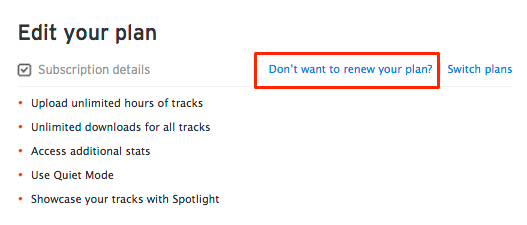
Next, click on ‘Don’t want to renew your plan?’:

20150907at1418-soundcloud-cancel-plan-subscription

You will then be shown the date that your plan will return to Free, and what the Free plan offers in comparison to your current Pro or Pro Unlimited plan. Click ‘Confirm & stop renewal’ to cancel your current subscription. If you change your mind, you can upgrade back to a Pro subscription at anytime here.

If you’re within the 30 days money back period after your first purchase,  a refund will be processed automatically.

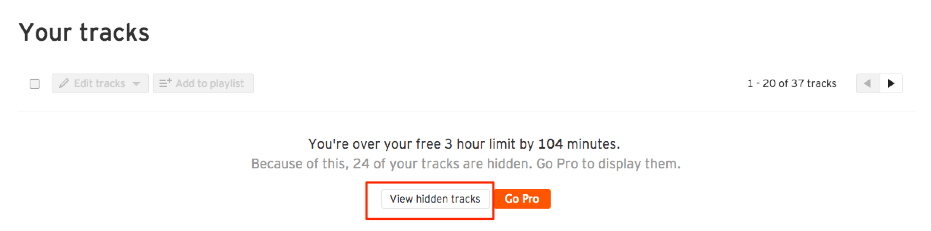
Please note: When you downgrade to a free plan, we will not delete anything from your account. The oldest uploads exceeding the limits of the free account will be hidden. You will be able to view these hidden tracks on your Tracks page.

20150831at1709-soundcloud-tracks-free-3-hour-limit-hidden-tracks-exceed-minutes

All your hidden tracks along with their stats and comments will be saved so that whenever you choose to re-upgrade, everything will be restored.


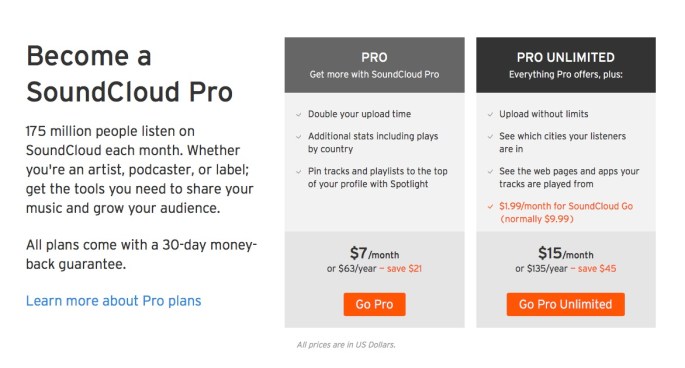
SoundCloud Subscription Plans

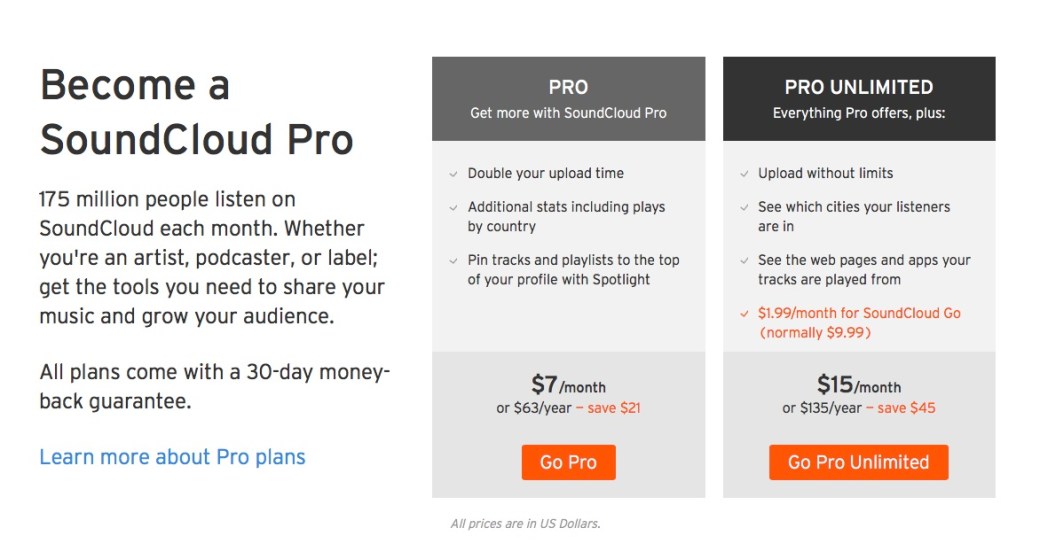
Below is the pricing model for SoundCloud Pro and Pro Unlimited subscriptions.

20160916fr0622-soundcloud-pricing

Apple iOS 10 Legacy Operational Issues

Summary

This is a live page being updated regularly with a list of iOS 10 legacy operational issues -problems that existed in previous iOS versions that have persisted and not been fixed yet in iOS 10. Additional items will be listed here as they are discovered.

iOS 10 Legacy Operational Issues

  1. Automatic Case. When typing, if you use a period such as in the abbreviation U.S. in the middle of a sentence, the word that immediately follows that abbreviation will be forced into upper case. The ‘automatic uppercase’ feature, doesnt’ seem to distinguish between a period at the end of a sentence and the period at the end of an abbreviation. Some abbreviations don’t force the next word to be capitalized, such as etc. yet others do. When he upper case letter is forced in the middle of a sentence, it’s necessary to type the word, then as the second letter of the word insert the lower case letter that starts the word, then manually delete the first letter (which was forced to be upper case). It’s a bit of a hassle.
  2. Dictation Keyboard Icon. If you’re using an iPad pro, and the dictation microphone key on the on-screen keyboard disappears, you may need to turn off the iPad and then turn it back on again to restore the button.
  3. Dictation Quote Marks. When dictating text, if you say ‘quote’ the quote mark will be generated immediately preceeding the next word you say. When you want to close the quote, you can’t simply say ‘quote’ to generate another quote mark because that will create a space and then a quote mark. You must say ‘end quote’ to generate a quote mark without a space before it.
  4. Dictation Spacing in Numbers. Usually when you dictate text, the text is dictated as if you typed it. If you’re using the Numbers program, every time you dictate text into a cell, after you press ‘Done’ to end dictation, a space will be inserted before what you just dictated. You’ll then need to awkwardly try to edit that space out of the cell which is more challenging in Numbers than most applications because of the close proximity to other buttons in the function edit area. There need to be no space inserted in front of dictated text.
  5. Email Signature Duplication. We reported this happening in iOS 9 back on 21 March 2016, and the problem has been brought forward into iOS 10. If you are typing a message and then change the ‘from’ account, you’ll end up with duplicate signatures. This also happens if you’re typing a message, and switch to another app, then return to email, you’ll end up with multiple copies of your signature. This happens on iPhone and iPad.
  6. Email Signature Settings. If you use multiple signatures, in Settings, when you go to review them, you may see the video presentation of those signatures overlapping on the screen making them unreadable and not editable. This has been a problem for years, spanning multiple iPhone and iPad models and multiple iOS versions.
  7. Emoticon Tray. When using an external Apple wireless keyboard with the iPad Pro, it’s possible to press the ‘eject’ key to display and hide the on-screen keyboard. Once switched to the emoticon on-screen keyboard, the ‘eject’ key no longer works to hide the on-screen keyboard. It’s necessary to switch back to the text keyboard first.

Zoom H2n Firmware Update 2.00 Installation

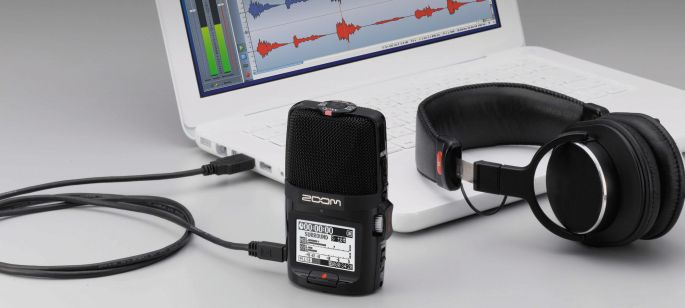
There is a firmware update for the Zoom H2n recorder. Recently purchased recorders may have the 1.20 update. To install the new update, follow these instructions.

  1. Download the H2n System Version 2.00 software. (here)
  2. The downloaded file will be named H2n_v2.00E.zip
  3. Double-click on that file to expand it.
  4. This should result in a folder named H2n_v2.00E.
  5. Within that folder, there should be a file named H2NMAIN.BIN
  6. Power off the H2n recorder.
  7. Remove the SD card from the H2n recorder.
  8. Most laptop computers and some desktop computers have SD card readers built-in. If you don’t have an SD card reader built-in, you’ll need an external SD card reader [view on Amazon] such as the Sabrent SuperSpeed 2-Slot USB 3.0 Flash Memory Card Reader or the IOGEAR 12-in-1 USB 2.0 Pocket Flash Memory Card Reader/Writer. When you plug in the SD card reader, and insert the card, the SD card will be available to your computer.
  9. Copy the H2NMAIN.BIN file to the SD card, not putting it in any particular folder, but just directly in the SD card.
  10. When removing the SD card, in Windows click on the eject icon for USB devices. For Apple Mac, use the eject feature. Otherwise files can be corrupted.
  11. Put the SD card in the H2n recorder (it should be off at this point).
  12. Turn on the H2n recorder while holding down (pressing in) the Play control button.
  13. When the H2n recorder turns on, you’ll see a message on screen indicating “VERSION UPDATE” showing your current version and the version of the update file with an option to press OK or CANCEL.
  14. Push the Play control button up to switch from CANCEL to OK, then push the Play button in to begin the update. The progress will be indicated on screen. When done, you’ll be prompted to turn the unit off.

__________

The above instructions are surprisingly nowhere to be found on the Zoom website or anywhere else on the Internet, so we’ve written them up and provided them here.

Facebook: Be careful when accepting friend requests from people you know.

Problem Summary

We’re all familiar with the warning to be cautious when accepting emails or social media requests from people we don’t know. Now it’s important to use caution when accepting friend requests from those we do know. Here’s why.

  • Scammers will setup a fake ‘imposter’ Facebook account using your friend’s name and maybe two or three of their photos. Then they will send you a friend request.
  • Because the friend request comes from someone you know, you’re less likely to be skeptical about it.
  • Additionally, because a few of your common friends will have already been duped into the scam, when you see the request come in,  you’ll see that you have several friends in common and that will further reassure you that the request is legitimate.

At this point, the snowball effect begins. The people behind these scams seek to build massive databases of names and personal information for identity theft, social engineering, and hacking into accounts.

You and those you know, who may have their Facebook content marked as ‘viewable by my friends and their friends’ are exposed to having all their content and list of friends stolen and misused.

So, for this reason, be VERY careful when accepting friend requests on Facebook even from people you know.

What To Do if You’re the Target

If someone has setup an imposter account pretending to be you, don’t post a message saying “my account has been hacked” because then your friends won’t know which account to trust. Explain that your account hasn’t been hacked, but that someone setup a new ‘fake / imposter’ account in your name and that you’re reporting it. Then follow the instructions on this page to report it and have it shut down.

Identification and Prevention – 3 Easy Steps

Here are three easy steps to identify and prevent fake accounts. (source)

  1. Take a few seconds to look and see if you are already friends with that person. If so, the new one is likely fake.
  2. Glance at the profile for the person making the request. Does it look legitimate? Often the fake accounts have only a few simple posts.
  3. Communicate with the person making the request. Send a message: “Hi ____, I’m just making sure this is really you.” If they reply by telling you that Facebook is giving away a million dollars, it’s probably fake.

If it’s fake, take a moment to report it quickly before the scam spreads. Use the steps below.

How to Report and Shut Down Imposters

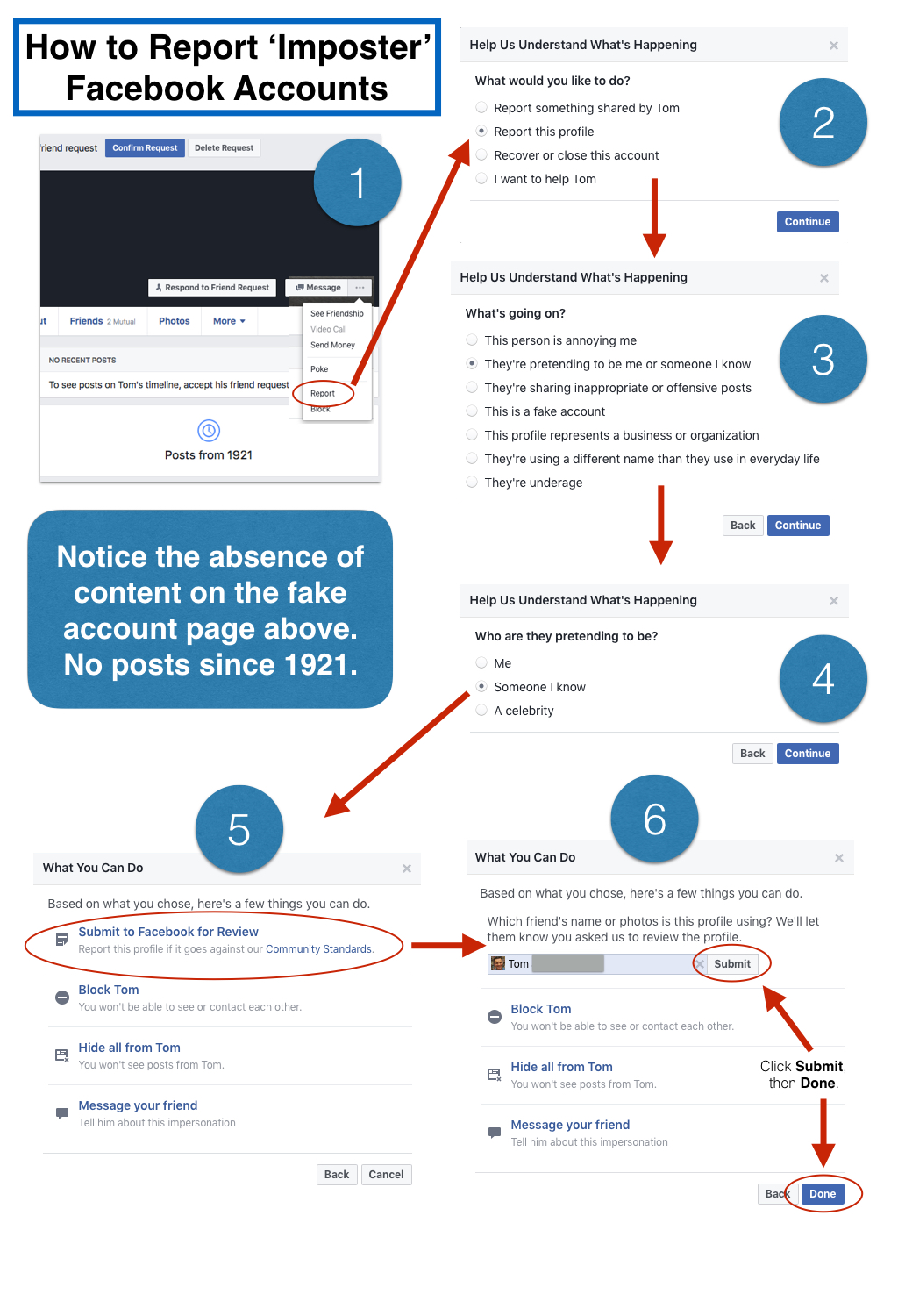
Because this is becoming a very prevalent problem, Facebook has improved the mechanism for reporting it. Follow the instructions shown below. Click the image for a larger view. In step 4 you can indicate whether someone is pretending to be you or someone  you know.

20160910sa0700-how-to-report-fake-imposter-facebook-accounts-1024x1500

Further Reading

Here are some additional articles on the topic of Facebook safety and how to avoid Facebook scams.

Facebook has an official ‘how to report things‘ page.

You can view all Facebook support requests in your support inbox, including reporting of user accounts.