Windows Update: Avoiding Conflicts, Failures, and Errors

Problem Summary

For many years, Microsoft has issued updates for their software in numerous independent update patches. Even in the Apple Mac environment, software like Microsoft Office 2011 requires many updates after a clean installation.

The most problematic issues arise with Windows updates.

If you have a computer that’s several years old, and you need to perform a system restore (back to factory settings), it will be necessary to install the many hundreds of updates that have been issued since the time the computer was manufactured.

If you follow the prompts to install each batch of updates, which can often be over 100 at a time, some of the updates will conflict with one another. Some updates will be irrelevant. This process is hugely time consuming, and could render the computer useless with repeated bluescreen errors and system failures.

At some point along the way, the system update window may indicate that the computer is up to date. This may be incorrect information. Keep persisting. Restart the computer, and then from the updates window, click the Check for Updates link. It’s common to have many updates, and then have a large Service Pack to install, which has hundreds of required updates.

Even with a brand new very expensive Windows 8.1 computer, you may find that the computer stops working after installing the suggested Windows updates.

Screenshots

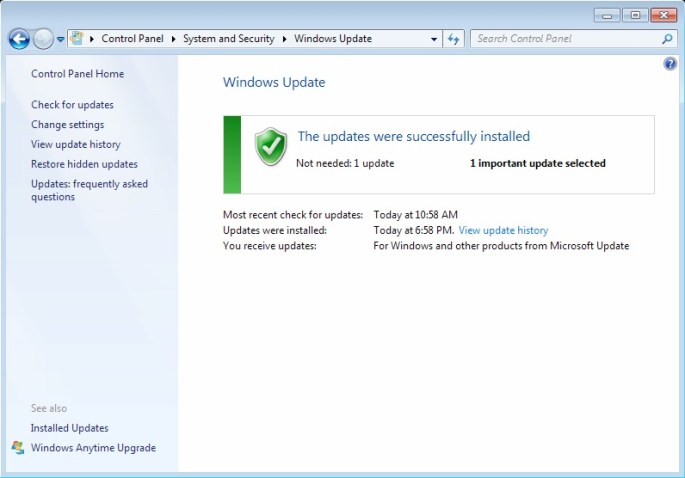
The screenshot below is a good example of the problems described above. Click the image for a larger view.

20150130fr-windows-updates-01

Notice that there are multiple updates for Internet Explorer 8 as well as an update/upgrade to Internet Explorer 11. There are also updates for multiple versions of Microsoft .NET Framework. Most software vendors are able to provide an updated version of their software that includes any updates since the previous major release. With Windows, a major update like a service pack should be able to include all the updates since the previous service pack.

If the Internet Explorer 11 update is installed, then this makes the Internet Explorer 8 updates unnecessary as shown in the notice below.

20150130fr-windows-updates-02

Problem Solution

The best way to avoid conflicts, failures, and errors with Windows Update is to scroll down to the bottom of the list of available updates and select only 5 to 10 updates at a time. Notice that the checkbox at the top of the list will select and deselect all updates. You can use this first to deselect all updates, and then scroll down and select 5 or 10 updates to install. After each batch, you will likely be prompted to restart the computer. This process can take many hours.

Cloud Synchronization May Be Slowing Down Your Computer

If you’re using services like Box.com, DropBox.com, Google Drive, or Microsoft OneDrive, you likely have the synchronization software installed and enabled.

Like most people, you probably have hundreds or thousands of files stored.

If you setup a new computer, depending on the speed of your Internet connection, you’ll need to wait hours (or maybe days) for all your files to synchronize again.

Even after that waiting period, you’ll likely find that the synchronization software running in the background tends to slow down your computer at startup, and while you’re using it.

AntiVirus software will want to scan every file that’s being synchronized, making the process even slower.

If you’ve been having trouble with your computer running slow, disable or close the synchronization software and see if that makes a difference.

Something else you can consider is to have one cloud service for your current files (keep that synchronized) and another service used as an archival backup of old files that are two or more years old (not synchronized).

Keep those thousands of files backed up in the cloud and also on a local removable hard drive. By doing this, you’ll free up disk space and speed up your computer.

You can always go to the website to get to your older archived files, but at least they aren’t taking up room on your local hard drive.

Many portable computers these days use solid state drives with less storage capacity. So, it’s important to only be carrying around the current files that are most important.

On Facebook Use Caution When Approving Friend Requests

Today I received a friend request from someone on Facebook. Usually I would just click “Approve” and move on.

Yet, we only had one friend in common, and upon checking this person’s Facebook profile, it showed that they had only one post on their timeline (a poor quality profile pic), yet they were adding friends on Facebook at a furious rate. I couldn’t really find anything from a Google search on this person. It was as if they didn’t exist.

Many of the people who he friended are from my community — people I know, although we’re not Friends on Facebook.

I thought I’d spend a few minutes investigating this a bit, so I contacted some of the people (dozens added in the last hour) who had recently friended him.

Turns out none of these people really know anything about him.

Potential Harm

Here’s the danger in accepting friend requests too quickly:

  1. The person controlling the fake user account (a troll) gets access to your entire friend list.
  2. The troll or potential hacker sees your private timeline posts as if they are your friend or family member. They see things about you that you’ve set as not public and only viewable to friends or friends of friends.
  3. Because of your supposed friendship with this fictitious person, the troll then gains the trust of your friends, so when the friend request appears, your friends think they are a trusted and known individual. So, they accept the friend request, and the troll returns to step 1 above to become friends with everyone that person knows, and so on.

The goal of these people is to quickly build up a huge friends list on Facebook which can grow exponentially. These accounts are typically built up over time and then sold on the black market to spammers, advertisers, and hackers who attempt to use reverse social engineering to hack into Facebook accounts (and your other accounts) based on what they gather from your personal information online.

What You Can Do

While Facebook is usually a fun and safe online environment, it’s still important to be cautious.

  • Alert Your Friends. If you suspect some suspicious activity, let your friends know — the friends who have already friended a troll using a fake account.
  • Alert Others. Look at the list of people the fake account has friended. Some of them will be people you’re not friends with, but you have dozens of friends in common. In other words, they are likely legitimate users. You could also consider notifying them.
  • Notify Facebook. You can also contact Facebook about suspicious activity. Go to the profile of the person you suspect is fraudulently using Facebook. Click on the dots to the right of the Message button and choose Report to report the person. You can also Block them.

It’s everyone’s responsibility to help keep Facebook safe and secure through each person being careful about who they connect with.

UPDATE #1

Several hours ago, there was no Google image match on the Internet for the profile image that had been posted by the fictitious user. None. Now, a few hours later, that same image is showing up for multiple user accounts under different names on Twitter and other websites. On those sites, he’s also posted little or nothing, but building friend networks.

UPDATE #2

Facebook took down the fraudulent user’s account within a few more hours of this post. Another victory.

Computer Won’t Startup – Freezes on Bootup

You may have a problem with your Apple or Windows computer where you startup the computer and it will hang on startup. With Windows computers, this may happen immediately after the POST (power on self test screens). With an Apple computer, this may happen before you see the Apple icon at startup.

This problem can be caused by a faulty USB device or USB Hub. For example, some connected hard drives may result in the system hardware attempting to identify the drive, or possibly scan the drive to determine its configuration. Multi-function devices can be perceived as external drives of they have memory card readers.

Try unplugging all unnecessary USB devices, then startup the computer, and then connect the devices again. This may speed up the startup process.

Something else that may slow down the startup process are synchronization applications for services like Dropbox, Box, Google Drive, and Microsoft OneDrive. Try configuring these mini-apps to not load at startup. That will likely speed up the startup process. You may want to choose just one synchronization drive service.

Cisco AnyConnect Web Security Not Compatible with Avast Apple Mac

If you attempt to install Avast Antivirus on your Apple Mac computer, you may get the following error message:

Incompatible software detected. The Web Security module of Cisco has been detected, which is not compatible with Avast. To install the Avast product, please uninstall the incompatible module first.

When you click the Close button, the installation will immediately quit.

Follow these instructions to fix this problem:

  1. If you have a direct license with Cisco, you can visit the Cisco Software Download Page and download the AnyConnect Secure Mobility Client. Navigate to the AnyConnect Secure Mobility Client v3.x download page and look for the download called Standalone DMG package for Mac OS X “Intel” platforms.
  2. For many people, you will need to go to your organization or employer software download page and download the version provided.
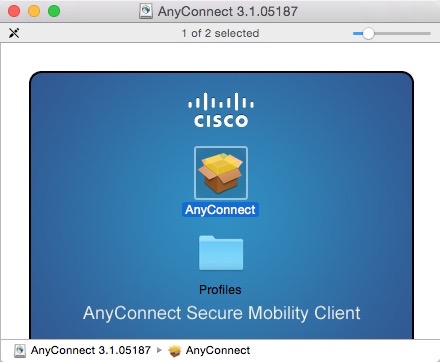
  3. Follow the installation instructions, and remember not to select the Web Security module (see below). This will configure the software so that Avast can be installed.

These are the installation screens. Click any image for a larger gallery view.

How to Find Your Lost iPhone, iPod, iPad, or Apple Computer

Summary

Most mobile devices these days have built-in tracking features that are very convenient for a variety of reasons. For example, health and wellness apps that monitor your activity require location tracking to be turned on. Location tracking can help find lost or stolen devices.

Because of privacy concerns, location tracking is typically an ‘opt-in’ service. Those who decide to not permit location tracking for their devices will not be able to have them easily located and recovered.

For users of Apple mobile devices, you’ll need to enable location tracking prior to attempting to find a lost device.

Instructions

These are the steps you can follow to find a device:

  1. Go to http://www.iCloud.com
  2. Login using your Apple ID.
  3. Click on the Find My Phone icon as shown below.
    20141218th-find-my-phone
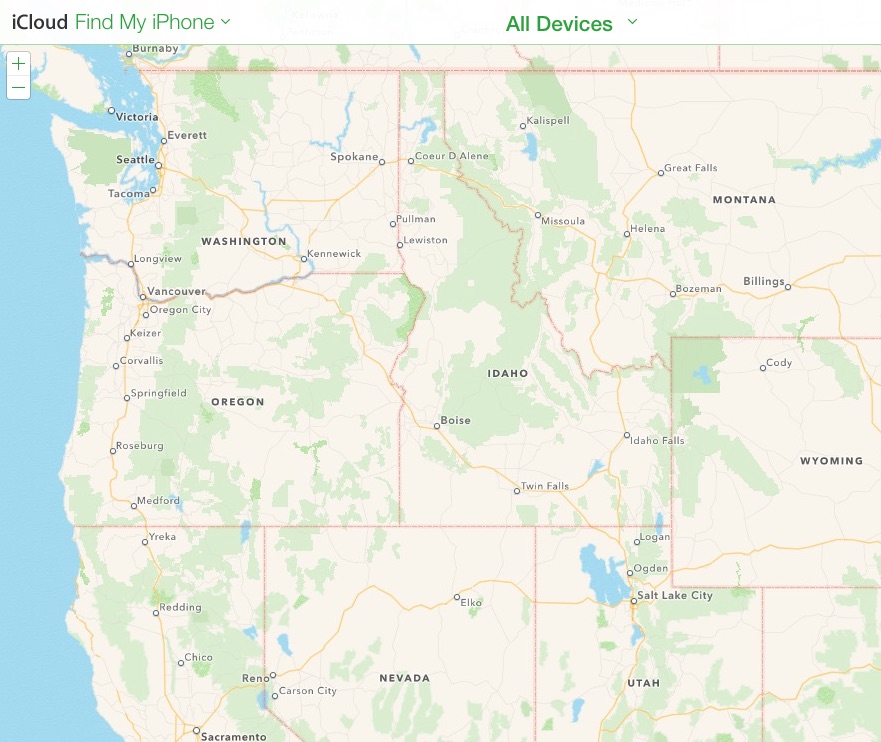
  4. The Find My Phone service will display a map with your device or devices indicated on the map with dots. in the example below there are no devices displayed, but when you use the service hopefully your device will show up. Under the All Devices drop-down menu, your available devices
    20141218th-find-my-phone-apple-iphone-ipad-ipod-macbook

Olympus Digital Audio Recorder Erase All

If you’re using an Olympus digital audio recorder and would like to erase all recordings, follow these instructions.

  1. Power on the recorder by sliding the hold switch to the on position.
  2. Press the Folder/Index button until you see the folder icon with the letter A appear in the display.
  3. If Folder A is empty, you’ll see 00/00 recordings indicated. So, press the Folder/Index button again and advance to any folder with recordings in it.
  4. Once you arrive at a folder with recordings, you’ll see that listed in the display as recording number / total recordings in folder (such as 01/03 for recording 1 of 3).
  5. Press the Erase button once. This will indicate you want to erase the current audio recording. You’ll see Erase: Cancel displayed. Press the Erase button again to indicate you’d like to erase all recordings in the folder. You’ll see the word ALL in the display, and Erase: Cancel below it.
  6. Press the Right arrow. You’ll see Erase: Start below the word ALL.
  7. Press the Play button. This will begin the process of erasing all recordings in the current folder.

You Can’t Copyright Your Facebook Content

Contrary to urban legend, you can’t copyright your Facebook content or otherwise unilaterally change your user agreement. This applies to other similar services, software, and agreements. The following excerpt from Snopes elaborates on this.

Messages about protecting your copyright or privacy rights on Facebook by posting a particular legal notice to your Facebook wall are similar to an item which circulated several years ago positing that posting a similar notice on a web site would protect that site’s operators from prosecution for piracy.

In both cases the claims were erroneous, an expression of the mistaken belief the use of some simple legal talisman — knowing enough to ask the right question or post a pertinent disclaimer — will immunize one from some undesirable legal consequence. The law just doesn’t work that way.

Facebook users cannot retroactively negate any of the privacy or copyright terms they agreed to when they signed up for their accounts, nor can they unilaterally alter or contradict any new privacy or copyright terms instituted by Facebook, simply by posting a contrary legal notice on their Facebook walls.

Moreover, that Facebook is now a publicly traded company (i.e., a company that has issued stocks which are traded on the open market) or an “open capital entity” has nothing to do with copyright protection or privacy rights.

Any copyright or privacy agreements users of Facebook have entered into with that company prior to its becoming a publicly traded company or changing its policies remain in effect: they are neither diminished nor enhanced by Facebook’s public status.

Further, the concerns about copyright ownership which these types of notices are intended to address are unfounded.

Click here to read more.

20140930tu-facebook-share-with-my-friends-and-the-nsa

Installing Ajenti Linux Server Management Software on Ubuntu

Enter this command in Terminal to install the Agenti Linux server management software:

wget -O- https://raw.github.com/Eugeny/ajenti/master/scripts/install-ubuntu.sh | sudo sh

The above command may appear to be wrapped from one line to the next, but it should be pasted in as one complete command.

More comprehensive instructions can be found on the Ajenti installation instructions page.

After installing, go to this address in your browser https://localhost:8000/ and then when warned about the connection not being private (if using Google Chrome), then click the Advanced link. Then click Proceed to local host (unsafe). The reason for the alert is that you don’t have an SSL certificate on your local computer.

Installation Process

Below is an example of what you’ll see during installation. The text in bold is what you type.

username@computername:~$ wget -O- https://raw.github.com/Eugeny/ajenti/master/scripts/install-ubuntu.sh | sudo sh
–2014-11-30 19:22:38– https://raw.github.com/Eugeny/ajenti/master/scripts/install-ubuntu.sh
Resolving raw.github.com (raw.github.com)… [sudo] password for username: 199.27.76.133
Connecting to raw.github.com (raw.github.com)|199.27.76.133|:443… connected.
HTTP request sent, awaiting response… 301 Moved Permanently
Location: https://raw.githubusercontent.com/Eugeny/ajenti/master/scripts/install-ubuntu.sh [following]
–2014-11-30 19:22:39– https://raw.githubusercontent.com/Eugeny/ajenti/master/scripts/install-ubuntu.sh
Resolving raw.githubusercontent.com (raw.githubusercontent.com)… 23.235.40.133
Connecting to raw.githubusercontent.com (raw.githubusercontent.com)|23.235.40.133|:443… connected.
HTTP request sent, awaiting response… 200 OK
Length: 472 [text/plain]
Saving to: ‘STDOUT’

100%[======================================>] 472 –.-K/s in 0s

2014-11-30 19:22:39 (78.9 MB/s) – written to stdout [472/472]

(If the installation gets stuck at this point, you may need to press Enter).

Sorry, try again.
[sudo] password for username:
:: Installing repo key
–2014-11-30 19:23:23– http://repo.ajenti.org/debian/key
Resolving repo.ajenti.org (repo.ajenti.org)… 198.232.124.224
Connecting to repo.ajenti.org (repo.ajenti.org)|198.232.124.224|:80… connected.
HTTP request sent, awaiting response… 200 OK
Length: 1716 (1.7K) [application/octet-stream]
Saving to: ‘STDOUT’

100%[======================================>] 1,716 –.-K/s in 0s

2014-11-30 19:23:23 (3.48 MB/s) – written to stdout [1716/1716]

OK
:: Adding repo entry
:: Updating lists
Get:1 http://repo.ajenti.org main InRelease [11.7 kB]
Get:2 http://repo.ajenti.org main/main amd64 Packages [6,494 B]
Get:3 http://repo.ajenti.org main/ubuntu amd64 Packages [3,534 B]
Ign http://dl.google.com stable InRelease
Ign http://security.ubuntu.com trusty-security InRelease
Get:4 http://repo.ajenti.org main/main i386 Packages [6,493 B]
Ign http://us.archive.ubuntu.com trusty InRelease
Get:5 http://repo.ajenti.org main/ubuntu i386 Packages [3,534 B]
Hit http://dl.google.com stable Release.gpg
Hit http://security.ubuntu.com trusty-security Release.gpg
Ign http://us.archive.ubuntu.com trusty-updates InRelease
Hit http://dl.google.com stable Release
Hit http://security.ubuntu.com trusty-security Release
Ign http://us.archive.ubuntu.com trusty-backports InRelease
Hit http://dl.google.com stable/main amd64 Packages
Ign http://extras.ubuntu.com trusty InRelease
Hit http://security.ubuntu.com trusty-security/main Sources
Hit http://us.archive.ubuntu.com trusty Release.gpg
Hit http://dl.google.com stable/main i386 Packages
Hit http://security.ubuntu.com trusty-security/restricted Sources
Get:6 http://us.archive.ubuntu.com trusty-updates Release.gpg [933 B]
Hit http://security.ubuntu.com trusty-security/universe Sources
Hit http://extras.ubuntu.com trusty Release.gpg
Hit http://us.archive.ubuntu.com trusty-backports Release.gpg
Hit http://security.ubuntu.com trusty-security/multiverse Sources
Hit http://us.archive.ubuntu.com trusty Release
Hit http://security.ubuntu.com trusty-security/main amd64 Packages
Hit http://extras.ubuntu.com trusty Release
Get:7 http://us.archive.ubuntu.com trusty-updates Release [62.0 kB]
Hit http://security.ubuntu.com trusty-security/restricted amd64 Packages
Hit http://security.ubuntu.com trusty-security/universe amd64 Packages
Hit http://extras.ubuntu.com trusty/main Sources
Hit http://security.ubuntu.com trusty-security/multiverse amd64 Packages
Hit http://security.ubuntu.com trusty-security/main i386 Packages
Hit http://us.archive.ubuntu.com trusty-backports Release
Ign http://dl.google.com stable/main Translation-en_US
Hit http://security.ubuntu.com trusty-security/restricted i386 Packages
Hit http://us.archive.ubuntu.com trusty/main Sources
Hit http://extras.ubuntu.com trusty/main amd64 Packages
Ign http://dl.google.com stable/main Translation-en
Hit http://security.ubuntu.com trusty-security/universe i386 Packages
Hit http://us.archive.ubuntu.com trusty/restricted Sources
Hit http://security.ubuntu.com trusty-security/multiverse i386 Packages
Hit http://us.archive.ubuntu.com trusty/universe Sources
Hit http://extras.ubuntu.com trusty/main i386 Packages
Hit http://security.ubuntu.com trusty-security/main Translation-en
Hit http://us.archive.ubuntu.com trusty/multiverse Sources
Hit http://security.ubuntu.com trusty-security/multiverse Translation-en
Hit http://us.archive.ubuntu.com trusty/main amd64 Packages
Hit http://security.ubuntu.com trusty-security/restricted Translation-en
Hit http://us.archive.ubuntu.com trusty/restricted amd64 Packages
Hit http://us.archive.ubuntu.com trusty/universe amd64 Packages
Hit http://us.archive.ubuntu.com trusty/multiverse amd64 Packages
Hit http://security.ubuntu.com trusty-security/universe Translation-en
Hit http://us.archive.ubuntu.com trusty/main i386 Packages
Hit http://us.archive.ubuntu.com trusty/restricted i386 Packages
Hit http://us.archive.ubuntu.com trusty/universe i386 Packages
Hit http://us.archive.ubuntu.com trusty/multiverse i386 Packages
Hit http://us.archive.ubuntu.com trusty/main Translation-en
Hit http://us.archive.ubuntu.com trusty/multiverse Translation-en
Hit http://us.archive.ubuntu.com trusty/restricted Translation-en
Hit http://us.archive.ubuntu.com trusty/universe Translation-en
Get:8 http://us.archive.ubuntu.com trusty-updates/main Sources [143 kB]
Ign http://extras.ubuntu.com trusty/main Translation-en_US
Get:9 http://us.archive.ubuntu.com trusty-updates/restricted Sources [1,408 B]
Get:10 http://us.archive.ubuntu.com trusty-updates/universe Sources [92.0 kB]
Ign http://extras.ubuntu.com trusty/main Translation-en
Get:11 http://us.archive.ubuntu.com trusty-updates/multiverse Sources [3,534 B]
Get:12 http://us.archive.ubuntu.com trusty-updates/main amd64 Packages [369 kB]
Get:13 http://us.archive.ubuntu.com trusty-updates/restricted amd64 Packages [5,820 B]
Get:14 http://us.archive.ubuntu.com trusty-updates/universe amd64 Packages [221 kB]
Get:15 http://us.archive.ubuntu.com trusty-updates/multiverse amd64 Packages [9,359 B]
Get:16 http://us.archive.ubuntu.com trusty-updates/main i386 Packages [361 kB]
Get:17 http://us.archive.ubuntu.com trusty-updates/restricted i386 Packages [5,820 B]
Get:18 http://us.archive.ubuntu.com trusty-updates/universe i386 Packages [221 kB]
Get:19 http://us.archive.ubuntu.com trusty-updates/multiverse i386 Packages [9,567 B]
Hit http://us.archive.ubuntu.com trusty-updates/main Translation-en
Hit http://us.archive.ubuntu.com trusty-updates/multiverse Translation-en
Hit http://us.archive.ubuntu.com trusty-updates/restricted Translation-en
Hit http://us.archive.ubuntu.com trusty-updates/universe Translation-en
Hit http://us.archive.ubuntu.com trusty-backports/main Sources
Hit http://us.archive.ubuntu.com trusty-backports/restricted Sources
Hit http://us.archive.ubuntu.com trusty-backports/universe Sources
Hit http://us.archive.ubuntu.com trusty-backports/multiverse Sources
Hit http://us.archive.ubuntu.com trusty-backports/main amd64 Packages
Hit http://us.archive.ubuntu.com trusty-backports/restricted amd64 Packages
Hit http://us.archive.ubuntu.com trusty-backports/universe amd64 Packages
Hit http://us.archive.ubuntu.com trusty-backports/multiverse amd64 Packages
Hit http://us.archive.ubuntu.com trusty-backports/main i386 Packages
Hit http://us.archive.ubuntu.com trusty-backports/restricted i386 Packages
Hit http://us.archive.ubuntu.com trusty-backports/universe i386 Packages
Hit http://us.archive.ubuntu.com trusty-backports/multiverse i386 Packages
Hit http://us.archive.ubuntu.com trusty-backports/main Translation-en
Hit http://us.archive.ubuntu.com trusty-backports/multiverse Translation-en
Hit http://us.archive.ubuntu.com trusty-backports/restricted Translation-en
Hit http://us.archive.ubuntu.com trusty-backports/universe Translation-en
Ign http://us.archive.ubuntu.com trusty/main Translation-en_US
Ign http://us.archive.ubuntu.com trusty/multiverse Translation-en_US
Ign http://us.archive.ubuntu.com trusty/restricted Translation-en_US
Ign http://us.archive.ubuntu.com trusty/universe Translation-en_US
Ign http://repo.ajenti.org main/main Translation-en_US
Ign http://repo.ajenti.org main/main Translation-en
Ign http://repo.ajenti.org main/ubuntu Translation-en_US
Ign http://repo.ajenti.org main/ubuntu Translation-en
Fetched 1,537 kB in 5s (284 kB/s)
Reading package lists… Done
:: Installing package
Reading package lists… Done
Building dependency tree
Reading state information… Done
The following packages were automatically installed and are no longer required:
libatk-bridge2.0-0:i386 libatspi2.0-0:i386 libcairo-gobject2:i386
libcolord1:i386 libdbusmenu-gtk3-4:i386 libgtk-3-0:i386 liblcms2-2:i386
libwayland-client0:i386 libwayland-cursor0:i386 libxkbcommon0:i386
linux-image-3.13.0-32-generic linux-image-extra-3.13.0-32-generic
Use ‘apt-get autoremove’ to remove them.
The following extra packages will be installed:
apt-show-versions python-catcher python-daemon python-exconsole
python-gevent python-gevent-socketio python-gevent-websocket python-greenlet
python-ldap python-mako python-markupsafe python-passlib python-psutil
python-reconfigure python-requests python-support python-urllib3
Suggested packages:
python-gevent-doc python-gevent-dbg python-greenlet-doc python-greenlet-dev
python-greenlet-dbg python-ldap-doc python-pyasn1 python-beaker
python-mako-doc
The following NEW packages will be installed:
ajenti apt-show-versions python-catcher python-daemon python-exconsole
python-gevent python-gevent-socketio python-gevent-websocket python-greenlet
python-ldap python-mako python-markupsafe python-passlib python-psutil
python-reconfigure python-requests python-support python-urllib3
0 upgraded, 18 newly installed, 0 to remove and 3 not upgraded.
Need to get 1,873 kB of archives.
After this operation, 8,717 kB of additional disk space will be used.
Get:1 http://repo.ajenti.org/debian/ main/main python-gevent-socketio all 0.3.6-1 [27.4 kB]
Get:2 http://repo.ajenti.org/debian/ main/main python-reconfigure all 0.1.64 [29.8 kB]
Get:3 http://us.archive.ubuntu.com/ubuntu/ trusty/universe python-support all 1.0.15 [26.7 kB]
Get:4 http://repo.ajenti.org/debian/ main/ubuntu python-passlib all 1.5.3-2 [156 kB]
Get:5 http://repo.ajenti.org/debian/ main/main python-catcher all 0.1.7 [5,338 B]
Get:6 http://repo.ajenti.org/debian/ main/main python-exconsole all 0.1.5 [3,638 B]
Get:7 http://us.archive.ubuntu.com/ubuntu/ trusty/main python-greenlet amd64 0.4.2-1build1 [16.7 kB]
Get:8 http://repo.ajenti.org/debian/ main/main ajenti all 1.2.22.16 [1,056 kB]
Get:9 http://us.archive.ubuntu.com/ubuntu/ trusty/main python-gevent amd64 1.0-1ubuntu1 [215 kB]
Get:10 http://us.archive.ubuntu.com/ubuntu/ trusty/universe python-gevent-websocket all 0.9.3-1 [15.3 kB]
Get:11 http://us.archive.ubuntu.com/ubuntu/ trusty/main python-psutil amd64 1.2.1-1ubuntu2 [50.2 kB]
Get:12 http://us.archive.ubuntu.com/ubuntu/ trusty/universe python-daemon all 1.5.5-1ubuntu1 [17.5 kB]
Get:13 http://us.archive.ubuntu.com/ubuntu/ trusty/main python-urllib3 all 1.7.1-1build1 [38.9 kB]
Get:14 http://us.archive.ubuntu.com/ubuntu/ trusty-updates/main python-requests all 2.2.1-1ubuntu0.1 [42.9 kB]
Get:15 http://us.archive.ubuntu.com/ubuntu/ trusty/universe apt-show-versions all 0.22.3 [33.9 kB]
Get:16 http://us.archive.ubuntu.com/ubuntu/ trusty/main python-markupsafe amd64 0.18-1build2 [14.3 kB]
Get:17 http://us.archive.ubuntu.com/ubuntu/ trusty/main python-mako all 0.9.1-1 [59.6 kB]
Get:18 http://us.archive.ubuntu.com/ubuntu/ trusty/main python-ldap amd64 2.4.10-1build1 [63.9 kB]
Fetched 1,873 kB in 0s (2,320 kB/s)
Selecting previously unselected package python-support.
(Reading database … 226577 files and directories currently installed.)
Preparing to unpack …/python-support_1.0.15_all.deb …
Unpacking python-support (1.0.15) …
Selecting previously unselected package python-greenlet.
Preparing to unpack …/python-greenlet_0.4.2-1build1_amd64.deb …
Unpacking python-greenlet (0.4.2-1build1) …
Selecting previously unselected package python-gevent.
Preparing to unpack …/python-gevent_1.0-1ubuntu1_amd64.deb …
Unpacking python-gevent (1.0-1ubuntu1) …
Selecting previously unselected package python-gevent-websocket.
Preparing to unpack …/python-gevent-websocket_0.9.3-1_all.deb …
Unpacking python-gevent-websocket (0.9.3-1) …
Selecting previously unselected package python-gevent-socketio.
Preparing to unpack …/python-gevent-socketio_0.3.6-1_all.deb …
Unpacking python-gevent-socketio (0.3.6-1) …
Selecting previously unselected package python-psutil.
Preparing to unpack …/python-psutil_1.2.1-1ubuntu2_amd64.deb …
Unpacking python-psutil (1.2.1-1ubuntu2) …
Selecting previously unselected package python-reconfigure.
Preparing to unpack …/python-reconfigure_0.1.64_all.deb …
Unpacking python-reconfigure (0.1.64) …
Selecting previously unselected package python-daemon.
Preparing to unpack …/python-daemon_1.5.5-1ubuntu1_all.deb …
Unpacking python-daemon (1.5.5-1ubuntu1) …
Selecting previously unselected package python-passlib.
Preparing to unpack …/python-passlib_1.5.3-2_all.deb …
Unpacking python-passlib (1.5.3-2) …
Selecting previously unselected package python-urllib3.
Preparing to unpack …/python-urllib3_1.7.1-1build1_all.deb …
Unpacking python-urllib3 (1.7.1-1build1) …
Selecting previously unselected package python-requests.
Preparing to unpack …/python-requests_2.2.1-1ubuntu0.1_all.deb …
Unpacking python-requests (2.2.1-1ubuntu0.1) …
Selecting previously unselected package apt-show-versions.
Preparing to unpack …/apt-show-versions_0.22.3_all.deb …
Unpacking apt-show-versions (0.22.3) …
Selecting previously unselected package python-markupsafe.
Preparing to unpack …/python-markupsafe_0.18-1build2_amd64.deb …
Unpacking python-markupsafe (0.18-1build2) …
Selecting previously unselected package python-mako.
Preparing to unpack …/python-mako_0.9.1-1_all.deb …
Unpacking python-mako (0.9.1-1) …
Selecting previously unselected package python-catcher.
Preparing to unpack …/python-catcher_0.1.7_all.deb …
Unpacking python-catcher (0.1.7) …
Selecting previously unselected package python-exconsole.
Preparing to unpack …/python-exconsole_0.1.5_all.deb …
Unpacking python-exconsole (0.1.5) …
Selecting previously unselected package python-ldap.
Preparing to unpack …/python-ldap_2.4.10-1build1_amd64.deb …
Unpacking python-ldap (2.4.10-1build1) …
Selecting previously unselected package ajenti.
Preparing to unpack …/ajenti_1.2.22.16_all.deb …
Unpacking ajenti (1.2.22.16) …
Processing triggers for man-db (2.6.7.1-1ubuntu1) …
Processing triggers for ureadahead (0.100.0-16) …
ureadahead will be reprofiled on next reboot
Setting up python-support (1.0.15) …
Setting up python-greenlet (0.4.2-1build1) …
Setting up python-gevent (1.0-1ubuntu1) …
Setting up python-gevent-websocket (0.9.3-1) …
Setting up python-gevent-socketio (0.3.6-1) …
Setting up python-psutil (1.2.1-1ubuntu2) …
Setting up python-reconfigure (0.1.64) …
Setting up python-daemon (1.5.5-1ubuntu1) …
Setting up python-passlib (1.5.3-2) …
Setting up python-urllib3 (1.7.1-1build1) …
Setting up python-requests (2.2.1-1ubuntu0.1) …
Setting up apt-show-versions (0.22.3) …
** initializing cache. This may take a while **
Setting up python-markupsafe (0.18-1build2) …
Setting up python-mako (0.9.1-1) …
Setting up python-catcher (0.1.7) …
Setting up python-exconsole (0.1.5) …
Setting up python-ldap (2.4.10-1build1) …
Setting up ajenti (1.2.22.16) …

:: Generating key

Generating RSA private key, 2048 bit long modulus
……………………………………..+++
………………………………………………..+++
e is 65537 (0x10001)

:: Generating certificate request
:: Removing passphrase

writing RSA key

:: Generating certificate

Signature ok
subject=/C=US/ST=NA/L=Nowhere/O=Acme Inc/OU=IT/CN=GregLinux
Getting Private key
:: SSL configured!
————————————————
Now start Ajenti with ‘service ajenti restart’
Ajenti will listen on HTTPS port 8000 by default

Default username : root
Default password : admin
————————————————
Processing triggers for python-support (1.0.15) …
Processing triggers for ureadahead (0.100.0-16) …
:: Done! Open https://<address&gt;:8000 in browser
username@computername:~$

Q&A with InvestInTech.com Makers of Able2Extract PDF Converter

Getting to Know Investintech.com: Helpful PDF Resources, Tutorials and Tools

Q: You’ve developed some great online technology tutorials. What topics are available and which ones seem to be the most popular?

MS Office for iPad Tips is one of our newer projects that we started working on as soon as Microsoft launched the apps for iPad. We knew that there’d be a huge interest in the apps, but as is the case with many great projects and tools out there, people don’t have much time to learn how to use them. We realized it would be extremely helpful to develop easy-to-read, straightforward tutorials with screenshots and images that clearly show what a Microsoft user needs to do in order to start using MS Office on their iPad.

With this goal in mind, we created a handful of quick guides to using Word, Excel and PowerPoint on iPad. We even included some general tips and advice on how to make the most of MS Office apps for iPad with a free Microsoft account. Basically, you can find out everything important about Microsoft for iPad in these tutorials, from learning how to print in Office for iPad and how to access MS documents saved on our PC from the iPad, to discovering how to make charts in Word and PowerPoint and how to freeze columns and rows in MS Excel.

We took the time to find out what it is about MS Office for iPad that creates the most headache to users, and we tried to answer their most common questions in these articles. We’ll constantly be updating the user guide with new tips.

Q: The Adobe PDF format has increasingly become a standard for stand-alone documents as well as content delivered through the Internet (as an alternative to HTML pages) when formatting/layout standardization across multiple platforms is desired. However, Adobe Acrobat Pro is very expensive, and not very user friendly. What does your PDF product offer? What is the cost compared to Adobe Acrobat Pro? Are there features your product has that Adobe Acrobat Pro doesn’t have?

One of the advantages of Investintech’s PDF solutions over Adobe’s is that they are very affordable. Also, at almost the fourth of Adobe Acrobat Pro’s price, users can enjoy high quality conversions that Investintech’s flagship PDF software, Able2Extract, provides.

Adobe Acrobat Pro costs $499 and Able2Extract Professional can be purchased for $139. Both the standard and professional version of Able2Extract can be used on all three major platforms, Windows, Mac and Linux, while Adobe Acrobat Pro is not available to Linux users.

It is not only the matter of price that makes Investintech’s product more appealing. Able2Extract’s conversion features are quite impressive. While Adobe Acrobat Pro can only convert to Excel, Word and PowerPoint, Able2Extract includes the following high-quality conversion options: PDF to Excel, Word, PowerPoint, Publisher, HTML, AutoCAD, OpenOffice, Images and it can also convert Text files to Excel, Word and PDF. Able2Extract PDF Converter’s major strength is its custom PDF to Excel option that allows users to manually tweak their output prior to conversion, and everyone who’s dealt with MS Excel recognizes this feature as a serious advantage.

Finally, Able2Extract’s intuitive, user-friendly GUI is high on the list of features that users like about our product. It makes the tool really easy to use, allowing users of any computer skill level to make quick conversions to different file formats.

Clearly, the range of options that Able2Extract offers, in combination with the tool’s price, is a much more attractive package to business professionals looking for powerful PDF conversion solutions.

Q: What makes your company unique?

Investintech.com is the most widely known for top quality PDF conversions for Excel users. Though its flagship product, Able2Extract, is created to cater to the needs of many different types of business professionals, from designers and architects who use AutoCAD to MS Office and OpenOffice users, we focused the most on Excel.

Our PDF solutions are widely used by accountants, auditors, finance analysts, bankers, and other finance and data scientists who use MS Excel spreadsheets for data processing and analysis. Since in the past many people complained about PDF to Excel conversion tools on the market at the time, especially the fact that the formatting and layout of Excel files are often lost after the conversion, Investintech developers put much of their efforts into creating an advanced, custom PDF to Excel creation feature that Able2Extract is now praised for. This feature allows users to tweak their Excel columns and rows structure prior to conversion, so that the formatting is exactly as it should be after the conversion.

Another feature of Able2Extract that brought Investintech a lot of recognition is the tool’s cross-platform operability, which enables users of the three major platforms (Windows, Mac, Linux) to use the software. It’s worth noting that Able2Extract was the first PDF converter on the market that introduced the cross-platform feature.

Q: What else does your company offer to its users?

Though Able2Extract is developed for and mostly used by business and individual professionals, we recognize the fact that not everyone around the globe can afford robust PDF software with a wide range of PDF conversion options. That is why we are working on developing some simple, quick and free online PDF conversion tools that people can find helpful.

We’ve already developed mobile apps for iOS and Android devices that help users smoothly convert and create PDFs for free. We also offer a range of other free tools for converting .docx to .doc, PDF to HTML and some inspirational templates for creating PowerPoint presentations and website designs.

We believe that the Internet’s potential for free and easy transfer of knowledge and information should really be used to the fullest. That is why we put a lot of energy into informing and teaching our readers about topics of interest to them, via our website, the company blog and our social media channels. Here they can find many articles, entertaining tips, helpful tutorials, must-have software lists, and some funny tech updates as well. Our wish is to spread the word about the usefulness of our PDF solutions, but also to help people manage their documents and files in the most productive and efficient way.

__________

A Note from Greg Johnson

I had an opportunity recently to connect with the friendly people at InvestInTech.com — the developers of the Able2Extract PDF converter software.

Being a writer of support documentation, I was really impressed with the free online support documentation they developed for the iPad version of Microsoft Office.

After learning a little more about their company, and the PDF product they offer, I thought it would be nice to offer the above Q&A to introduce them to my website visitors and subscribers. I wrote up the questions and they graciously provided the answers.