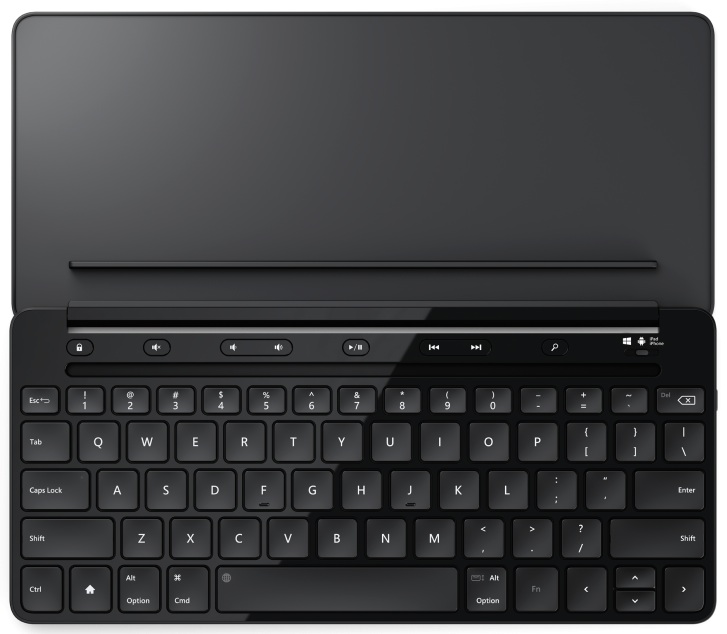
New Universal Mobile Keyboard works with Windows, iOS and Android mobile devices

(Source: Microsoft, 16 Sept. 2014)

[Purchase on Amazon]

Today’s tablets and smartphones are more powerful than ever, enabling people to be productive on the go. However, typing on the small, virtual on-screen-keyboard of a smartphone or tablet can be uncomfortable and inefficient.

It’s also common for people to carry multiple mobile devices and use the one that is best suited for the specific scenario they’re in — an iPad while in a coffee shop, a Samsung Galaxy S4 while sitting on an airplane, a Windows laptop in their hotel room.

With all these different devices, people frequently find they have a mixture of operating system platforms, resulting in them having to carry different accessories for each device. Microsoft’s new Universal Mobile Keyboard helps address that — it works with iPad, iPhone, Android devices and Windows tablets.

With the Microsoft Universal Mobile Keyboard, getting stuff done while you’re on the go has never been easier. Power through emails, put together a proposal, build a presentation, or simply instant message with a friend. The Universal Mobile Keyboard has an OS switch that lets you change from one operating system to another while maintaining a fully functional keyboard. And with the physical “chiclet” style keyset on this keyboard, you’ll feel like you’re typing on your laptop without lugging around the extra weight or bulk.

The Universal Mobile Keyboard was built with portability in mind. It’s easy and quick to set up, especially on the go. Simply open the protective cover and the keyboard automatically turns on, and connects using Bluetooth. Shut the cover, and it instantly turns off.

The cover has an integrated stand that can easily be detached, so you can position your tablet in the most comfortable position.

The Universal Mobile Keyboard will be generally available in October 2014 for the estimated retail price of $79.95 at the Microsoft Store and at various other retailers.

Suzanne Choney
Microsoft News Center Staff

20140922mo-Microsoft-Universal-Keyboard

__________

Note: This article was reposted here from the Microsoft website for broader distribution and for the purpose of promoting the product. No payment was received for posting this article.

Plex.tv Media Server Users Guide

Summary

This page offers a brief introduction to the Plex.tv Media Server system. There is plenty of support online for Plex. However, for the beginner it isn’t quite clear how to navigate around the interface, so that’s primarily what this document is for. Some of the instructions on this page are specific to Linux computers, although the Plex Media Server can run on Windows or Apple as well.

Setup Plex Server

The Plex server software can run on just about any computer (Windows, Apple, Linux), but ideally you would pick a computer that isn’t being used for something else. That way you can ensure it will stay up and running all the time, and be dedicated to video services — without taxing the CPU by performing other tasks. Follow these instructions to setup a computer as your Plex server:

  1. On the computer that will be used as your Plex server, visit the Plex.tv website and click the Download menu button.
  2. Under the Plex Media Server heading, click on Computer. This will take you to the download page for computer-based servers.
  3. The website should automatically detect the correct software for your computer. The minimum recommended system specifications will be listed.  Click Download.
  4. With an Ubuntu (Linux) computer, the software installation should begin automatically Install the downloaded software.

Here are some documents with further reading about installing Plex Media Server:

Connect the Server to Your Plex.tv Account

  1. Login. Login to your Plex account (while on the Server computer).
  2. Launch. Click the Launch button in the top right.
  3. Settings. Click the tools icon in the top right for Settings.
  4. Connect. Click the Server menu link and then click the Connect link to get to the login screen. Provide your login information. This will connect your server to the outside world and make it accessible to authorized users.

Note that if you’ve reinstalled the Plex software, mobile devices on the same network may be able to still play content, but computers going through the web interface won’t be able to play content until the server has connected to Plex as described above.

Plex Account

You will want a Plex account. The paid account will let you stream video outside your home for access from mobile devices and sharing with friends. There’s a lifetime membership level at $75 (as of 17 September 2014).

Creating Videos

Software programs like Handbrake let you mobilize your physical video media, so you can have DVDs converted to video files viewable on a computer. So, you can convert your DVDs and Blueray media to computer video files (the same video files like those created by a video camera). You can also put your personally created videos on a Plex server for sharing.

About Media Libraries

Media Libraries are collections of Movies, TV Shows, Music, Photos, or Home Videos. These categories determine how Plex will index and display the media. TV Shows are organized by season and episode. Movies are listed with visuals of their cover art and other information.

  • Prior to creating a media library, you’ll want to organize your content into folders on your hard drive. For example, one folder for Movies and another folder for TV Shows.
  • You can also create folders for groups of Movies, such as all the Lord of the Rings movies. This makes it easier to share just that collection.
  • Plex lets you sort and search on many things, but presently it doesn’t allow organizing movies by genre, so creating genre folders could be helpful.

Creating Media Libraries

When allowing others to access and view media on your Plex server, it’s possible to allow access to all content or only certain Media Libraries. This is why it’s a good idea to use separate folders for Media. For example, it would be possible to group movies by their rating and allow access to different libraries by age group and maturity level. That way your entire video collection isn’t accessible to anyone regardless of age. If you have separate folders for videos by a certain category, rating, sequels, or genre (for example) you can share those as Media Libraries individually. You can also create a Media Library that combines several folders into a single Library listing. Follow these basic steps to setup a Library:

  1. Login. Login to your Plex account (while on the Server computer).
  2. Launch. Click the Launch button in the top right.
  3. Add Library. Click the plus (+) link next to your server name.
  4. Media Type. Choose the type of media.
  5. Name. Give your Media Library a name, such as Movies, or Sci Fi movies.
  6. Folders.  Choose one or more folders to be included in the library. Click Add Library when done. If you’re unable to view folders on your hard drive(s) then follow the instructions below under the heading When Plex Can’t View Folders.

TV Shows Are Different

Because television shows have seasons and episodes, they are managed differently by Plex.

It was suggested above that movies could be grouped into different folder and libraries. For example, putting all Star Trek movies in a single folder. However, in the case of television shows, Plex uses the folder structure and folder names to properly determine the series.

If you point to a television series folder, and within that folder you have Season 1, Season 2, Season 3, etc. Plex won’t know what Season of what show it is so you might get a mismatch.

Since television shows are automatically grouped and organized, there’s no need to have separate television show libraries. Instead, create a single folder with all television shows each having their own folder, and then sub-folders for each season. Then, Plex will automatically setup the library structure and show the proper cover art and other details for each show and season.

When Plex Can’t View Folders

Sometimes in the process of adding folders to your Library, Plex won’t be able to see folders that exist on your drives. Follow these steps to correct the problem:

  1. Run Terminal.
  2. Enter the following command to bring up the settings editor:
    sudo nano /etc/default/plexmediaserver
  3. Use the arrow keys to move down to the bottom of the settings file.  The last setting entry is PLEX_MEDIA_SERVER_USER=plex. Change this to your user account name. Then press Control+X to exit, then Y to save. Notice in the example below, the user account is maintenance. Click the image to enlarge.
    20141008we-plex-media-server-settings-user
  4. Open your Internet browser and enter the following address to initialize the Plex server:
    http://localhost:32400/web/index.html#!/dashboard
  5. Exit your Internet browser.
  6. Return to the terminal and enter the following command to stop the plexmediaserver process:
    sudo service plexmediaserver stop
  7. Enter the following commands to add plex to your usergroup:
    sudo addgroup plex yourusername
    sudo addgroup yourusername plex
  8. Enter the following command to start the Plex Media Server service:
    sudo service plexmediaserver start
  9. Return to your Internet browser and go to http://plex.tv then login with your Plex user account and launch your server window.

When Plex Can’t Play Content

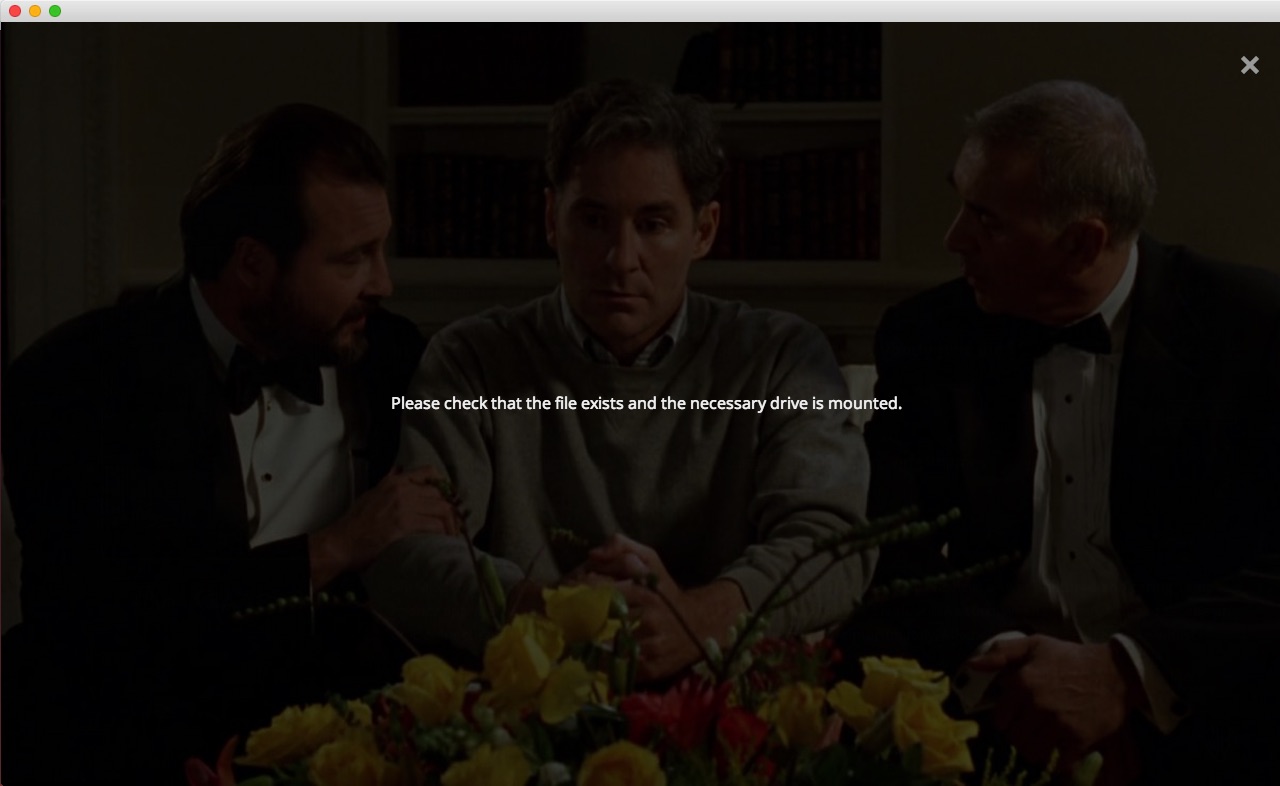
You may get a message stating, “Please check that the file exists and the necessary drive is mounted.” Click the image for a larger view.

20141026su-plex-please-check-that-the-file-exists-and-the-necessary-drive-is-mounted

The drives on your computer exist, and they probably appear to be mounted. This can happen on Linux computers, and with Windows computers that have mapped network drives. Once you click on the drives (on the server), and they open, and you see their contents, then other programs can use them. Until you do this, software will assume the drives aren’t available.

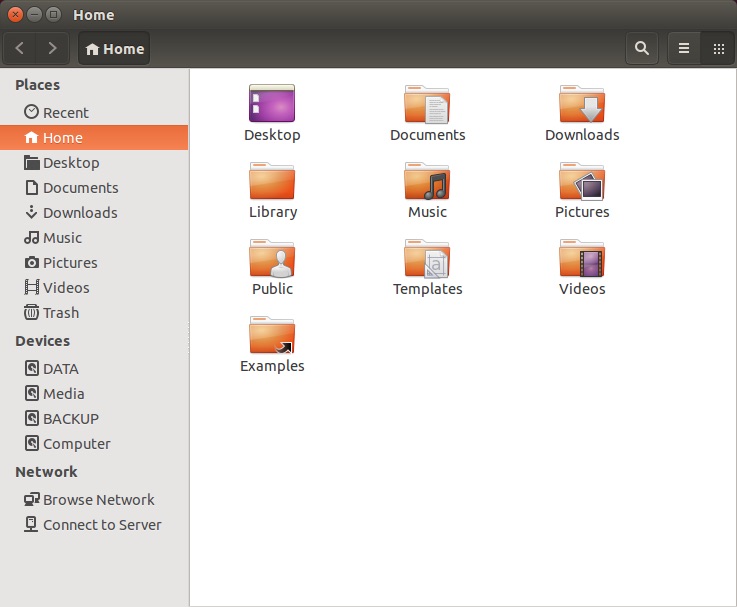
In the window below, you can see several drives are listed under Devices. They have been mounted on startup. Otherwise they wouldn’t be listed here. However the eject symbol is missing on the right. Click the image for a larger view.

20141026su-ubuntu-drives-display-without-eject-symbol

Once you click on a drive, or all the drives, the eject icon will show up and then you know that they are accessible to programs as shown below. Click the image for a larger view.

20141026su-ubuntu-drives-display-with-eject-symbol

When Old Plex Servers Are Still Listed

Sometimes after a Plex server has been deleted it will still show up in the Plex player client. The problem may very well be that your browser cache is retaining the old server information.

Removing and Reinstalling Plex

There’s a support article about this topic and in that article it is suggested that the Plex Media Server software be completely removed and reinstalled as a first step. However, in testing the above steps, it wasn’t necessary to do this to fix the problem. However, each situation is unique, so removal and reinstallation may help in your case. Here are the instructions to do so.

  1. Run Terminal.
  2. Enter the following commands to remove the old installation of the Plex Media Server:
    sudo apt-get remove plexmediaserver
    sudo apt-get purge plexmediaserver
    sudo rm -r plexmediaserver/
  3. Download the appropriate software from the Plex Media Server Downloads page. The installation should start automatically from the Ubuntu Software Center. If not, you could try entering this command:
    sudo dpkg -i plexmediaserver_installation_filename.deb

Here are some documents with further reading about installing Plex Media Server:

Sharing Media Libraries

Follow these instructions to share content from your server with others:

  1. Click on the Servers menu option (top right).
  2. Click the Edit Sharing button.
  3. Anyone you’re currently sharing with will be listed and you can click Edit to select and change what Media Libraries (folders) they have access to.
  4. Under the Share with heading, you can add people using their Plex username or login email address. If you remove the checkmark next to Share All Libraries, a selectable listing of your libraries will show up and you can pick which libraries the person has access to. Click the Share or Save button to finalize.

Deleting a Media Library

If you’re removing or reorganizing folders, you may want to delete a Media Library. Follow these instructions:

  1. Login to Plex.tv
  2. When you hover your mouse to the right of a Media Library name, a pencil (edit) icon will show up. Click the pencil icon.
  3. From the Edit Library menu, you can change view and change many things, including deleting a library. When you delete a library, you’re not removing all the videos. You’re only removing them from the listing.


Fluke Networks LSPRNTR-200 LinkSprinter 200 Network Tester with WiFi

Summary

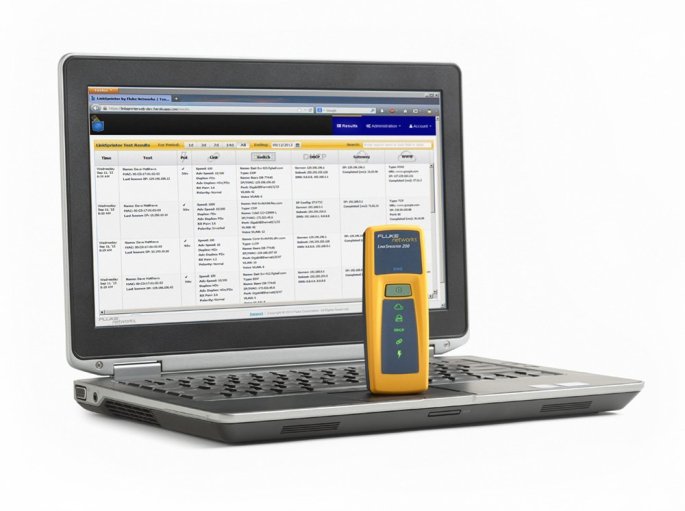
The LinkSprinter 200 Network Tester with WiFi from Fluke Networks is an economical way to get sophisticated network diagnostics and reporting. [Buy]

Product Photos

Below are product photos.

Product Description

This smart network tester fits in your pocket, connects to your phone and stores your network test results in the cloud.

Five essential network tests in the palm of your hand

  • Power Over Ethernet (PoE)
    Check to make sure you can power a phone, security camera or Access Point through a specific port. The LinkSprinter Network Tester can even run without batteries on PoE.
  • Link to the Switch
    Perform a switch test, which will indicate the switch name and port your cable connects to. Know your available speed and duplex settings.
  • DHCP Connection
    Confirm that the DHCP server is running and responsive. Request an IP address, get your subnet information, and identify the default gateway and DNS server.
  • Gateway Connection
    Verify the gateway/router address and reachability by pinging the device three times.
  • Internet Connection
    Confirm cloud connectivity or internal service reachability. Verify DNS server lookup and application port connectivity.

The LinkSprinter™ Cloud Service

Simply connect your LinkSprinter Network Tester to an Ethernet drop and the test sequence will begin automatically

  • Test results can be sent directly to your email
  • Email test results
  • Annotate test results
  • Manage, sort and analyze results
  • Filter results by time, user, network, errors
  • Download firmware updates

View detailed network test results on your mobile device.

The LinkSprinter 200 results can be accessed through the browser of any mobile device with its built-in Wi-Fi access point and web server.

Which network tester is right for you?

LinkSprinter 200
Quick and simple network testing for the advanced troubleshooting professional – with the added benefit of having immediate access to your in-depth test results from any mobile device, anywhere!

  • Embedded Wi-Fi access point for details in real-time using your mobile devices
  • Cloud-based management system
  • Battery/Power over Ethernet (PoE) operated
  • One-button, tri-state LED interface

LinkSprinter 100
For the technician who doesn’t need to fuss with the details immediately – your results are sent straight to the cloud for the network engineer or later review.

  • Cloud-based management system
  • Battery/Power over Ethernet (PoE) operated
  • One-button, tri-state LED interface

Click here for further reading on the Fluke Networks website.

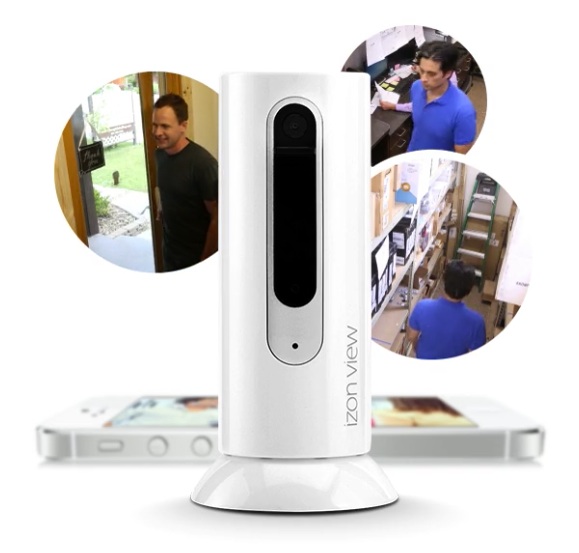
Internet Security and Surveillance Cameras for Home and Business

Problems With Traditional Surveillance Systems

Traditional video surveillance systems have several cameras all linked to a central controller where video footage is saved. These are generally costly to purchase and maintain. Having equipment on-site means that it is vulnerable to being stolen or damaged, leaving no recorded video.

Benefits of Cloud-Based Surveillance

Newer video security monitoring systems have off-site storage of video recordings and provide easy viewing of live or recorded videos from computers, tablets, and smart phones. Wired or wireless cameras function independently and even if a camera is damaged, the video recording leading up to the incident will be preserved off-site.

Video Surveillance Vendors

Here are a few companies to consider when shopping for security and surveillance cameras:

Home Automation

These products enhance automated care of home or office.

Product Videos

Below are videos about innovations in video surveillance.


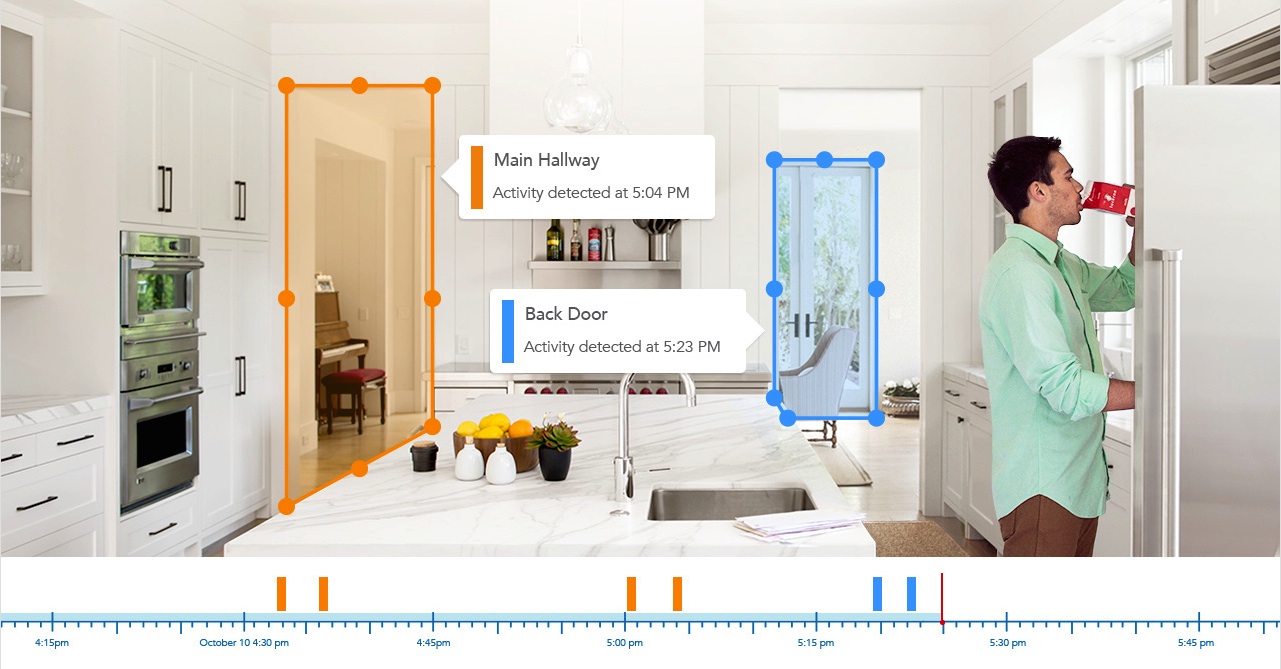
Activity Zones

Dropcam has a cool feature that allows you to define activity zones. If there’s motion in a defined area, the camera will identify that and you can view only activity for a certain zone if you like.

20140821th-dropcam-cloud-storage-surveillance-video-recording-timeline-activity-zones

TRENDNET® SETS NEW STANDARD FOR FREE IP CAMERA SOFTWARE

TRENDNET (5/30/2012)

TRENDnet’s new free SecurView Pro IP camera management software sets new performance and feature standard

TORRANCE, Calif. –May 30, 2012TRENDnet, a best-in-class wired and wireless networking hardware brand, today announces the availability of new industry leading SecurView Pro IP camera management software.

SecurView Pro software will be included with every new TRENDnet IP camera launched to market. It is compatible with all existing TRENDnet IP camera models, and will be phased into existing IP camera packaging in the coming months. Customers who own an existing compatible camera, or who have recently purchased a camera with older software are invited to download the new software free from TRENDnet’s website. SecurView Pro is compatible with Windows 7 and Microsoft Server 2008, it offers low CPU loading, and can manage up to 32 TRENDnet IP cameras.

SecurView Pro video tour: http://youtu.be/wURt3Fm1-Bs

SecurView Pro provides users with extensive camera viewing options including preset viewing modes, custom viewing layouts, and full screen mode. Side, top, and bottom tool bars can be hidden to increase the video viewing field. Managers can drag and drop live feeds to a new location; define camera cycle viewing sequences; and force video with motion to the front of the viewing screen.

Users can define a combination of weekly recording schedules and motion detection recording; program motion detection areas of any shape; integrate alarm system event triggers with IP cameras; set date, time, and text overlays per camera; and define mask overlays to conceal sensitive areas.

Zero loss architecture is provided with the ability to record a single video stream to multiple locations simultaneously. Manage recording files by recording time or by space allocation. Handy recording statistics help manage files and a disk cleaning feature condenses and optimizes old files.

Search and playback functionality is particularly advanced. A navigation timeline provides a quick visual reference to recorded content by displaying when video and motion was recorded over a set time. Users can save significant time using the option to search continuous recordings by motion event, within a defined area of the viewing field. Time lapse playback provides yet another useful search option. The Map feature allows users to map cameras onto an image such as an office floor plan, or onto Google Maps™.

“Free management software included with IP cameras is often cited as having high CPU loading and few advanced features,” stated Sonny Su, technology director for TRENDnet. “Our goal when we started redesigning TRENDnet’s camera software was to set a new standard for performance and functionality. I think customers who experience SecurView Pro software will agree that we hit a home run.”

Best Mobile Smart Phones From One Plus One, HTC One M8, Google Nexus, Moto X, LG G3, and Amazon Fire

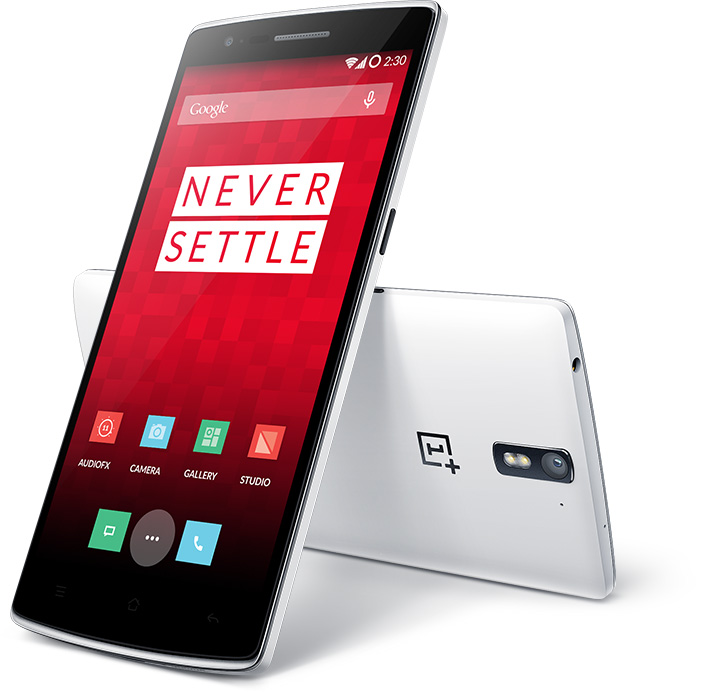
20140803su-one-plus-one-smartphone

One Plus One

Summary. The powerful Qualcomm© Snapdragon™ 801 processor with global 4G LTE is coupled with an immersive 5.5″ 1080p display for over a day’s worth of battery life.  We focused only on features that would truly improve the OnePlus One experience such as Voice Wakeup, and On Screen Gestures. (How to buy.) Thanks to T.P. for assisting in the research of this document.

Enhanced Android OS. The OnePlus One comes with a special version of CyanogenMod (based on Android™), designed for the One. It’s fast, light, secure and will receive updates for at least 2 years.

Camera. The camera on the OnePlus One excels thanks to quality optics, sensors and algorithms. Boasting a 13 megapixel Sony Exmor IMX214 camera with f/2.0 aperture, the OnePlus One camera takes amazing pictures even in low light conditions. Shoot anytime, anywhere for bright, sharp photos. Our camera has 6 physical lenses. Your photos will be more precise and detailed without suffering from distortion often caused by lower apertures. With an impressive 5 megapixel camera adorning the front of the OnePlus One, selfies will be more captivating than ever. The extra-wide 80º viewing angle captures more area than other phones so your pictures will include more background without distortion.

Processor. Packing a Qualcomm© Snapdragon™ 801 processor with 2.5GHz Quad-Core CPUs, the OnePlus One’s operational capacity and performance are enhanced by Qualcomm’s heterogeneous computing approach. This chipset harnesses the robust integration of many components for incredible speed and power efficiency. Among them, the custom Krait CPU architecture for sustained peak performance, integrated 4G LTE connectivity and Adreno 330 GPU for superior graphics and gaming experience, boosting 3D interfaces, colors and textures.

* * *
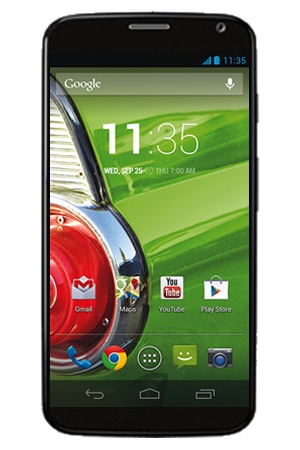
20140803su-motorola-moto-x

Motorola Moto X

Moto X™ is ready when you are.  It responds to your voice – no touching necessary.  Quickly access the 10-megapixel camera with a twist of your wrist, letting you take pictures before the moment passes. Record 1080p HD video with stereo sound, and video chat with a front-facing HD camera. Use Moto X’s entire 4.7-inch HD screen as a viewfinder without any icons obstructing your view. Intuitive controls let you push to zoom, tap anywhere on the screen to take a shot, or tap and hold to continuously shoot. Moto X is the first smartphone ever to be designed and assembled in the USA, so it’s close to you before it even gets to you.  Once you turn it on, it’s all yours. Just talk. (Buy from Republic Wireless, Verizon, or use the MotoMaker to design your own.)

* * *
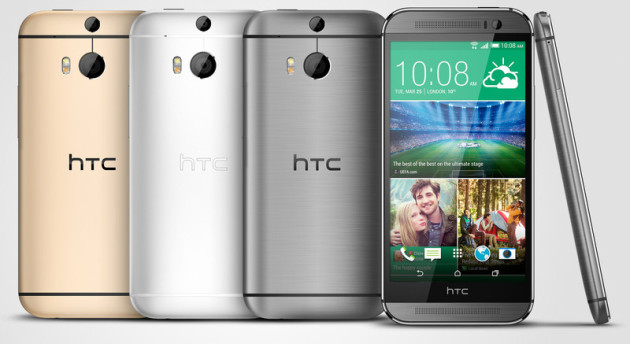
20140803su-htc-one-m8-colors

HTC One (M8)

The HTC One (M8) has an all metal body with sleek lines and soft curves that has been crafted to fit perfectly in the palm of your hand. It curves around the screen with no edges or seams to make it one of the most comfortable phones to hold. HTC sense 6: We’ve given the Sense 6 user experience a stylish new overhaul. It’s bolder, cleaner, and more colorful. Enhanced intuitive gesture recognition makes access to your phone faster and easier, and allows you to interact with your phone in ways you never thought possible. • Motion LaunchTM gestures • Custom themes and fonts • HTC Sense TVTM Sports – Real time sports scores and stats • HTC BlinkFeedTM – Your world at a glance • ZoeTM – Bring your stories to life.

Take brilliant day or night time shots with the HTC Duo camera. Add pro effects effortlessly, automatically make mini movies in seconds, or flip to the 5MP front camera for the perfect selfie.

UFocus lets you select what you would like to be in focus, even after you’ve taken the picture. The aesthetic blur you see is called the bokeh effect. It’s a professional effect you normally only get with expensive cameras or complicated editing software. On the new HTC One it just happens automatically.

* * *

20140803su-google-nexus-five-smartphone

Google Nexus 5

Slimmer, lighter design. Nexus 5 is precision-built from strong materials, and the intelligently simple design showcases more of what matters to you. At only 4.59 oz and 8.59 mm thin, it’s the most powerful Nexus phone yet. Speed and power to spare.

With 4G/LTE and ultra-fast Wi-Fi, Nexus 5 keeps you connected at blazing speeds. Add in the cutting-edge 2.26GHz Qualcomm SnapdragonTM 800 processor and you’ll race through games, zip around the web and switch between apps at the flick of a finger. Stunning 5 display.

More room to do what you do, and better colors too. Nexus 5 gives you a Full HD display so you can see every detail in lifelike color with less glare and a wider viewing angle-the perfect canvas for your moments. Powered by Android 4.4, KitKat. Android is fast and powerful yet simple to use. Focus on getting stuff done without having to think about the technology underneath.

* * *
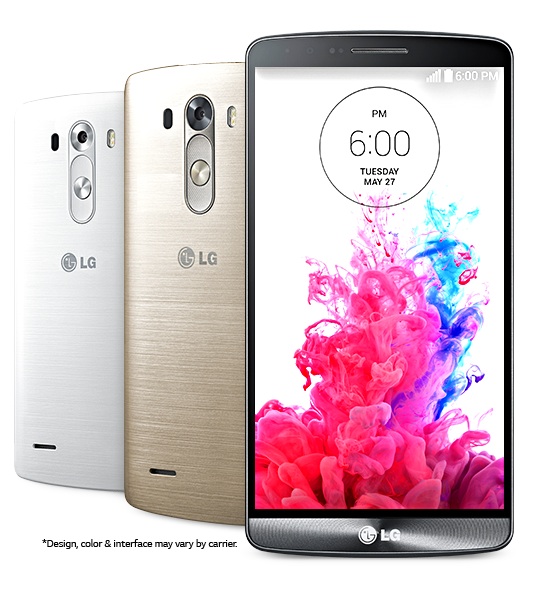
20140803su-lg-g3-smartphone

LG G3

Get the ultimate in smart technology. The LG G3 phone is sleek, stylish and innovative to its core. Featuring a stunning 5.5 Inch, Quad HD 2,560 x 1,440 resolution display, Laser Auto Focus and more, the LG G3 proves that form and function are not mutually exclusive.

Sign up to get the latest LG G3 news and LG G3 release dates delivered directly to your inbox, or browse our collection of cell phone accessories and activity trackers – to get even more from the devices you rely on.

Behold the latest smartphone in LG’s award-winning G Series. Now, with a larger, clearer display, a laser-precise camera and superior smart interactivity, we can confidently call the G3 the best smartphone that LG has ever made.

The LG G3’s new 5.5″ Quad HD (2560 x 1440) display transforms the smartphone visual experience at 4 times the resolution of HD. Stunning graphics and life-like colors seem to jump off the screen, showing imagery in its finest detail and clarity at 538 pixels per inch.

Never miss a photo-op again! Capture the moment when it happens, even when the subject is moving or the lighting isn’t optimal. You’ll be able to take the photo faster due to the advanced Laser Auto Focus feature and streamlined camera UI.

Capture true-to-life memories with the LG G3’s 13 MP OIS camera. The floating lens steadies the shot for sharp, focused imagery and the advanced sensor lets more light in. And, take perfect pictures without having to adjust a bunch of settings. Just point, shoot, and take your best shot.

Gain quick, secure access to the home screen by tapping your personalized 3 to 8 point pattern anywhere on the display. There are 86,358 possible code combinations.

The LG G3 is a device that constantly learns and adapts to your ever-changing needs and interests, providing personalized suggestions that makes life easier and more productive. With contextual analysis, it helps you get organized, stay on task, keep in touch with friends, and won’t let you miss an important event.

* * *
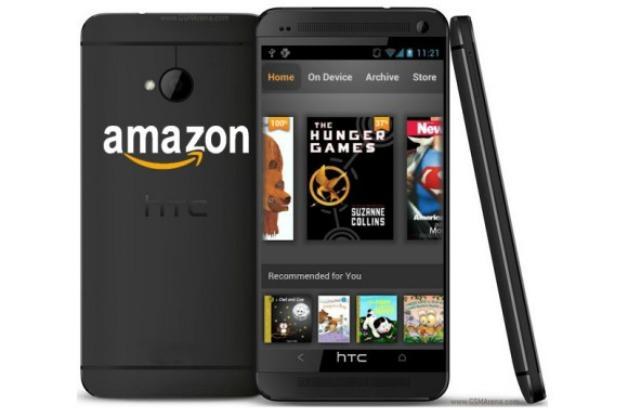
20140803su-amazon-fire-phone

Summary

The Amazon Fire Phone is a powerful mobile technology that comes with free technical support.

Dynamic Perspective

Experience interactions not possible on other smartphones. Tilt, auto-scroll, swivel, and peek to navigate menus and access shortcuts with one hand. Dive into a new class of immersive apps and games—peek to see detailed views of clothing, shoes, and more in the new Amazon Shopping app for Fire phone, or take on a character’s viewpoint to see around corners and obstacles in games. Learn more

Firefly technology

Quickly identify printed web and email addresses, phone numbers, QR and bar codes, plus over 100 million items, including movies, TV episodes, songs, and products—simply press and hold the dedicated Firefly button to discover useful information and take action in seconds.Learn more

Mayday

Get free, live, on-device video support with an Amazon expert, 24×7, 365 days a year at the touch of a button. No appointments necessary. Now available over the AT&T cellular network, in addition to Wi-Fi. Learn more

Amazon Prime

For a limited time, Fire phone includes a full year of Prime. Enjoy unlimited streaming and downloads of tens of thousands of popular movies and TV episodes with Prime Instant Video, over one million songs and hundreds of playlists with the all-new Prime Music, over 500,000 books to borrow for free with the Kindle Owners’ Lending Library, and FREE Two-Day Shipping on millions of items. Normal data charges apply when accessing Prime Instant Video, Prime Music and other digital content over the cellular networkLearn more about Amazon Prime

Immersive apps and games

Peek in maps to show Yelp ratings. In StubHub stadium view, see 90 degrees to the left and right of your seat, as if you were actually there, looking around. In games, like Lili, take on the character’s viewpoint and move your head to look around corners, obstacles, and other objects.

One-handed short cuts

Access menus, shortcuts, and useful information with tilt, swivel, and peek.

  • Tilt for panels—use the left panel to navigate menus, and the right panel to access useful information and shortcuts, like attaching photos to a text message, viewing song lyrics, and more.
  • Swivel for access to important notifications and quick actions like Mayday, Flashlight, Settings, and more.
  • Peek keeps your display uncluttered by revealing additional details and quick actions only when you need it.

One-handed reading

With auto-scroll, scan long web pages without ever having to touch the screen.

Simply press the Firefly button to instantly identify and take action on…

  • Phone numbers, web, and email addresses. Firefly identifies printed text on posters, magazines, and business cards—make calls, save new contacts, send emails, and visit websites without typing long addresses.
  • Movies & TV. Firefly recognizes over 240,000 movies and TV episodes, and 160 live TV channels. Firefly uses X-Ray, powered by IMDb, to show information on actors, plot details, and related content—add titles to your Watchlist or download to watch later.
  • Music. Firefly recognizes songs so you can access artist information, play related songs, download albums direct to your Fire phone, or add them to your Wish List to purchase later on. With Firefly-enabled apps like iHeartRadio and StubHub, you can create radio stations based on an identified artist, or even find tickets for their next show.

Over 70 million products

Recognize household items, books, DVDs, CDs, video games, and more. Access product details, add items to your Wish List, or order on Amazon straight from your Fire phone.

Free, live, on-device tech support

Simply hit the Mayday button in quick actions and an Amazon expert will appear to help you via live video. Our tech experts can co-pilot you through any feature by drawing on your screen, walking you through how to do something yourself, or doing it for you—whatever works best. Throughout the process, you’ll be able to see the Amazon expert live on your screen, but they won’t see you.

Now available over the AT&T cellular network

In addition to Wi-Fi, Mayday is now available over the AT&T cellular network. Enjoy free, on-device tech support, 24×7, 365 days a year. Normal data charges apply when you are using Mayday over the cellular network.

Help in 15 seconds or less

No waiting in line. No appointment required. The Mayday response time goal is 15 seconds or less.

Microchip Credit Card Processing from #Square #chipcards #emv

(Source: “What is EVM?,” Square Blog, 30 July 2014)

U.S. banks are switching up the insides of your customers’ credit cards. They’re adding something called EMV technology, which stands for “Europay, MasterCard, and Visa.” Translation: Credit cards will be equipped with a super-small computer chip that’s extremely hard to counterfeit. If you’ve gotten a card recently, chances are it’s souped up with this technology.

20140730we-creditcard-chipcard

Why the changeover? Here’s a crazy statistic: Almost half of the world’s credit card fraud now happens in the United States—even though only a quarter of all credit card transactions happen here. The banks want to rein this in ASAP by moving away from magnetic-stripe cards, which are much easier to counterfeit. The recent Target and Neiman Marcus security breaches also added motivation.

So how exactly will this affect your business? For starters, you’ll need a new processing device to read the information in the chip cards. This can get expensive. And come October 2015, businesses that don’t have an EMV processing device could be on the hook for fraudulent chip card transactions.

As you might imagine, chip cards are a pretty hot topic in the financial press right now. There’s a lot of information to sift through. And because any EMV card discussion usually mentions “fraud” and “liability,” it’s natural that it could put small business owners on edge.

We’re here to give you all the essential information about how the upcoming changes will affect you. We’ll be starting a regular newsletter to keep you in the know, which you can sign up for here.

You probably already have questions about all of this. So to kick off our EMV article series, we thought we’d go through the nuts and bolts. We’ll also explain exactly how Square can help.

Will migrating my business to EMV cost me an arm and a leg?

Here’s where Square comes in. We’re building an EMV-compliant reader that’s incredibly affordable and easy to use. We’re also working on several solutions for our Square Stand customers. You can sign up here to be notified when our EMV-enabled chip card readers are ready.

What’s the deal with this “liability shift”?

Here’s the lowdown: Currently, if you run a fraudulent card, banks absorb the costs. Starting in October 2015, if someone pays with a fraudulent chip card, and you’re not set up with an EMV card reader, the banks will no longer be liable. So say, for example, a fraudster buys $30 worth of hot sauce from a restaurant with a counterfeit EMV chip card. If the restaurant doesn’t have a chip card reader to process the transaction, it could be on the hook for the $30.

Is this completely new technology?

Nope. Most of the world, including Europe, has been using chip cards for years. The United States is actually the last major market still using magnetic-stripe-only cards.

Will chip cards be swiped the same way as magnetic-stripe cards?

It’s a totally new dance we call the “chip-and-dip.” Chip cards are inserted, or “dipped,” into the payment device and left in place for the entire transaction as the reader and card talk back and forth. That’s when the magic happens. Square’s new chip card reader will be able to process both chip and magnetic stripe cards.

Will Square still offer the current Square Reader after October 2015?

You’ll still be able to get our current reader while the nationwide transition to EMV technology is underway. Based on chip card rollouts in other countries, we estimate it’ll take roughly three to five years for mass adoption. (Old habits die hard.) But getting an EMV-enabled device is a good thing to start considering. The sooner you’re set up, the sooner your business will be better protected.

20140730we-chip-credit-card

goTenna Personal Long-Range Public Mesh Network

A new product called goTenna lets two or more people create a publicly owned wide area phone network for text messaging.

Even without access to mobile services, the goTenna network will operate as a mesh multi-node peer-to-peer network.

You can visit the GoTenna website, and support the product by purchasing two devices for half price.

“goTenna pairs wirelessly with your smartphone, enabling you to text and share your location with anyone who has the device even if you don’t have service. No towers, routers or satellites required!”

20140718fr-gotenna-mesh-personal-public-wide-area-network