On Facebook Use Caution When Approving Friend Requests

Today I received a friend request from someone on Facebook. Usually I would just click “Approve” and move on.

Yet, we only had one friend in common, and upon checking this person’s Facebook profile, it showed that they had only one post on their timeline (a poor quality profile pic), yet they were adding friends on Facebook at a furious rate. I couldn’t really find anything from a Google search on this person. It was as if they didn’t exist.

Many of the people who he friended are from my community — people I know, although we’re not Friends on Facebook.

I thought I’d spend a few minutes investigating this a bit, so I contacted some of the people (dozens added in the last hour) who had recently friended him.

Turns out none of these people really know anything about him.

Potential Harm

Here’s the danger in accepting friend requests too quickly:

  1. The person controlling the fake user account (a troll) gets access to your entire friend list.
  2. The troll or potential hacker sees your private timeline posts as if they are your friend or family member. They see things about you that you’ve set as not public and only viewable to friends or friends of friends.
  3. Because of your supposed friendship with this fictitious person, the troll then gains the trust of your friends, so when the friend request appears, your friends think they are a trusted and known individual. So, they accept the friend request, and the troll returns to step 1 above to become friends with everyone that person knows, and so on.

The goal of these people is to quickly build up a huge friends list on Facebook which can grow exponentially. These accounts are typically built up over time and then sold on the black market to spammers, advertisers, and hackers who attempt to use reverse social engineering to hack into Facebook accounts (and your other accounts) based on what they gather from your personal information online.

What You Can Do

While Facebook is usually a fun and safe online environment, it’s still important to be cautious.

  • Alert Your Friends. If you suspect some suspicious activity, let your friends know — the friends who have already friended a troll using a fake account.
  • Alert Others. Look at the list of people the fake account has friended. Some of them will be people you’re not friends with, but you have dozens of friends in common. In other words, they are likely legitimate users. You could also consider notifying them.
  • Notify Facebook. You can also contact Facebook about suspicious activity. Go to the profile of the person you suspect is fraudulently using Facebook. Click on the dots to the right of the Message button and choose Report to report the person. You can also Block them.

It’s everyone’s responsibility to help keep Facebook safe and secure through each person being careful about who they connect with.

UPDATE #1

Several hours ago, there was no Google image match on the Internet for the profile image that had been posted by the fictitious user. None. Now, a few hours later, that same image is showing up for multiple user accounts under different names on Twitter and other websites. On those sites, he’s also posted little or nothing, but building friend networks.

UPDATE #2

Facebook took down the fraudulent user’s account within a few more hours of this post. Another victory.

Career Opportunity as a User Interface Designer at the University of Iowa

The University of Iowa Foundation is currently seeking a User Interface Designer. The job posting is below. Click here to apply.

* * *

The University of Iowa Foundation (UIF), a 501(c)(3) organization that raises private gift support for The University of Iowa (UI), seeks a User Interface Designer to develop and maintain high-quality UIF Internet and Intranet sites. The successful candidate serves as a UIF resource for applying creativity and innovation to Internet and Intranet use, web marketing, and responsive web page development.

Job duties include, but are not limited to:

  • Works with supervisor to implement web-use strategies. Analyzes userexperience effectiveness, updates and improves site structure and content, and maintains site functionality.
  • Designs, codes, and modifies websites from layout to function.
  • Works closely with IT and other areas within the Foundation to redevelop and optimize online giving functionality and user experience.
  • Provides leadership to online communications team on user experience design concepts and processes.
  • Recommends and ensures consistent use of design concepts and branding elements across applications.

Qualifications: The successful candidate must have a Bachelor’s degree in graphic design, marketing, computer science, or related field. Five to ten years of experience in web design and user interface development with an extensive portfolio of websites developed using responsive design practices and/or experiences tailored to mobile audiences is required.

Candidates must have the ability to work in a fast-paced environment, possess excellent verbal and written communication skills, and strong problem solving skills. Experience designing for and developing within WordPress and a thorough knowledge of design tools including, Photoshop and Illustrator are required along with an understanding of web usability and accessibility.


The UI Foundation does not discriminate in employment (M/V/F/D/GI). All qualified applicants are encouraged to apply. To learn more about our organization, visit us at: www.uifoundation.org

Domo Business Intelligence Systems Offer Live Analytics and Charting

The videos below offer an introduction to Domo business intelligence systems which offer live analytics and charting for meaningful and actionable data aggregation and analysis.

How ShareThis uses Domo

How Sage uses Domo

How Coverhound uses Domo

How Bohme uses Domo

How Arizona State University uses Domo

Domo Launch Party (2011)

Web 2.0 Summit 2011 Josh James

Q&A: What’s a Browser?

Q: What’s a browser?

A: Despite the abundance of people using browsers, this is still a common question.

A browser is a program that lets you go to a web page and otherwise explore the Internet. Browsers let you interact with social network sites like Facebook, Pinterest, or Twitter. Unless you’re reading this as a printed page, you are most likely viewing this page with a browser.

Searching

You can type in a website address in a browser to view that website, or you can search.

Browsers generally have some form of search capability that is connected to a search engine. This is where things get a little bit confusing.

The browser itself doesn’t search but it connects you, seamlessly, to a service that does. Generally speaking, a browser will have you use the associated search service (engine) offered by the browser provider. So, the Microsoft Internet Explorer browser will use Microsoft Bing. The Google Chrome browser will use the Google search service. However, you can set your browser to use another search engine such as Yahoo.

Saving Bookmarks or Favorites

Browsers let you print web pages and you can also save website addresses (called Favorites or Bookmarks).

Print or Save Web Pages

In addition to printing, you can save web pages as PDF files or as locally stored web content (saving the text and images from the page).

Cloud Features

Browser providers typically offer some kind of cloud synchronization so that your bookmarks, browsing history, and other settings can be synchronized across multiple devices. Apple, Microsoft, Google, and Mozilla offer cloud synchronization. This means you can easily pickup reading on one device where  you left off on another device.

Programs

Google Chrome is unique because there is a Google Chrome Web Store where you can get programs that run in Google Chrome. These are useful apps and programs written to work with Google Chrome, and in this way they can be used on Windows, Apple, Linux, and any other system that has Google Chrome.

Popular Browsers

Common browsers are Microsoft Internet Explorer, Google Chrome, Mozilla Firefox, Apple Safari, and Opera. There are many others.  Below are the icons for some popular browsers.

20150106tu-web-browser-icons-chrome-firefox-internet-explorer-opera-apple-safari-kadvacorp

Cisco AnyConnect Web Security Not Compatible with Avast Apple Mac

If you attempt to install Avast Antivirus on your Apple Mac computer, you may get the following error message:

Incompatible software detected. The Web Security module of Cisco has been detected, which is not compatible with Avast. To install the Avast product, please uninstall the incompatible module first.

When you click the Close button, the installation will immediately quit.

Follow these instructions to fix this problem:

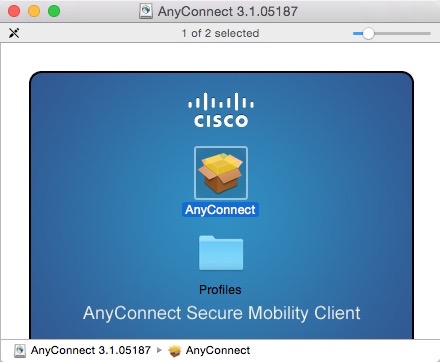
  1. If you have a direct license with Cisco, you can visit the Cisco Software Download Page and download the AnyConnect Secure Mobility Client. Navigate to the AnyConnect Secure Mobility Client v3.x download page and look for the download called Standalone DMG package for Mac OS X “Intel” platforms.
  2. For many people, you will need to go to your organization or employer software download page and download the version provided.
  3. Follow the installation instructions, and remember not to select the Web Security module (see below). This will configure the software so that Avast can be installed.

These are the installation screens. Click any image for a larger gallery view.

Choosing a Color Printer: InkJet or Laser?

Summary

When it’s time to purchase a new printer, one of the first questions to consider is whether to purchase a laser printer or an inkjet printer. This page offers some considerations and suggestions in exploring your options.

Color InkJet Printers

Here are some points to consider regarding InkJet printers:

  • Lower purchase price compared to laser printers.
  • Cost of operation may be higher for those who print a lot. Although, some inkjet printers in the $400 price range or higher have economical high capacity ink cartridges.
  • Cost of operation may be higher (per page) for those who print very infrequently because the ink cartridges on some printers can dry out when not used for long periods of time (several weeks or more).
  • Good for people who print frequently (several times a week) but don’t print a lot of pages.
  • Good choice for people wanting to print pictures on photo paper.
  • Printing in high quality mode can be slow unless you purchase a more expensive inkjet printer.
  • Lower priced inkjet printers are typically small and light weight.
  • If you want scanning, copying, printing, and possibly faxing, there are inexpensive inkjet printers that offer these features.

Color Laser Printers

Here are some points to consider regarding Laser printers:

  • Higher cost to purchase initially, but long-term lower cost of ownership for those who do a lot of printing.
  • Toner is used instead of ink and it doesn’t dry out like ink cartridges used by inkjet printers.
  • Typically faster printing than low priced inkjet printers. Although, at the $400 to $500 price range, many inkjet printers are now as fast as laser printers.
  • Generally heavier and bigger than inkjet printers because multiple large toner cartridges are used and the printing mechanism is heavy. However, some expensive inkjet printers can be as big or bigger than laser printers, so it depends on the printer.
  • To get scanning, copying, printing, and possibly faxing capabilities, a laser printing system will likely cost more than an inkjet printer offering the same features.

Purchase Choices

Here are links to some top rated inkjet and laser printers on Amazon that you can consider based on your budget.

It’s best to choose from the above options based on what you feel your needs are, and then contact us to confirm it’s the right choice for you.

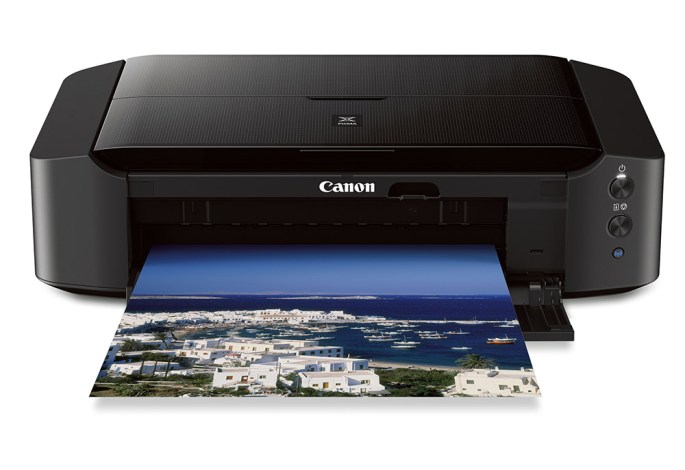
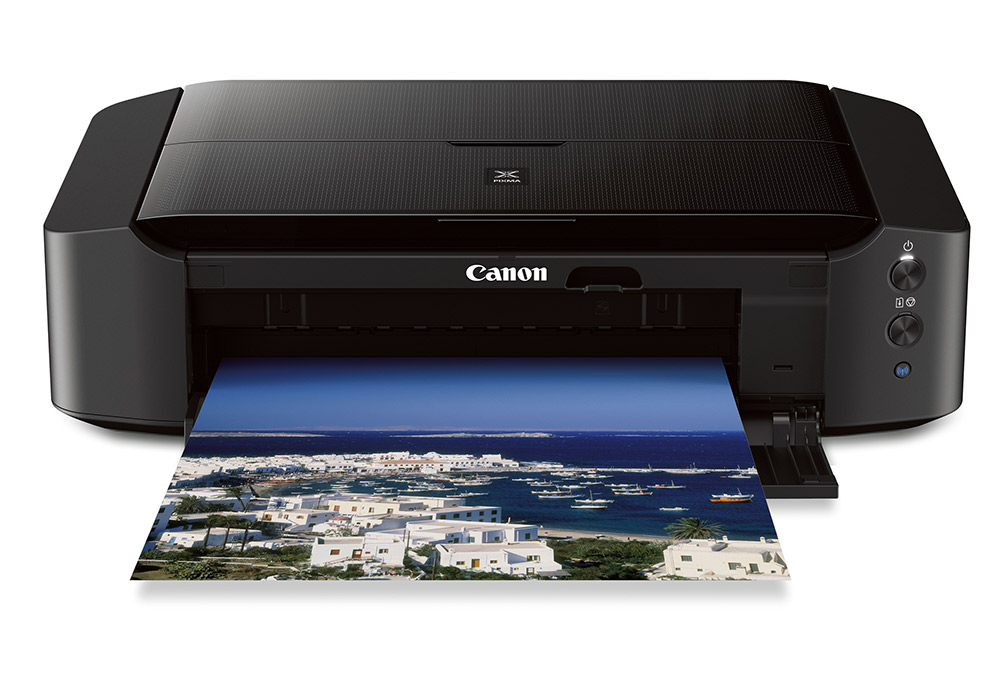
20141218th-353360-canon-pixma-ip8720-wireless-inkjet-photo-printer

Olympus Digital Audio Recorder Erase All

If you’re using an Olympus digital audio recorder and would like to erase all recordings, follow these instructions.

  1. Power on the recorder by sliding the hold switch to the on position.
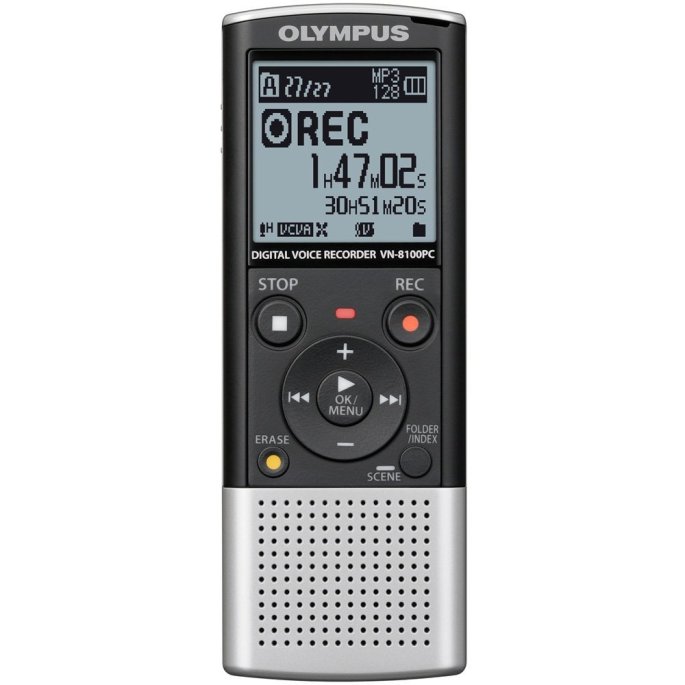
  2. Press the Folder/Index button until you see the folder icon with the letter A appear in the display.
  3. If Folder A is empty, you’ll see 00/00 recordings indicated. So, press the Folder/Index button again and advance to any folder with recordings in it.
  4. Once you arrive at a folder with recordings, you’ll see that listed in the display as recording number / total recordings in folder (such as 01/03 for recording 1 of 3).
  5. Press the Erase button once. This will indicate you want to erase the current audio recording. You’ll see Erase: Cancel displayed. Press the Erase button again to indicate you’d like to erase all recordings in the folder. You’ll see the word ALL in the display, and Erase: Cancel below it.
  6. Press the Right arrow. You’ll see Erase: Start below the word ALL.
  7. Press the Play button. This will begin the process of erasing all recordings in the current folder.

AeroMobil: The Automobile Airplane is a Car that can Fly

About

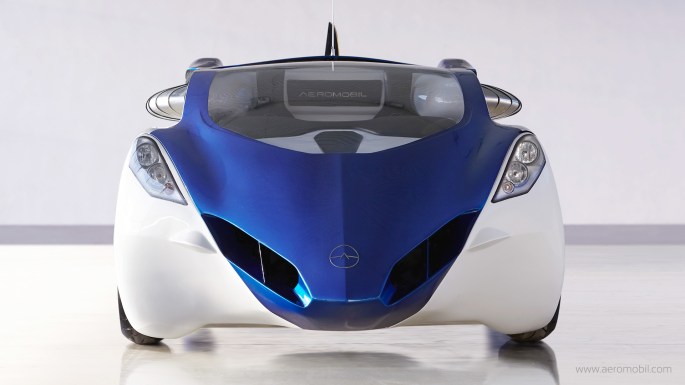
AeroMobil. Beautiful flying car. Beautifully integrated. Transforms in seconds from an automobile to an airplane. Gives you freedom to move.

AeroMobil is a flying car that perfectly makes use of existing infrastructure created for automobiles and planes, and opens doors to real door-to-door travel. As a car it fits into any standard parking space, uses regular gasoline, and can be used in road traffic just like any other car. As a plane it can use any airport in the world, but can also take off and land using any grass strip or paved surface just a few hundred meters long.

The current flying car prototype AeroMobil 3.0 incorporates significant improvements and upgrades to the previous pre-prototype AeroMobil 2.5. It is now finalised and has been in regular flight-testing program in real flight conditions since October 2014.

The AeroMobil 3.0 is predominantly built from advanced composite material. That includes its body shell, wings, and wheels. It also contains all the main features that are likely to be incorporated into the final product, such as avionics equipment, autopilot and an advanced parachute deployment system.

AeroMobil 3.0 also implements a number of other advanced technologies, such as a variable angle of attack of the wings that significantly shortens the take-off requirements, and sturdy suspension that enables it to take-off and land even at relatively rough terrain.

Image Gallery

Video

About the Video

Originally Published to YouTube on Oct 29, 2014

The current flying car prototype AeroMobil 3.0 incorporates significant improvements and upgrades. It is now being tested in real flight conditions since October 2014. Initially certified by the Slovak Federation of Ultra-Light Flying, it now entered a regular flight-testing program.

The AeroMobil 3.0 prototype is very close to the final product. It is predominantly built from the same materials as the final product, such as advanced composite materials for the body shell, wings, and wheels. It also contains all the main features that will be incorporated into the final product, such as avionics equipment, autopilot and an advanced parachute deployment system.

Credits AeroMobil 3.0 video

Produced by Protos Productions http://www.protos.sk
Director: Jonáš Karásek
DOP: Tomáš Juríček
Producer: Michal Hlavačka
2nd DOP: Peter Bencsik, Ivo Miko
Editor: Michal Kondrla
Music: Michal Novinski

Camera equipment: Reproduction
Lighting crew: Shining
Grip: RSR, Majo Tardík, Palo Bachňa
Aerial photography: SkyEye
Production crew: Michal Torma, Samuel Vojtek Marek Tóth
Online postproduction: Ekran, Peter Koštál, Paľo Durák
Sound mix: Soundline
Making of: Juraj Valica, Juraj Ondáš, Lukáš Terén

Credits AeroMobil Photography

Photographer: Miro Minarovych
Photographer: Róbert Kňažko

Contact

For more information, contact AeroMobil at:

__________

Thanks to Alex for letting us know about the AeroMobil.

Q&A with InvestInTech.com Makers of Able2Extract PDF Converter

Getting to Know Investintech.com: Helpful PDF Resources, Tutorials and Tools

Q: You’ve developed some great online technology tutorials. What topics are available and which ones seem to be the most popular?

MS Office for iPad Tips is one of our newer projects that we started working on as soon as Microsoft launched the apps for iPad. We knew that there’d be a huge interest in the apps, but as is the case with many great projects and tools out there, people don’t have much time to learn how to use them. We realized it would be extremely helpful to develop easy-to-read, straightforward tutorials with screenshots and images that clearly show what a Microsoft user needs to do in order to start using MS Office on their iPad.

With this goal in mind, we created a handful of quick guides to using Word, Excel and PowerPoint on iPad. We even included some general tips and advice on how to make the most of MS Office apps for iPad with a free Microsoft account. Basically, you can find out everything important about Microsoft for iPad in these tutorials, from learning how to print in Office for iPad and how to access MS documents saved on our PC from the iPad, to discovering how to make charts in Word and PowerPoint and how to freeze columns and rows in MS Excel.

We took the time to find out what it is about MS Office for iPad that creates the most headache to users, and we tried to answer their most common questions in these articles. We’ll constantly be updating the user guide with new tips.

Q: The Adobe PDF format has increasingly become a standard for stand-alone documents as well as content delivered through the Internet (as an alternative to HTML pages) when formatting/layout standardization across multiple platforms is desired. However, Adobe Acrobat Pro is very expensive, and not very user friendly. What does your PDF product offer? What is the cost compared to Adobe Acrobat Pro? Are there features your product has that Adobe Acrobat Pro doesn’t have?

One of the advantages of Investintech’s PDF solutions over Adobe’s is that they are very affordable. Also, at almost the fourth of Adobe Acrobat Pro’s price, users can enjoy high quality conversions that Investintech’s flagship PDF software, Able2Extract, provides.

Adobe Acrobat Pro costs $499 and Able2Extract Professional can be purchased for $139. Both the standard and professional version of Able2Extract can be used on all three major platforms, Windows, Mac and Linux, while Adobe Acrobat Pro is not available to Linux users.

It is not only the matter of price that makes Investintech’s product more appealing. Able2Extract’s conversion features are quite impressive. While Adobe Acrobat Pro can only convert to Excel, Word and PowerPoint, Able2Extract includes the following high-quality conversion options: PDF to Excel, Word, PowerPoint, Publisher, HTML, AutoCAD, OpenOffice, Images and it can also convert Text files to Excel, Word and PDF. Able2Extract PDF Converter’s major strength is its custom PDF to Excel option that allows users to manually tweak their output prior to conversion, and everyone who’s dealt with MS Excel recognizes this feature as a serious advantage.

Finally, Able2Extract’s intuitive, user-friendly GUI is high on the list of features that users like about our product. It makes the tool really easy to use, allowing users of any computer skill level to make quick conversions to different file formats.

Clearly, the range of options that Able2Extract offers, in combination with the tool’s price, is a much more attractive package to business professionals looking for powerful PDF conversion solutions.

Q: What makes your company unique?

Investintech.com is the most widely known for top quality PDF conversions for Excel users. Though its flagship product, Able2Extract, is created to cater to the needs of many different types of business professionals, from designers and architects who use AutoCAD to MS Office and OpenOffice users, we focused the most on Excel.

Our PDF solutions are widely used by accountants, auditors, finance analysts, bankers, and other finance and data scientists who use MS Excel spreadsheets for data processing and analysis. Since in the past many people complained about PDF to Excel conversion tools on the market at the time, especially the fact that the formatting and layout of Excel files are often lost after the conversion, Investintech developers put much of their efforts into creating an advanced, custom PDF to Excel creation feature that Able2Extract is now praised for. This feature allows users to tweak their Excel columns and rows structure prior to conversion, so that the formatting is exactly as it should be after the conversion.

Another feature of Able2Extract that brought Investintech a lot of recognition is the tool’s cross-platform operability, which enables users of the three major platforms (Windows, Mac, Linux) to use the software. It’s worth noting that Able2Extract was the first PDF converter on the market that introduced the cross-platform feature.

Q: What else does your company offer to its users?

Though Able2Extract is developed for and mostly used by business and individual professionals, we recognize the fact that not everyone around the globe can afford robust PDF software with a wide range of PDF conversion options. That is why we are working on developing some simple, quick and free online PDF conversion tools that people can find helpful.

We’ve already developed mobile apps for iOS and Android devices that help users smoothly convert and create PDFs for free. We also offer a range of other free tools for converting .docx to .doc, PDF to HTML and some inspirational templates for creating PowerPoint presentations and website designs.

We believe that the Internet’s potential for free and easy transfer of knowledge and information should really be used to the fullest. That is why we put a lot of energy into informing and teaching our readers about topics of interest to them, via our website, the company blog and our social media channels. Here they can find many articles, entertaining tips, helpful tutorials, must-have software lists, and some funny tech updates as well. Our wish is to spread the word about the usefulness of our PDF solutions, but also to help people manage their documents and files in the most productive and efficient way.

__________

A Note from Greg Johnson

I had an opportunity recently to connect with the friendly people at InvestInTech.com — the developers of the Able2Extract PDF converter software.

Being a writer of support documentation, I was really impressed with the free online support documentation they developed for the iPad version of Microsoft Office.

After learning a little more about their company, and the PDF product they offer, I thought it would be nice to offer the above Q&A to introduce them to my website visitors and subscribers. I wrote up the questions and they graciously provided the answers.

Moto G – MicroSD and SIM Card Installation and Removal

Summary

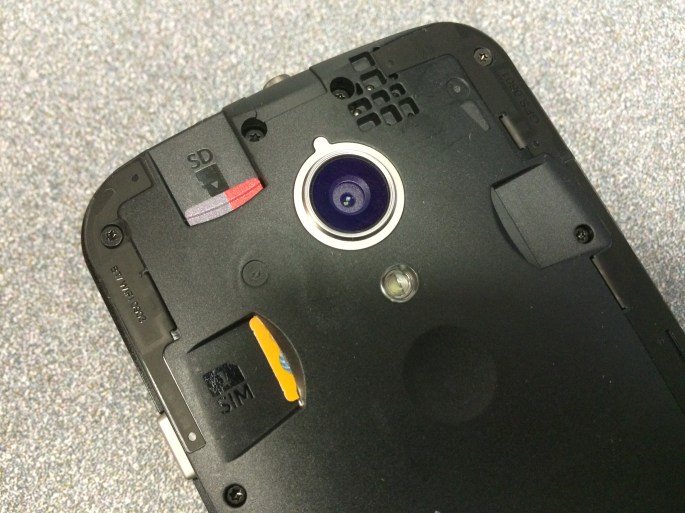
The Motorola Moto G (Second Generation) smartphone allows for the installation of a SIM card as well as a MicroSD memory storage card in the back of the unit — accessible once the back cover has been removed.

Removing the Back Cover

The back cover of the Moto G has some exceptional benefits. Along the top and long edges of the phone, where the back cover snaps on, there’s a very tight seal that you’ll have a hard time inserting a fingernail or anything else in. This smooth tight design makes the phone feel smooth in your hand and it keeps out dust and debris.

On the bottom of the phone, where the Micro USB connector jack is, it’s possible to insert a small object to twist and separate the back cover from the phone. An ideal object would be something like a wooden clothespin (the side you press with your fingers). This fits in the Micro USB opening and is soft enough not to damage or mar the phone.  You don’t want to jam anything all the way into the Micro USB port. Just twisting 1/16th of an inch inside that opening is enough to open the back cover. Then, using a fingernail, you can carefully pry the rest of the cover off.

20141114fr-motorola-motog-microsd-sim-back-open-case-cover-IMG_0179

MicroSD and SIM Cards

The SIM card is spring loaded. When inserting it, you’ll feel resistance until it’s all the way in, and then as you let go, it will come back and lock in place. To remove it, simply press in with your fingernail to release the lock mechanism and it will come out.

The MicroSD card is held in by friction only. To remove it, use your fingernail to grab the top ridge and pull it directly out.

So, in summary, pull to remove the MicroSD card, but push in to remove the SIM card.