Ubuntu Software Center Search Box Missing

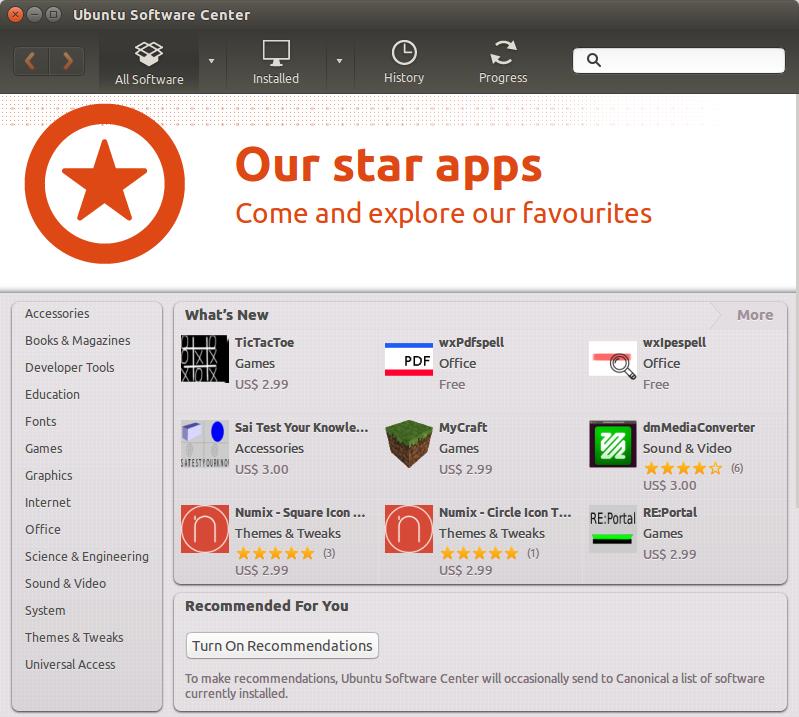
The Ubuntu Software Center normally has a search box in the upper right corner. However, if the window is sized slightly smaller than usual, that search box goes away. This is an error in how the responsive design of the interface was setup.

You can see examples below. The top example is of the window when it’s not sized large enough. The bottom example shows a slightly wider view. Click either image for a larger view.

A better method would be to resize the icons or have a ‘more’ indicator button to expand out and see other options.

20141007tu-ubuntu-software-center-search-missing 20141007tu-ubuntu-software-center-search-visible

Google Video Quality Report Usage for Your Area

From the repositories of Big Data at Google, reports are generated that dynamically show streaming video demand for various areas. This is provided through the Google Video Quality Report.

20141005su-google-video-quality-report

4th Dimension 4D Database Excessive CPU Utilization

Some users of the 4D Database software (by 4th Dimension) may experience excessive CPU utilization to the point that the server stops responding at about 78% CPU utilization (as measured by the server software). The utilization may increase over several days until this happens.

This behavior could be indicative of a runaway looped process or poor memory management. However, the problem is caused by a default setting in the server software.

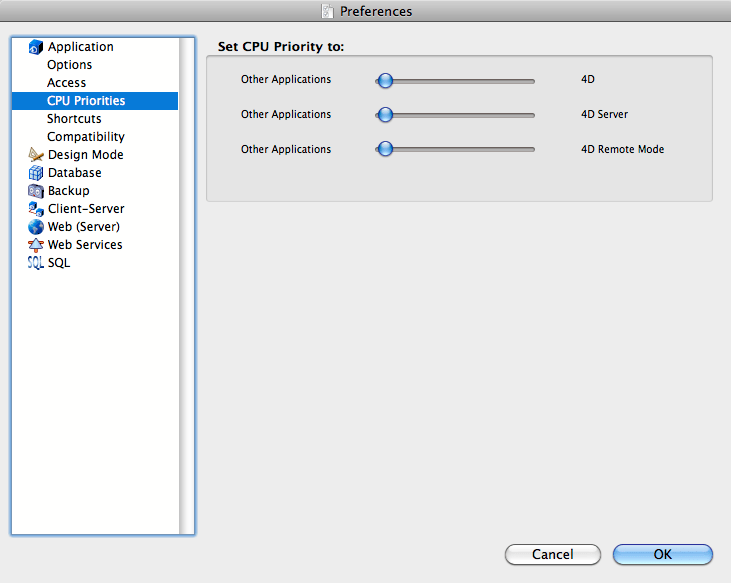
The corrected settings for CPU Priority are shown below. Click the image for a larger view.

20141001we-4th-dimension-database-preferences-cpu-utilization

The default setting is to have all three of the sliders in the middle setting (which causes a problem).

Although sliders are used, these actually don’t slide. There are three possible settings: low, medium, high.

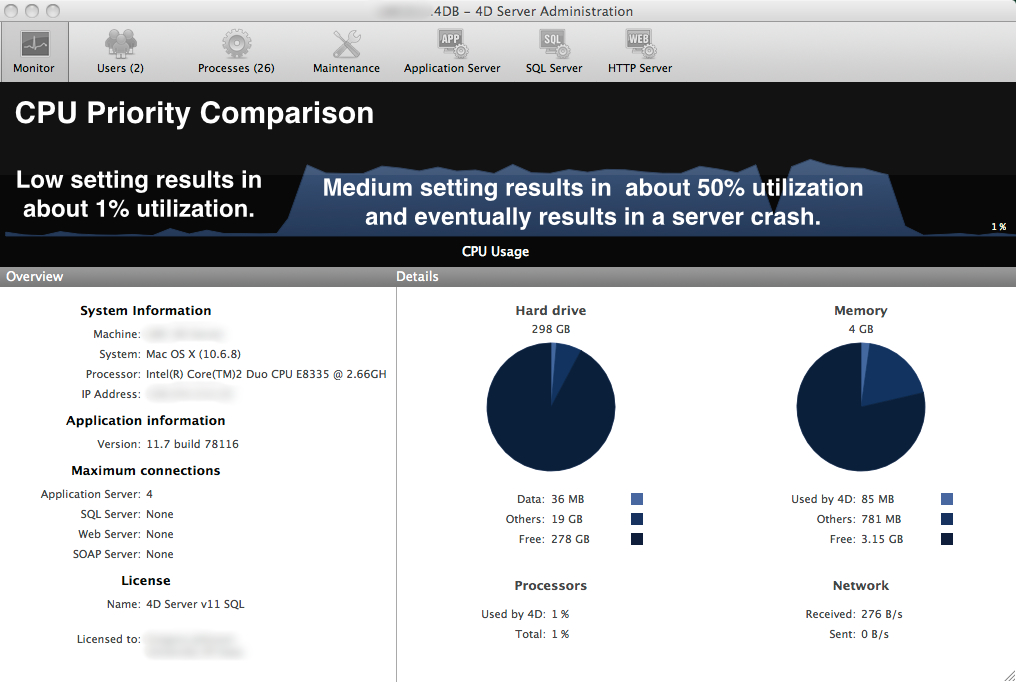
The chart below shows the CPU load difference when the CPU Priority is set to low compared to having the setting on medium priority. Click the image for a larger view.

20141001we-4th-dimension-database-preferences-cpu-utilization-chart-before-after

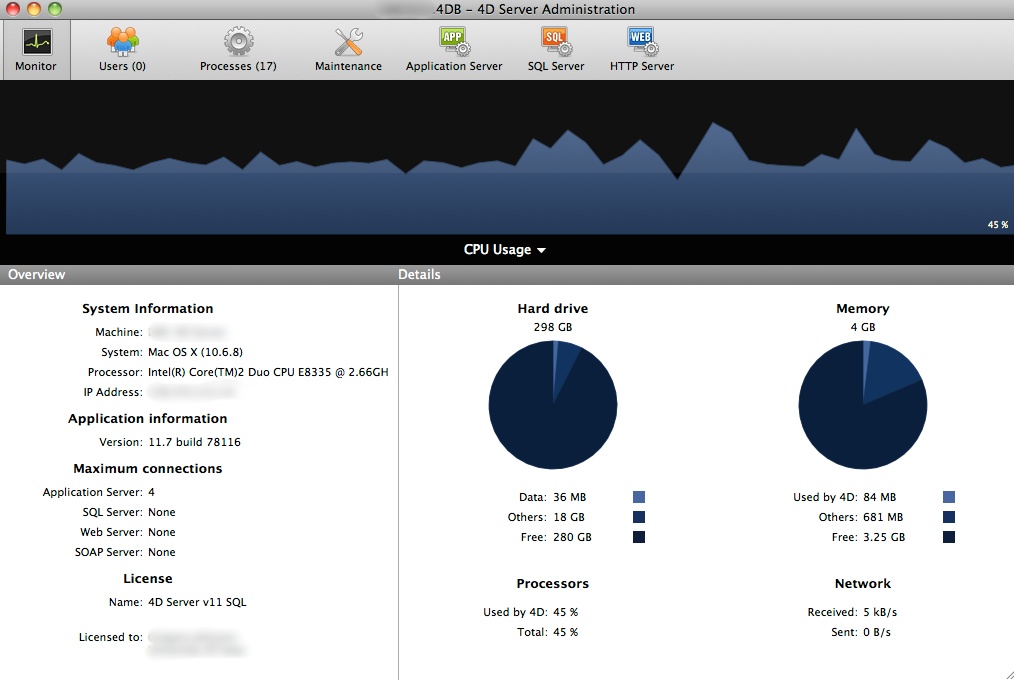
The image below shows the constant CPU utilization when the setting is in the default middle position. Click the image for a larger view.

20141002th-4th-dimension-4d-database-cpu-excessive-utilization

Checking an MD5 SHA-1 Checksum on an Apple Mac Computer

Summary. The MD5 Checksum (Message-Digest algorithm 5) is a cryptographic hash function with a 128-bit hash value. It is commonly used to verify the integrity and authenticity of files.

Instructions. Follow these instructions to confirm the checksum of a file using an Apple computer.

  1. You will need the checksum code associated with the file.
  2. Run the Terminal utility found in Applications > Utilities.
  3. In the Terminal window, type “md5″ and then a space, and then drag the downloaded file from the desktop or downloads folder into the Terminal window. This will cause the name of that file as well as its location to be pasted into the Terminal window.
  4. Press the Return/Enter key. This will generate the MD5 checksum value for that file.
  5. Compare the number generated to the one provided with the downloaded file. They should be identical. Type exit to exit the Terminal session. Then quit the Terminal utility.
Windows. For Windows users, an MD5 checksum utility can be downloaded from http://www.fourmilab.ch/md5/
For SHA on Apple, read this:
Additional reading:

How to get Microsoft Windows 10 Preview Download

There are a lot of lengthy and complicated articles describing how to Microsoft Windows 10.

Here’s a simpler approach to get your copy of Microsoft Windows 10 Preview, and what those other articles aren’t telling you.

You can just go to this Microsoft webpage and follow the instructions:

http://windows.microsoft.com/en-us/windows/preview

or, you can go to this page and download the full ISO (disc image):

http://windows.microsoft.com/en-us/windows/preview-iso

It’s that simple.

Virtual Computing

And to make your life easier, you may want to consider setting up a virtual computing environment for your new Windows 10 installation. This will allow you to test it out and not interfere with your own computing. To learn more about virtual computing, simply search on the terms Virtual PC or VMWare and find the right solution for your computer. Oracle offers a free virtual computing software alternative called VirtualBox.

Apple iPod, iPad, iPhone Photo Transfer and Organizing

Summary

Apple iOS devices have several categories of photos:

  1. Photos. This is a presentation of the photos in your device based on date and location.
  2. Shared. If you have iCloud sharing turned on, you can store, backup, and share photos in the cloud, including having a PhotoStream for easy sharing between devices.
  3. Albums. These are collections of photos organized by galleries of your choosing, rather than organized by date or location.

Photo Organizing Overview

It’s best to move photos and images off your device onto your desktop computer for permanent storage and backing up. You can also use your desktop device to organize the pictures you’d like to keep on your mobile device. Keeping lots of photos in the camera roll for sharing later is complicated because the camera roll doesn’t allow for creating and organizing sub-folders.

Photo Transfer Procedure

Follow these steps to transfer and organize your photos:

  1. Image Capture. Use Image Capture to copy your photos to your local drive. After copying, double-check to make sure they all copied properly. If they are really important, you could back them up as well. Then, using Image Capture, choose Select All and Delete them. This is easier than trying to delete photos in your iOS device.
  2. iPhoto. Usually people connect their iOS device and go directly to iPhoto. However, this isn’t a good idea because the folder structure in iPhoto makes it difficult to easily copy, backup, transfer, or work with other programs. So, you’ll want to keep your original images organized in folders on your hard drive before copying them into any image editing program. If you have pictures you’d like to keep on your iOS device, the best way to do that is to use iPhoto and make Photo Albums. Import the photos you’d like to work with into iPhoto. Then make albums. If you’re using iCloud with iPhoto, you could make some photo galleries in iCloud that will show up on your different devices. Otherwise, exit iPhoto and continue to the next step.
  3. iTunes. To get selected photo galleries / albums into your iOS device, you’ll need to use iTunes and synchronize the device. When synchronizing, you can choose what songs, movies, photos, and other content you’d like put on your device. Choose the photo galleries you created in iPhoto (step #2) above.

20141002th-ios-photography-tips-672x372

Republic Wireless Misinformation About Motorola Moto X Motomaker

Moto X Moto Maker is NOT Discontinued

If you visit the  Moto X page on the Republic Wireless website, you’ll see in big print that the phone can be customized, and there’s a bright green button that states, “Design your Moto X Now.”

If you click on that button, you’ll be taken to a page with this statement on their website:

Customizable Moto Maker options for Moto X have ended as of 9/23/14. Normally this page would tell you you’re leaving Republic Wireless to go build your very own Moto X on Moto Maker. But! All the Moto X Moto Maker phones are sold out. No more. Done-zo. All gone. Finito.

This statement would lead people to believe that the customizable Moto X design is no longer available. That’s just not true, as can be seen on the Motorola Moto Maker web page.

Poor Customer Service Experience

If you try to engage in a chat session with customer service at Republic Wireless,  you’ll likely be mistreated. At least that was my experience (see transcript below). In fact, had the customer service person been a little less defensive, this article might not even have been written.

Here’s the customer service chat exchange from today at 1:43 PM inquiring about this issue:

Republic Wireless (Brandon)

Hi, How may I help you?

Customer

On this page, you prominently advertise the Moto X and the ability to customize it: https://republicwire…blicwireless.com/ip/moto-maker

There’s a button that says, “Design Your Moto X Now”

Clicking on the button takes you here:
https://republicwire…cwireless.com/info/moto-maker/

Here’s the statement on that page:

Customizable Moto Maker options for Moto X have ended as of 9/23/14. Normally this page would tell you you’re leaving Republic Wireless to go build your very own Moto X on Moto Maker. But! All the Moto X Moto Maker phones are sold out. No more. Done-zo. All gone. Finito.

Republic Wireless (Brandon)

We recently stopped the Moto Maker option. If you go onto our main page you will see that the link is not there anymore. It ended on Sept 23

Customer

… but Moto Maker wasn’t an option on your site, it was and still is an option on the Motorola site. The statement is a bit misleading.

For those really wanting a customized Motorola phone, it is actually still available.

Telling the truth may result in your losing customers, but it’s the right thing to do.

Republic Wireless (Brandon)

I am telling you the truth. The Moto Maker option through Republic ended on Sept. 23

Customer

What I’m saying is that the statement on your site is a bit misleading, that’s all.

Some people really like the idea of making a custom phone. They will be lead to believe that option isn’t available any more. So, they will just go ahead and get a non-customized phone through Republic Wireless. Then later, they will find out that they could have had that amazing customized phone they really wanted, but they would have had to go with another carrier. This is the point left our on your website.

All I’m saying is that for those customers who forgo the customized phone, believing (from reading on your site that it’s no longer available), those people will feel mislead.

Your statement should read, “You can still customize your own Moto X phone, but if you do, you’ll need to find another carrier. Republic Wireless only offers two designs (black and white) of the Moto X.” It’s really just that simple. Just let people know that there’s another option.

Republic Wireless (Brandon)

Thanks for insight. However, if you click on the link, we are not misleading. We are making it clear that Moto Maker option is not available through Republic as well as giving you the date. Also, we are allowing you to sign up for updates in case the option becomes available with future devices.

Brandon has closed the chat.

Rude Customer Service Person

While I was typing a reply, the chat was abruptly ended by the customer service representative (Brandon). This is the equivalent of hanging up the phone on someone.

Republic Wireless Website

The image below is a snapshot from the Moto Maker page on the Republic Wireless website from 30 September 2014 at 2:00 PM CT. They are leaving their Moto Maker landing page live, presumably to bring in search traffic, then misleading people into believing the Moto Maker is discontinued. Click the image for a larger view.

20140930tu-republic-wireless-motorola-moto-x-motomaker-discontinued

Republic Wireless Statement

After Tweeting about this issue, using the @republicwireless tag, there was an immediate response from the company via a direct Twitter message stating the following:

“Not even sure where to start with that one. 1st Gen Moto X phones were sold out on the Moto Maker site. They have since been replaced with 2nd Gen Moto X options available for pre-order through certain carriers. Regardless – Moto X phones on Moto Maker with RW service are currently unavailable. While we may understandably be in one of the most hated industries known to man we’re a small startup of people trying to disrupt said industry b/c we feel the same pain points with it you do.”

That said, apologies you were left unsatisfied with you chat session. Brandon is one of our favs and we’re glad to talk.

Alessandro Acquisti Ted Talk Video About Privacy and Technology

Published on Oct 18, 2013

The line between public and private has blurred in the past decade, both online and in real life, and Alessandro Acquisti is here to explain what this means and why it matters. In this thought-provoking, slightly chilling talk, he shares details of recent and ongoing research — including a project that shows how easy it is to match a photograph of a stranger with their sensitive personal information.

TEDTalks is a daily video podcast of the best talks and performances from the TED Conference, where the world’s leading thinkers and doers give the talk of their lives in 18 minutes (or less). Look for talks on Technology, Entertainment and Design — plus science, business, global issues, the arts and much more.
Find closed captions and translated subtitles in many languages at http://www.ted.com/translate

Follow TED news on Twitter: http://www.twitter.com/tednews
Like TED on Facebook: https://www.facebook.com/TED

Subscribe to our channel: http://www.youtube.com/user/TEDtalksD…

Bash Shellshock Bug Vulnerability Exploit Patch

Summary

Some people are calling the Bash Shellshock Bug the worst thing since the Heartbleed Virus. Others are saying that the vulnerability isn’t as bad as reported since it won’t directly effect most users. The truth is probably somewhere in between. This document offers an introduction into what the Bash exploit is and what you can do about it.

Bash Facts

Here are a few facts about Bash.

  • “Bash or the Bourne again shell, is a UNIX-like shell, which is perhaps one of the most installed utilities on any Linux system. From its creation in 1980, Bash has evolved from a simple terminal based command interpreter to many other fancy uses. In Linux, environment variables provide a way to influence the behavior of software on the system. They typically consists of a name which has a value assigned to it. The same is true of the Bash shell. It is common for a lot of programs to run Bash shell in the background. It is often used to provide a shell to a remote user (via ssh, telnet, for example), provide a parser for CGI scripts (Apache, etc) or even provide limited command execution support (git, etc)” (source)
  • “Bash is present on every Linux distribution, almost every UNIX system, many Android phones, thousands upon thousands of embedded OS versions on hardware devices — and on every version of Mac OS X ever shipped.” (source)
  • “This patch doesn’t even BEGIN to solve the underlying shellshock problem. This patch just continues the ‘whack-a-mole’ job of fixing parsing errors that began with the first patch. Bash’s parser is certain have many many many other vulnerabilities; it was never designed to be security-relevant.” (source)

Quick Test for Bash Vulnerability

Using Terminal, you can enter the following commands to test for Bash vulnerability.

  • env x='() { :;}; echo vulnerable’ bash -c “echo this is a test”

If you type that, and only get the message “this is a test” then your system is most likely not vulnerable (other exploits are currently being evaluated, so don’t assume you’re completely protected). However, if you also see the word “vulnerable” generated, then your system is vulnerable.

If you run the above example with the patched version of Bash, you should get an output similar to:

bash: warning: x: ignoring function definition attempt
bash: error importing function definition for `x’
this is a test

Ubuntu Users

If you’re a user of the latest version of Ubuntu (14) and have been installing system updates regularly, your computer has likely already been patched.

Resources

Rather than recreating here what has already been posted elsewhere, the following resources have been gathered to provide the information you need and save you from searching the web through thousands of articles.

20140928su-computer-security-news-672x372

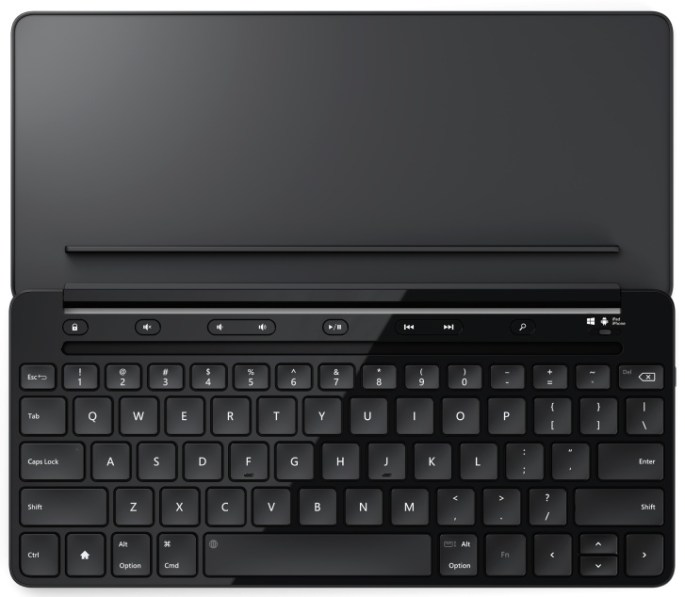
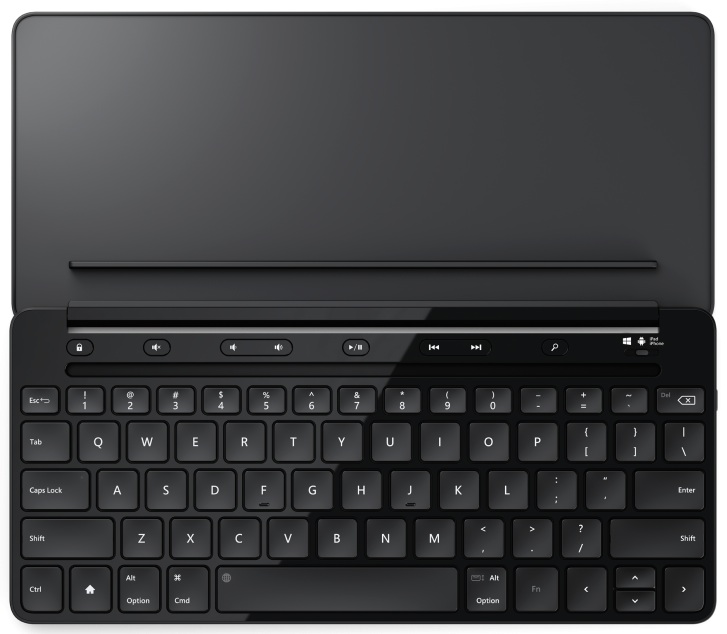
New Universal Mobile Keyboard works with Windows, iOS and Android mobile devices

(Source: Microsoft, 16 Sept. 2014)

[Purchase on Amazon]

Today’s tablets and smartphones are more powerful than ever, enabling people to be productive on the go. However, typing on the small, virtual on-screen-keyboard of a smartphone or tablet can be uncomfortable and inefficient.

It’s also common for people to carry multiple mobile devices and use the one that is best suited for the specific scenario they’re in — an iPad while in a coffee shop, a Samsung Galaxy S4 while sitting on an airplane, a Windows laptop in their hotel room.

With all these different devices, people frequently find they have a mixture of operating system platforms, resulting in them having to carry different accessories for each device. Microsoft’s new Universal Mobile Keyboard helps address that — it works with iPad, iPhone, Android devices and Windows tablets.

With the Microsoft Universal Mobile Keyboard, getting stuff done while you’re on the go has never been easier. Power through emails, put together a proposal, build a presentation, or simply instant message with a friend. The Universal Mobile Keyboard has an OS switch that lets you change from one operating system to another while maintaining a fully functional keyboard. And with the physical “chiclet” style keyset on this keyboard, you’ll feel like you’re typing on your laptop without lugging around the extra weight or bulk.

The Universal Mobile Keyboard was built with portability in mind. It’s easy and quick to set up, especially on the go. Simply open the protective cover and the keyboard automatically turns on, and connects using Bluetooth. Shut the cover, and it instantly turns off.

The cover has an integrated stand that can easily be detached, so you can position your tablet in the most comfortable position.

The Universal Mobile Keyboard will be generally available in October 2014 for the estimated retail price of $79.95 at the Microsoft Store and at various other retailers.

Suzanne Choney
Microsoft News Center Staff

20140922mo-Microsoft-Universal-Keyboard

__________

Note: This article was reposted here from the Microsoft website for broader distribution and for the purpose of promoting the product. No payment was received for posting this article.