Mediacom Cable Modem Purchase or Rent

Internet service providers typically give you the option to purchase or rent equipment from them. Most will allow you to buy your own equipment from a third party and they will help you configure it. Mediacom supports a variety of Cable Modems described below.

If you’re requesting equipment from Mediacom, for rent or to purchase, you’ll want to get their combined modem and wireless router XTREAM solution which supports the latest high speed wireless standards.

Benefits to Renting

There are several benefits to renting equipment:

  1. Hardware Warranty. The primary benefit to renting equipment is that the rental comes with an implied perpetual warranty. So, if anything goes wrong with the equipment, it’s replaced for free. Even if the equipment fails due to a power surge or other environmental factor.
  2. Technical Support. The rental also comes with valuable tech support that might otherwise cost hundreds of dollars if you’re otherwise paying a consultant to come to your home or office to diagnose problems or help with initial setup.
  3. Free Upgrades. By renting equipment, you can periodically request an upgrade to newer equipment for free.
  4. Better Customer Service. If you call your Internet service provider for support, they are likely going to be able to give you better service if they are familiar with the equipment you’re using and can remotely reset, upgrade, or diagnose it.

Benefits to Purchasing

The primary benefit to purchasing is that it supposedly will save you money over two or three years. However, if the equipment fails or becomes obsolete, there will be replacement costs that outweigh the small savings.

That said, when purchasing a modem, one may want to consider purchasing it from the Internet service provider. This could provide the technical support and customer service benefits described above.

What’s a Good Cable Modem for Mediacom?

For those wanting to purchase a cable modem from a third party, buying a separate cable modem and router can be a good way to go. Here’s a good combination:

Purchasing third party equipment could offer some advantages. For example, if the components are separate, you can upgrade them independently as needed. Also, you can choose to go with a more powerful or more feature-rich wireless router.

Note: There is an ARRIS SURFboard modem with wireless built-in but it has 33% of reviews that are either 1-star or 2-star. For whatever reason, the combined cable modem and wireless solution doesn’t seem to work well according to many people.

Email Security and Encryption Interview with Fox News Affiliate

“On Monday, 25 July 2016, I was interviewed by our local Fox News affiliate on the topic of email security. The report is archived below, the original is online.” ~ Greg Johnson

Video

Full Report

CEDAR RAPIDS, Iowa (CBS2/FOX28) — Hackers have already disrupted the Democratic Party after releasing many damaging emails from the Democratic National Committee. They were embarrassing for party leaders and will likely result in at least the party chair stepping down this week.

But IT security for political groups and organizations at many different levels often balances on human error.

Running a campaign is a lot like a small business. There’s plenty of things to spend money on. With so much technology all around us, it’s often not an area where campaigns spend a lot of extra resources.

Physical protection is generally something we think politicians and their Secret Service Agents get right, especially at the highest levels.

Online, IowaCityTechnologyServices.com Director Greg Johnson says even they fall short.

“There are just so many points of failure,” said Johnson.

CBS2/FOX28 spoke to local campaigns and elected officials from both major political parties about their IT security. They say, generally, campaign staff email is handled through services like Google’s Gmail and some additional security options within those programs. Rarely will even the most Congressional races have a dedicated IT team to keep it safe.

“Just using Google, or some similar service, steps it up a bit, but it’s not entirely secure,” said Johnson.

Once a candidate is elected to Congress, their staff is brought on to Federal Government systems. That’s usually a step above most security, but Greg says it still doesn’t solve human carelessness.

“All it takes is for one person to lose their computer or have one person get their password and suddenly, that person has access to all those emails that somebody was copied on, or anything they’ve ever sent or received,” said Johnson. “It would be a huge collection of emails just from one account getting breached.”

Greg says there is encryption software that would make sure emails and information is locked and can only be accessed by someone with the right password. He says that can be free, or be as expensive at $175.

Problematic BitDefender AntiVirus is Still PCMagazine Editor’s Choice Despite Numerous Consumer Complaints

Months ago, we reported on a long list of problems with BitDefender. At one point, they had an F-rating with the Better Business Bureau due to so many customer complaints and bad reviews. Their rating is now up to a C, which still isn’t very good. One of the primary customer complaints is that there seems to be no easy method to cancel the subscription renewal. So, customers are getting charged when they don’t want to.

There is no information within the user account login about cancelling the automatic renewal. The BitDefender support search produces no results on a search about cancelling the automatic renewal.

If you do a Google search for bit defender cancel automatic renewal, you’ll find a customer service page with the title “I do not want the Automatic Renewal.” That page has a link you can click on to cancel the service. However, the page it send you to has a login dialog box that doesn’t work, so you’ll never be able to login and cancel. Very bad.

Amazingly, PCMagazine still rates BitDefender as their Editor’s Choice. Anymore, it’s hard to know who to trust online. It seems like many previously reputable companies and online resources are now paid off by unscrupulous companies, and as a result customers get deceived and ripped off.

Resources

Here are links to further reading.


Apple WWDC Keynote Report and Commentary

Introduction

This page provided live commentary on the 2016 Apple WWDC Keynote beginning at noon Central Time on 13 June 2016. The event should be available for viewing via streamed video or download through the iTunes as a podcast. The notes below provide a general outline of the event.

Introduction: Orlando

Tim Cook began the event expressing condolences for those impacted by the violence this weekend in Orlando.

Conference Overview

People at the conference are from over 70 countries. The youngest developer in attendance is a 9 year old girl.

There are over 2 million apps in the App Store with over 130 billion downloads.

There are now four Apple platforms: the Macintosh computer, iPhone / iPad, Apple Watch, and Apple TV. These represent the four operating systems of Apple: watchOS, tvOS, OSX, and iOS.

watchOS

Kevin Lynch. Provides an overview of WatchOS. There are performance increases that speed up the watch. Interface improvments save steps. Handwriting recognition allows you to write responses and have them converted to text. Health data can be represented on the watch face along with an analog or digital clock.

Reminders are easily managed in the watch. Find friends is built-in. The handwriting recognition can convert English or Chinese writing into print.

A feature called SOS integrates with 911 services in many countries so your watch will contact the emergency response people in the location where you are. The Medial ID information will be displayed on your watch, and your own emergency contacts will be notified along with a map showing your location.

Activity tracking and motivation are now adaptable for those who use wheel chairs. Prompts such as “It’s time to stand!” can be adjusted to say “Time to roll!”

A new app will now provide guidance for deep breathing exercises.

(1228) Kevin Lynch presenting again. Summarizing the above and talking about new APIs. Support for Apple Pay, fitness apps can run in the background, more animation, audio and video integration, Game Center integration. The preview release for developers is available today. The new upgrade will fee like a new watch and will be available this Fall.

tvOS

Split screen will allow four sports games simultaneously. Molotov offers French programming with video on demand.

Remote control is provided through an iPhone App for control and gaming.

Siri for tvOS is improved. You can search movies by topic, such as “Find High School Comedies from the 80s.”

Siri searches 650,000 movies and TV shows currently. In the future, Siri will also search YouTube.

Live Tune-in is a feature that lets you speak a request such as “Watch ESPN 2” and you’re taken directly to that channel.

Currently, each app much be authorized when the programming is limited to subscribers of a certain cable provider. There will be a Single Sign on in the future, so all apps will be activated.

Apps download on the iPhone will automatically appear on the AppleTV when there’s an available equivalent app available. The new tvOS will be available in the Fall.

OS X

After 15 years, Apple OS X is now being renamed as macOS. The next version to be released will be called macOS Sierra.

The ability to move from one Apple device to another creates a seamless transition when working on tasks as one device picks up where we left off.

Auto Unlock is based on the Apple Watch location and authentication. So, now your computer can automatically let you login.

Copy something on your iPhone and now paste it into your Mac.

Over 10 billion documents are in iCloud today. The goal will be to have all documents, photos, music, videos, etc. on all your devices. A seamless pervasive cloud will make all content available everywhere. Cloud storage can store older files to make room for newer files.

A new file management system helps reduce wasted space. This can free up 130GB of unnecessary files and storage.

Apple Pay will now be available on the web. When you click the “Pay with Apple Pay” button, the computer will authenticate through your secured iPhone or Apple Watch.

Tabs will now be supported in apps.

Picture in picture will let videos continue to play over other programs.

Siri will now be on the Mac. Sophisticated queries for files. Searches can be saved to the Notification Panel. Commands are possible such as playing a certain playlist. Image searches from the web. Copy and paste from the iPad into a presentation is possible. Sending messages can be done through Siri. It’s possible to ask questions such as “What new movies are playing on Friday?”

The Developer Preview is available today. Public Beta in July, then the final update will be available to the public in the Fall.

iOS 10

The new iOS is version 10. Raise to wake makes it possible to see the notification screen. This helps eliminate the problem of skipping past the notification screen when you wake the phone from sleep with your fingerprint. The ability to clear all notifications will be possible. Better controls from the lock screen. Slide from right for camera. Slide from left for widgets. An improved 3D Touch capability, shows a summary widget for the selected app. This summary widget can be added to the widgets from te home screen.

In iOS 10 there is an improved Siri. There are currently over 2 billion Siri requests per week. Siri can go into applications and fulfill requests. Search photos, make payments, request Uber/Lyft, make Skype calls. This works in CarPlay.

Currently, QuickType uses context for better prediction. Siri will be able to intelligently suggest responses in text exchanges. Smart pre-population of calendar events. QuickType will automatically detect language input.

Currently, Photos Places allows you to see all photos based on location. With face recognition, you will be able to see photos based on people. With 11 billion computations per photo, it will be possible to find photos based on the content of the photo. Siri can bring up photos of people, trips, groups, topics, etc. An intuitive user interface can help organize the photos.

There is a new tab called Memories that shows events organized with details such as where the events took place, who was there, and events that are related because they are in similar places or with similar people. A video can be created automatically for a Memory event. These videos can be edited and shared. Themes determine what music is used for a video.

iOS Maps

Eddie Cue is discussing Maps in iOS. In Navigation, the 3D zooming is automatic and shows you further ahead including traffic conditions. Embedded restaurants are shown with wait times and you can book a reservation in Maps. Turn-by-turn instructions can be shown in the vehicle instrument display area. When you’re leaving a place, you can easily book a ride inside of maps.

iOS Music

There are 15 million subscribers to Apple Music. There will be a new interface. Now playing will be a bolder simpler screen.

Downloaded music will show you what’s on the iPhone. Recently Added shows albums, songs, and playlists recently added to the library. Lyrics are now included. For You offered suggested songs along with a Discovery Mix. Browse provides an insight into recent and important music, curated playlists, and top charts. Radio is live in every country. Beats 1 is becoming the largest radio station in the world. Stations provide genre-based all music stations.

iOS News

Over 60 million active monthly users. There will be a new interface and notifications.

iOS Home Kit

This is the iOS interface and framework for home automation. A new App called Home will allow for controlling all home automation devices. Commands like “Good night” will close the shades, lock the doors, dim the lights. When you say “Good Morning” the home can be prepared for your morning routine. When someone rings the doorbell, the Home App is awakened, shows you a video of who is at the door, and lets you unlock the door if desired. Geofences can be programmed so when you arrive home, the garage door can open, and the lights can turn on. On the iPad, more controls are shown. The Apple Watch includes Home support as well.

iOS Phone

Voicemail transcriptions. Third parties can provide you with a notification of possible spam calls. The Contact card has been upgraded to include various Apps to contact people with, based on your preferred App for each person. Calls can be routed from office systems to the iPhone.

iOS Messages

Videos can be seen right in messaging. Photos are easier to access. Invisible ink can be used for text messages or photos. Quick affirmation icons are a tap away. Handwriting bubbles convey handwriting. Neon written doodles can be sent. Full screen effects are available.

Emoji are suggested based on words in your message. Digital touch photos or videos can be created from within Messages. There are now apps within Messages.

iOS Other Improvements

Other improvements include split view in Safari.

Privacy

End-to-end encryption is used with Messages, Home, and Maps. Searches for a route in Maps don’t produce user profiles. Differential privacy permits personalized operation of devices.

Swift Playgrounds for iPad

Swift programming code works across multiple platforms. There are over 100,000 apps that have been built on the Swift code. Swift was made open source in December 2015.

The Swift Playgrounds can help people learn to code. Just like QuickType suggestions, code suggestions are at the bottom of the screen.

Starting in the Fall, Swift Playgrounds will be available for free.

An inpiring video was shared that features what programmers are doing around the world, and what their experience was like when getting started with programming.

Conclusion

Tim Cook is concluding the keynote presentation by reviewing all that was presented. Tim emphasized how technology can make a better world and should enrich people’s lives.

The event ended shortly after 2PM Central Time.

Problems with Neat Receipts Cloud Scanning Software

After 14 years of building a very dedicated customer base and the world’s most successful and popular scanning platform, Neat has decided to scrap everything and start over with a new scanning solution. So far, reviews have been less than enthusiastic. Top company leadership are leaving and many employees are being laid off. (source)

This document lists some of the design problems with their new product as it relates to Apple users. This document will be updated over time with any new developments or discoveries.

  1. Apple Version Not Native. Rather than create an actual OS X application, the Apple version seems to have been developed on a non-standard emulator platform similar Adobe Air in the way it looks and feels. To find the program, you’ll look for it in Applications under the letter ‘N’ for Neat, but you won’t find it there. It’s in a folder named The Neat Company. To find it, look in The Neat Company > Neat Smart Organization System > Helium-shell > HeliumAppShell > and there you’ll find the familiar Neat program icon. This is where you’ll have to go if you need to drag the program icon to the Dock again, but don’t touch any of the other exposed program files because the entire fragile system will break down if you do.
  2. Columns Not Adjustable. The new program is broken into three primary columns. The left column shows the folders. The middle column shows the folder contents or the specifics of a particular entry. The right column is a preview window. These columns aren’t sizable or adjustable.
  3. Database Change. The database files are individually stored as PDF files in Documents > NeatScan > your name. Presumably if you mess with any of these files, the database index will be thrown off.
  4. Drag and Drop. In the previous versions of the Neat scanning software, it was possible to drag PDF files into the program and have them added, being scanned for OCR. In the new version, you must manually add files from the file menu.
  5. Item Type. When you change the item type from Document to Receipt (for example) the software goes through the ‘Processing’ step again.
  6. Slowness. To adequately test the speed of the Neat cloud-based scanning software, use a 100Mbps Internet connection, and a quad-core computer with 8 virtual cores, running on a solid state hard drive. When you test with this blazing fast computer, you’ll notice the system is slow to load receipt images — even with a database of only a dozen receipts.
  7. Zoom Issues. When you try to zoom in on a receipt using two finger zoom, the viewer zooms too fast.

Neat Receipts: Starting a New Year

Neat Receipts is a scanning hardware and software solution that integrates cloud services. Over a year or more, the scanning database can grow to over 1GB in size. This can eventually slow down your computer, and cause other problems.

So, it’s a good idea to consider keeping separate Neat Library files for each year. There can only be one default library file, but you can open other library files.

Below are instructions for creating a new Neat Library for a new year.

NOTE: These instructions only work with the older legacy Neat software. Their new cloud-dependent software is entirely different.

  1. Before starting the Neat software, copy the previous year’s library and put it in a folder for the new year giving the file a new name such as Neat Library 2016. It’s also good to have a backup copy of this file in case anything goes wrong, so you may want to put another copy elsewhere.
  2. Set the default library to the file created in step #1 above. Do this by going to the Neat menu, then Preferences. Under the General tab, you’ll find Default Library.
  3. Exit the Neat software.
  4. Start the Neat software.
  5. The recently created library file for the new current year should open as default automatically.
  6. Open the previous year’s file. It will try to synchronize (assuming you pay for the cloud storage). Stop it from synchronizing since you want to only synchronize the current year’s library file. To stop synchronization Double click on sync icon and turn off sync. Then close that file.
  7. Exit the Neat software.
  8. Start the Neat software.
  9. Now when you start Neat, the new year will open. If you open a previous year, it won’t synchronize.
  10. Remove any data from the previous year that still exists in the new year library file. Similarly, you can remove any data in the previous year’s library that belongs in the current year (if you had already started scanning in receipts for the new year while using the previous year’s library).


Mediacom System Maintenance Notification

If you’re a Mediacom customer and subscribe to their Internet service, you may get an HTML message injected into whatever website you visit. They are somehow able to insert their own HTML into whatever site you are viewing. Below is a screen shot showing what this looks like, and here is the actual text of the message:

IMPORTANT: From 5/3/2016 03:00 AM to 5/3/2016 06:00 AM (Central Time) we will be performing maintenance on our Internet systems network. For this reason, during this time, your connection to the Internet may be unavailable or slow. Our maintenance program involves regular system updates and improvements that help make your service experience more reliable and deliver the always fast Internet you expect from us. We apologize for any inconvenience this may cause you, and appreciate your patience and understanding while we work to improve your service experience.

Example

The example below is what a person would see visiting a site like Subaru.com. The message would appear above the website content.

20160419tu0338-mediacom-system-maintenance-notification-notice-message

Mediacom System Maintenance Notification

If you’re a Mediacom customer and subscribe to their Internet service, you may get an HTML message injected into whatever website you visit. They are somehow able to insert their own HTML into whatever site you are viewing. Below is a screen shot showing what this looks like, and here is the actual text of the message:

IMPORTANT: From 4/19/2016 04:00 AM to 4/19/2016 06:00 AM (Central Time) we will be performing maintenance on our Internet systems network. For this reason, during this time, your connection to the Internet may be unavailable or slow. Our maintenance program involves regular system updates and improvements that help make your service experience more reliable and deliver the always fast Internet you expect from us. We apologize for any inconvenience this may cause you, and appreciate your patience and understanding while we work to improve your service experience.

Example

The example below is what a person would see visiting a site like Subaru.com. The message would appear above the website content.

20160419tu0338-mediacom-system-maintenance-notification-notice-message

PayPal Now Hiring: Only Geeks Need Apply

PayPal is now hiring, but unless you’re a real tech nerd, you probably wouldn’t even know how to apply.

I was on the PayPal website yesterday and was checking out the HTML code of their home page.

Hidden in code was the following text written as a programmer’s notation on the page:

20160402sa1211-paypal-page-code

The only link to the jobs page on the PayPal site is at the very bottom of the site in the last line of the footer in small print.

Of course, they are probably interested in hiring more than just geeks and nerds who would read through the HTML of their website, but still it’s a clever way to announce career opportunities.

Apple Mac OS X How to Add / Delete / Remove Speech Voice Time Announcement Files

Introduction

Apple allows many different voice styles, dialects, and languages for the operating system to speak the time on the hour, half hour, or quarter hour. Once added, these additional languages, and their advanced more natural versions, take up a lot of space on the hard drive.

A Google search for instructions on how to remove these languages results in incorrect information that will instruct you to remove system files unnecessarily and permanently delete language options. Once deleted, it won’t be easy to get them back if you ever want them. This document describes the proper method of adding and removing voices.

Setting the Language for Time Announcements

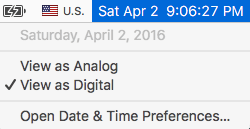
To set your computer to speak the time, click on the time and select Open Date & Time Preferences as shown below.

20160402sa2108-apple-mac-os-x-time-announce-speak-voice-language-001

You’ll be presented with the Date & Time settings screen as shown below.

20160402sa2108-apple-mac-os-x-time-announce-speak-voice-language-002

If you click on Customize Voice you’ll see the voice customization settings as shown below.

20160402sa2108-apple-mac-os-x-time-announce-speak-voice-language-003

When you click on the Voice drop-down menu, you can select from a variety of English voices as well as other language voices (depending on what’s installed and available).

20160402sa2108-apple-mac-os-x-time-announce-speak-voice-language-005

In the list above, some of the highest quality English and Spanish voices are shown as installed.

At the bottom of the list you’ll see an option to Customize. Choosing this option lets you add or remove voices from the speech system. Placing a checkmark next to a voice installs it for use. You can choose standard or high quality voices.

Removing Voice Files

Removing a check-mark after selecting Customize (described above) will let you delete the files associated with that voice.