News Feed

Domo Business Intelligence Systems Offer Live Analytics and Charting

The videos below offer an introduction to Domo business intelligence systems which offer live analytics and charting for meaningful and actionable data aggregation and analysis.

How ShareThis uses Domo

How Sage uses Domo

How Coverhound uses Domo

How Bohme uses Domo

How Arizona State University uses Domo

Domo Launch Party (2011)

Web 2.0 Summit 2011 Josh James

Q&A: What’s a Browser?

Q: What’s a browser?

A: Despite the abundance of people using browsers, this is still a common question.

A browser is a program that lets you go to a web page and otherwise explore the Internet. Browsers let you interact with social network sites like Facebook, Pinterest, or Twitter. Unless you’re reading this as a printed page, you are most likely viewing this page with a browser.

Searching

You can type in a website address in a browser to view that website, or you can search.

Browsers generally have some form of search capability that is connected to a search engine. This is where things get a little bit confusing.

The browser itself doesn’t search but it connects you, seamlessly, to a service that does. Generally speaking, a browser will have you use the associated search service (engine) offered by the browser provider. So, the Microsoft Internet Explorer browser will use Microsoft Bing. The Google Chrome browser will use the Google search service. However, you can set your browser to use another search engine such as Yahoo.

Saving Bookmarks or Favorites

Browsers let you print web pages and you can also save website addresses (called Favorites or Bookmarks).

Print or Save Web Pages

In addition to printing, you can save web pages as PDF files or as locally stored web content (saving the text and images from the page).

Cloud Features

Browser providers typically offer some kind of cloud synchronization so that your bookmarks, browsing history, and other settings can be synchronized across multiple devices. Apple, Microsoft, Google, and Mozilla offer cloud synchronization. This means you can easily pickup reading on one device where  you left off on another device.

Programs

Google Chrome is unique because there is a Google Chrome Web Store where you can get programs that run in Google Chrome. These are useful apps and programs written to work with Google Chrome, and in this way they can be used on Windows, Apple, Linux, and any other system that has Google Chrome.

Popular Browsers

Common browsers are Microsoft Internet Explorer, Google Chrome, Mozilla Firefox, Apple Safari, and Opera. There are many others.  Below are the icons for some popular browsers.

20150106tu-web-browser-icons-chrome-firefox-internet-explorer-opera-apple-safari-kadvacorp

Cisco AnyConnect Web Security Not Compatible with Avast Apple Mac

If you attempt to install Avast Antivirus on your Apple Mac computer, you may get the following error message:

Incompatible software detected. The Web Security module of Cisco has been detected, which is not compatible with Avast. To install the Avast product, please uninstall the incompatible module first.

When you click the Close button, the installation will immediately quit.

Follow these instructions to fix this problem:

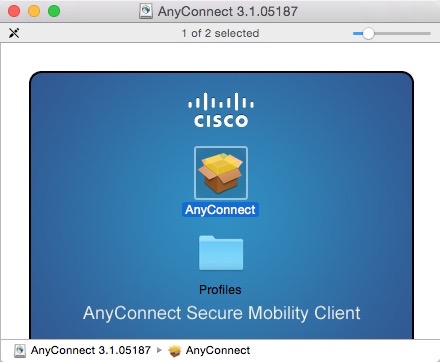
  1. If you have a direct license with Cisco, you can visit the Cisco Software Download Page and download the AnyConnect Secure Mobility Client. Navigate to the AnyConnect Secure Mobility Client v3.x download page and look for the download called Standalone DMG package for Mac OS X “Intel” platforms.
  2. For many people, you will need to go to your organization or employer software download page and download the version provided.
  3. Follow the installation instructions, and remember not to select the Web Security module (see below). This will configure the software so that Avast can be installed.

These are the installation screens. Click any image for a larger gallery view.

2014 Motorola Moto G and Moto X 2nd Generation Review

The 2014 Motorola Moto G and Moto X 2nd Generation phones have both been updated to offer faster performance compared to the previous years’ models, and each have their unique benefits. This article will briefly explore the advantages of each phone.

2014 Motorola Moto G ($180)

Although the Moto G is one of the least expensive Android phones on the market today, it’s actually one of the most advanced and serves as a standard by which all other phones can be measured. The Moto G is available in a US/Canada model (XT1064) and a Global GSM model (XT1063). Both are about $180 without a contract. [Buy Now]

Here are some of the features that make the Moto G one of the best phones available today:

  • Android 5 Lollipop. When you read the 14 page summary of new features offered in Android 5, you may agree that Android has surpassed all other smartphone operating systems. It’s not just a slightly modified version of Android 4.4.4, but a total redesign (familiar, yet so much better). This makes any phone with Android 5 an amazing phone. The Moto G (Global GSM Version) is one of the first phones on the planet to offer Android 5. Although the Nexus 6 is advertised as the only product to offer Android 5, the Nexus 6 remains sold out and unavailable to the average consumer. It’s important to note that it’s only the Global GSM Version of the Moto G that receives the free OTA (over the air / pushed out) automatic Android upgrade from 4.4.4 (KitKat). The US Model doesn’t offer this upgrade yet. If having access to Android 5 is a priority for you, then the Moto G Global Version is the only phone for you. There are unapproved ways of reprogramming other phones to load modified operating systems including Android 5, but these void the warranty. By the time you read this article, other phones may be receiving updates to Android 5, but you’ll need to check to verify this, and the updates sometimes get rolled out over a period of days or weeks so it’s not guaranteed. Where Android 5 is adopted by other manufacturers, it probably won’t be the pure (stock) Android version, but a heavily modified and tweaked version to make it compatible with the modifications and special apps from that manufacturer and the carrier. Moto G offers one of the purest cleanest Android 5 experience available.
  • Audio. The Moto G has two front facing stereo speakers that produce surprisingly good sound. Many other more expensive phones have only mono sound with a tiny speaker on the back of the phone where you might cover it with the palm of your hand, or have the sound muffled when the phone is sitting on a noise dampening surface such as a couch, bed, or blanket.
  • Case. The Moto G is durable enough that you may not feel a case is needed for protection. At only $180 for the phone, the cost of a case is significant — given that the price of some phone cases could be as much as 20% to 30% of the entire cost of the phone. Not having to buy a case saves considerable money and helps retain the thin light design of the phone.
  • Display. The Moto G has a very bright and colorful 5″ display that’s easy to read. When playing high quality 4K YouTube videos for example, it almost looks 3D. Even though the resolution is 720p (1280×720), it looks stunning and amazing.The AMOLED technology of the display makes it very pleasant to look at. The surface of the screen is made of Corning® Gorilla® Glass 3 which is virtually indestructible. This is much preferred to other phones which seem to use ‘chimpanzee glass’ that shatters into a million pieces with the slightest provocation.
  • Feel. The Moto G has a very nice feel to it. The back of the phone is a smooth but not slippery surface that is very comfortable and soothing to the touch. The fit and finish where the back removable case meets the phone is almost seamless, so there are no rough or sharp edges.
  • Handling. The Moto G is thin and light, making it easy to handle and slip into your pocket.
  • Size. The Moto G isn’t much bigger than its 5″ display — which makes it easy to handle and operate with one hand. It’s tempting to have a larger phone that can double as a small tablet device. However, for all the times that one handed operation is needed, it’s preferable to have a smaller phone and buy a separate tablet device with the screen you really desire. Displays smaller than 5″ become less usable either because of having a limited viewing area and/or because of smaller fonts being hard to read.
  • Storage. Although the phone comes with only 8GB RAM, it can be easily expanded with an internal microSD memory card.

Drawbacks. There are a few drawbacks to the Moto G.

  • Camera. The camera quality in the Moto G is adequate, but not exceptional, and some people have reported difficulty getting the camera to focus precisely on what they want to be taking a photo of. If you swap out your camera app with the Google Camera rather than the build-in camera software, you may get better results. Keep in mind that these are not for award winning professional competition photos that can be enlarged. These cameras are primarily for quick snapshots of average quality.
  • Battery. The battery isn’t removable. For people who travel a lot, it’s nice to have a few extra fully charged batteries with you to swap out when the battery gets low. Or, if a battery becomes defective, removable batteries ensure that you only need to replace a battery instead of the entire phone.
  • Speed. Having a slightly slower processor than the more expensive phones, the Moto G may be sluggish when playing some games or when viewing very high resolution videos — depending on what else is running.
  • Storage. Despite having a removable microSD storage card for added expansion, the Moto G is still limited to the included 8GB storage for most system operations. Application and media can be stored on the microSD, but other system functions can’t be moved, so you may at some point reach the upper limit of the device’s storage capacity.

Moto X 2nd Generation ($424)

In 2014, Motorola announced the Moto X 2nd Generation phone. It’s an excellent choice for people who like the benefits of the Moto G, but want a more powerful processor and faster 4G LTE mobile data speeds. Based on the Moto G specs shown above, here are some points for those who are considering the phone.

  • Android. The Moto X comes with Android 4.4.4 KitKat. Although it’s been announced that Android 5 is available for the Moto X, the update hasn’t been fully released yet. Availability will depend on when your carrier approves and releases the update. See more details above for the Android entry under Moto G.
  • Audio. The sound of the Moto X is quite good. However, it lacks the front facing speakers of the Moto G. Even so, audio quality while talking on the phone (top speaker) or listening to music and video is quite clear and loud.
  • Case. Any phone costing several hundred dollars or more should probably have a case, or bumper guard (rubber protection for edges). Fancier phones tend to have metal edges and fancier finishes that one would want to protect. So, with the Moto X, various cases are available. As with any phone, the use of a case will change the phone size and feel.
  • Custom Design. For anyone wanting a phone made partially of bamboo or wood, a customized Moto X is your only choice. Other phones on the market are made of metal and plastic. Having the natural feel of wood in your hand is very nice. Also, knowing that your phone is made partly from renewable, organic, compostable materials is kind of cool. The Motorola Moto Maker let’s you completely customize the colors and materials of your phone.
  • Feel. The Moto X has a nice feel to it, and depending on the material you choose for the back of the phone case, it can be customized to have a touch you’d like most including choices of bamboo, wood, leather, and more.
  • Handling. The Moto X is heavier than the Moto G, but otherwise feels good in the hand and easily slips into a pocket.
  • Size. The Moto X is almost identical to the Moto G in size and appearance. So, it has the optimal size for single handed operation.
  • Storage. The Moto X lacks the removable microSD option found on the Moto G, but it is possible to order it with storage capacity of 16 GB or 32 GB ($50 more). Any additional storage would need to be connected via the USB port.

Drawbacks. There are a few drawbacks to the Moto X.

  • Camera. The camera quality in the Moto X is adequate, but not exceptional, and some people have reported difficulty getting the camera to focus precisely on what they want to be taking a photo of. If you swap out your camera app with the Google Camera rather than the build-in camera software, you may get better results. Keep in mind that these are not for award winning professional competition photos that can be enlarged. These cameras are primarily for quick snapshots of average quality.
  • Battery. The battery isn’t removable. For people who travel a lot, it’s nice to have a few extra fully charged batteries with you to swap out when the battery gets low. Or, if a battery becomes defective, removable batteries ensure that you only need to replace a battery instead of the entire phone.
  • MicroSD. Most smartphones have a removable MicroSD. The Moto X does not. This means you’re limited to the internal memory, unless you connect an external USB storage device.

Other Considerations

  • 4G LTE. The latest cellular data service is 4G LTE and it is capable of delivering Internet speeds that are likely faster than what you have at home. In cities where the market is saturated with 4G LTE devices, there can be connectivity issues and slowness. This also happens at football games and other situations when the 4G LTE network is overloaded. When traveling, it’s likely that there won’t be 4G LTE service, so your phone will adjust to use slower networks, or no data at all for areas where only phone service is available. The Moto G doesn’t have 4G LTE capability. It has H+ capability which can deliver about 21 Mbps. Click here to learn more about various speeds and services.
  • Audio. Many people use headphones with their smart phones. So, the audio quality when playing videos and music on a smart phone is really only important for those who don’t plan to use headphones.
  • Battery. Most smart phones state that they can provide 8 hours or more of continuous use. However, getting to the end of the day typically requires a recharge, especially if you are using features like video viewing, GPS mapping, and hotspot wireless sharing. You could try to carry around an extra battery if your phone accommodates that. Otherwise, you may want to consider a charging pack (a small portable charging station). Also look for phones that have turbo (fast) charging features.
  • Camera Quality. Most mobile phones can take fairly good photos. At least, they look okay on the phone display. If photos get enlarged, or if you zoom in on a desktop computer, the quality diminishes. This is true even for the 41 megapixel phones. While the images look nice on screen, when uploaded to social media like Facebook or Pinterest, the quality can sometimes be degraded if images get compressed. So, ultimately, smartphones have a very difficult time competing with point and shoot cameras of almost the same size.The quality of point and shoot cameras has increased dramatically, size has decreased, and prices have come down. Any serious photographer will want to consider carrying a small point and shoot camera in addition to their phone. There are other more important considerations besides camera quality to have as a priority when choosing a phone.
  • Display Quality. In the same way mobile phones have been competing with higher megapixel cameras, displays are also increasing in their resolution and pixels per inch. With high-end DSLR cameras, we know that just adding more megapixels doesn’t necessarily result in higher quality photos. So, with displays the same is true. A lower resolution display might actually be brighter, more colorful, and easier to look at than a higher resolution display. The Moto G is an excellent example of this. Walk into an AT&T store, and compare all the phones, including those costing $800 or more. You’ll likely decide that the Moto G has the best display quality.
  • Processor Power. The processing power of smart phones, like computer, is dependent upon the computing CPU and available cache memory (a small amount of very fast memory close to the processor). The Moto G and Moto X are fast enough for most tasks. If you plan to do intensive gaming or other tasks, you may want to consider an even faster phone.
  • Storage. With data increasingly being stored in the cloud, it’s less important to have huge amounts of storage in your mobile device. In fact, if you do accumulate 32 GB or more of data stored up in your phone, it will take a long time to copy it off. Most phones have microSD expansion storage. Or, even if microSD storage isn’t available, you can get an OTG (on the go) cable and connect a USB flash drive or hard drive. Given these considerations, the actual built-in storage is less relevant.

Moto G as a WiFi Accessory Device

Given it’s low cost ($180), a person might consider purchasing a Moto G as an accessory for their existing phone. If you use hotspot (tethering) with your primary phone, you can have the Moto G connected to the Internet wherever you go. If your primary phone is an iOS (Apple) device, then it will give you the ability to use Android apps as well. It will give you an additional screen — like having side-by-side dual displays with a desktop computer. It will also give you a device to use for Internet access and other uses, thereby distributing your battery usage across two devices — extending your usable time.

Other Phones to Consider

There are hundreds of phones out there, and each person’s needs and use will dictate the best choice for them. There isn’t a specific phone that’s ‘the best phone’ for everyone. However, that said, you generally get what you pay for, and if you’re willing to pay a bit more here are some good choices:

Further Reading

20141224we-motorola-moto-x-motomaker-moto-g-global-review-980x620

Choosing a Cable Modem or DSL Modem with Wifi

Summary

Most Internet service providers offer customers the option to purchase their own modem or rent one for a monthly fee. Renting for a year is sometimes the same cost as purchasing a unit. This article describes cable modem and DSL modem options.

Renting or Purchasing

Renting can be more economical if you have several service calls per year, because your service provider is able to perform remote diagnostics or even come on-site to resolve any hardware issues with the equipment. Otherwise, you’ll be paying someone to come and diagnose problems with equipment. If you feel a purchased unit will be easy to setup and keep working, without any hardware failures, then purchasing a unit should be fine.

Hybrid Rental Solution

One option is to rent a modem, but purchase your own wireless router. This gives you the ability to purchase a very high quality wireless router independent from the modem. A dedicated wireless router may have more features, speed, and range than a combination modem/router. There’s a wide range of price from as low as about $40 to as much as $300 or more for a high-end wireless router.

Combination Unit Considerations

Having a combined modem/router is nice because you can interact with a single interface to setup the unit and not worry about compatibility between the units. If you’re renting the equipment, your service provider can remotely diagnose problems more easily and they will be more familiar with a unit they are providing.

Support Concerns

It’s possible that you’ll have trouble with the setup and ongoing use of your device without the support of your service provider. Here’s a product feedback comment from one person on Amazon:

“Centurylink (because they apparently only want you to rent/buy modem/routers from then instead of buying them elsewhere cheaper and with faster delivery) will NOT give you the info needed to set up unless you buy some monthly “help with non-Centurylink modems” plan, or buy one of their modem/routers!!!”

It’s understandable that companies want to and need to recuperate the cost of providing customer service and support. If a product is being rented, part of the rental fee is for providing the support needed when customers have questions about setup or use of their device. No company can hire employees to provide free phone support all day for products they haven’t sold or profited from. Those wanting free and unlimited support for their hardware should rent it from the support provider.

Cable Modems with Wireless Router

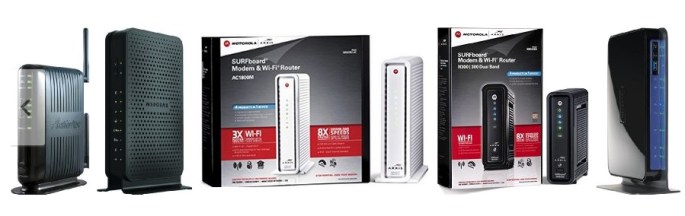
Here are a few cable modems with wireless routers built-in.

DSL Modems with Wireless Router

Here are a few cable modems with wireless routers built-in.
20141220sa-cable-dsl-modem-wireless-router

How to Find Your Lost iPhone, iPod, iPad, or Apple Computer

Summary

Most mobile devices these days have built-in tracking features that are very convenient for a variety of reasons. For example, health and wellness apps that monitor your activity require location tracking to be turned on. Location tracking can help find lost or stolen devices.

Because of privacy concerns, location tracking is typically an ‘opt-in’ service. Those who decide to not permit location tracking for their devices will not be able to have them easily located and recovered.

For users of Apple mobile devices, you’ll need to enable location tracking prior to attempting to find a lost device.

Instructions

These are the steps you can follow to find a device:
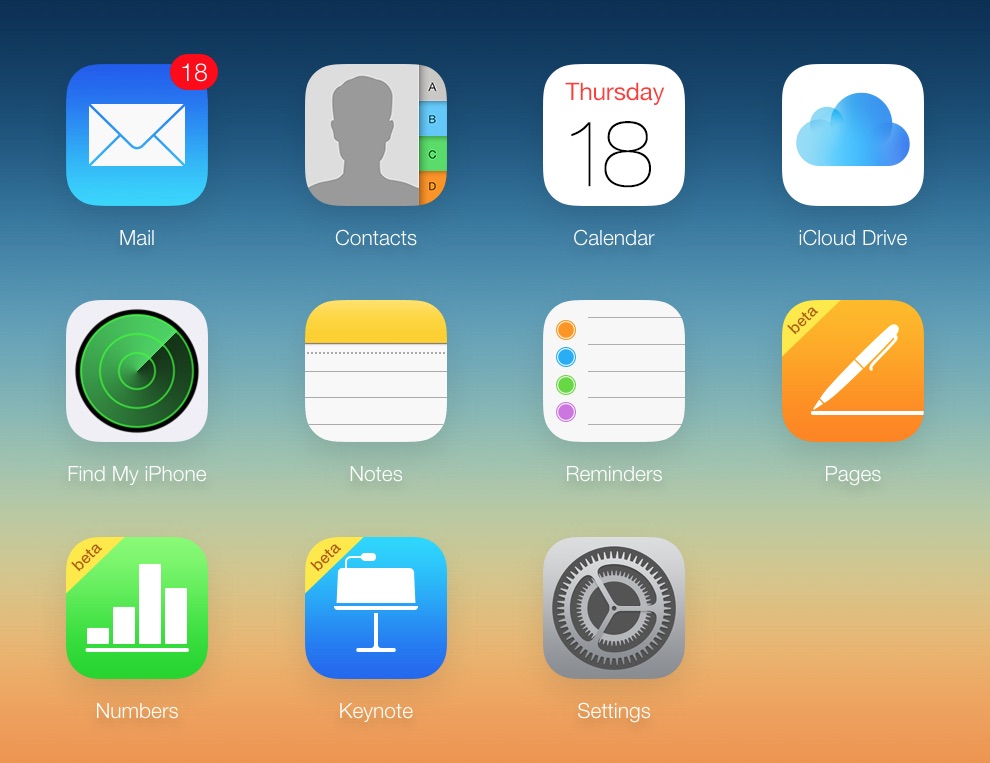
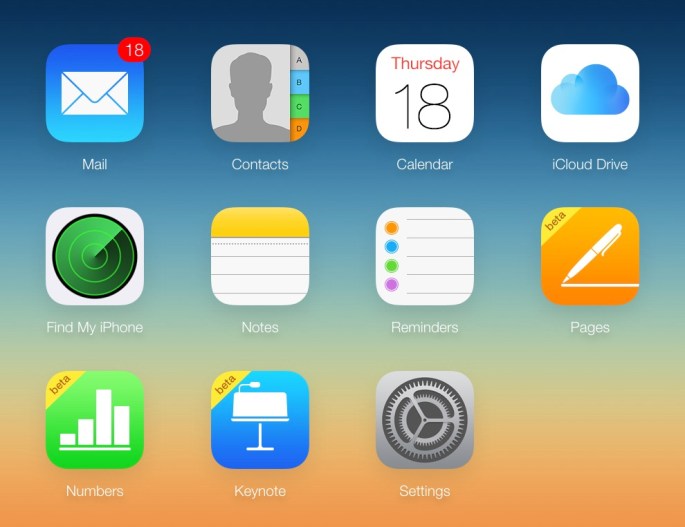
  1. Go to http://www.iCloud.com
  2. Login using your Apple ID.
  3. Click on the Find My Phone icon as shown below.
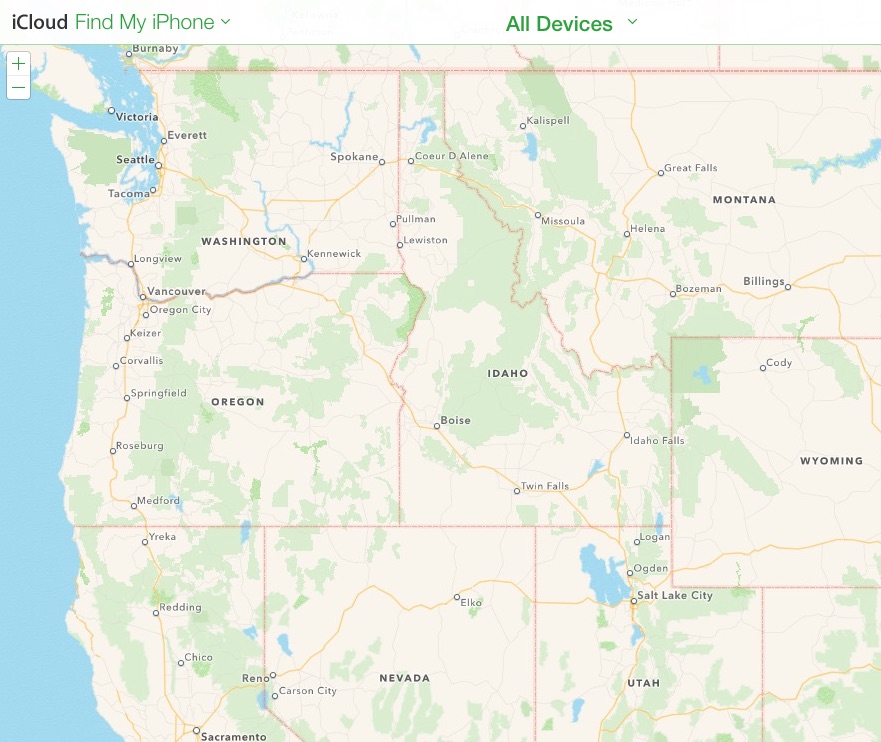
    20141218th-find-my-phone
  4. The Find My Phone service will display a map with your device or devices indicated on the map with dots. in the example below there are no devices displayed, but when you use the service hopefully your device will show up. Under the All Devices drop-down menu, your available devices
    20141218th-find-my-phone-apple-iphone-ipad-ipod-macbook

Choosing a Color Printer: InkJet or Laser?

Summary

When it’s time to purchase a new printer, one of the first questions to consider is whether to purchase a laser printer or an inkjet printer. This page offers some considerations and suggestions in exploring your options.

Color InkJet Printers

Here are some points to consider regarding InkJet printers:

  • Lower purchase price compared to laser printers.
  • Cost of operation may be higher for those who print a lot. Although, some inkjet printers in the $400 price range or higher have economical high capacity ink cartridges.
  • Cost of operation may be higher (per page) for those who print very infrequently because the ink cartridges on some printers can dry out when not used for long periods of time (several weeks or more).
  • Good for people who print frequently (several times a week) but don’t print a lot of pages.
  • Good choice for people wanting to print pictures on photo paper.
  • Printing in high quality mode can be slow unless you purchase a more expensive inkjet printer.
  • Lower priced inkjet printers are typically small and light weight.
  • If you want scanning, copying, printing, and possibly faxing, there are inexpensive inkjet printers that offer these features.

Color Laser Printers

Here are some points to consider regarding Laser printers:

  • Higher cost to purchase initially, but long-term lower cost of ownership for those who do a lot of printing.
  • Toner is used instead of ink and it doesn’t dry out like ink cartridges used by inkjet printers.
  • Typically faster printing than low priced inkjet printers. Although, at the $400 to $500 price range, many inkjet printers are now as fast as laser printers.
  • Generally heavier and bigger than inkjet printers because multiple large toner cartridges are used and the printing mechanism is heavy. However, some expensive inkjet printers can be as big or bigger than laser printers, so it depends on the printer.
  • To get scanning, copying, printing, and possibly faxing capabilities, a laser printing system will likely cost more than an inkjet printer offering the same features.

Purchase Choices

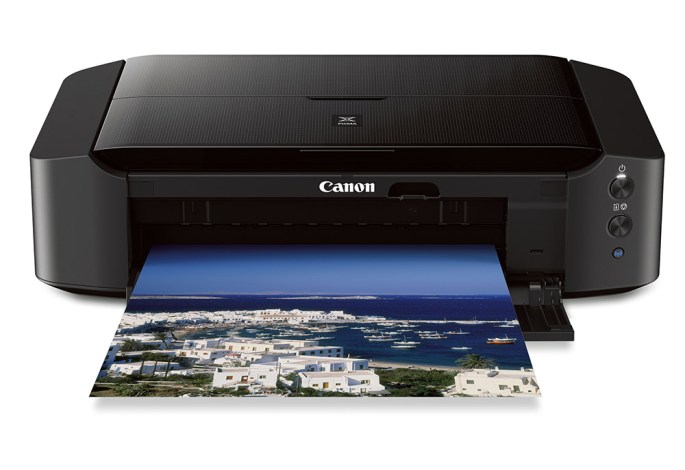
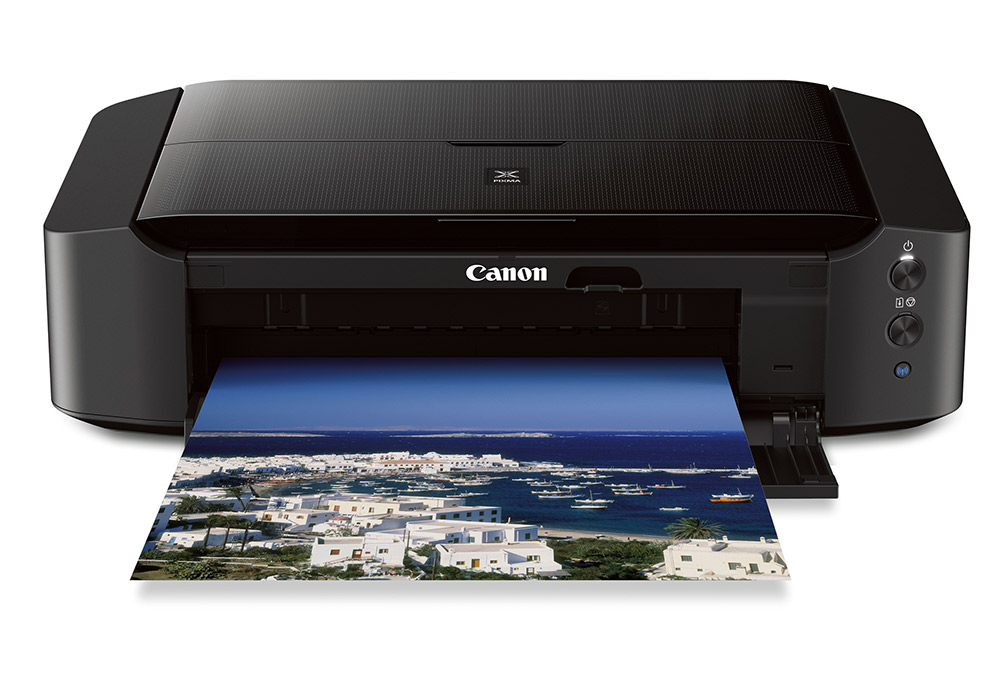
Here are links to some top rated inkjet and laser printers on Amazon that you can consider based on your budget.

It’s best to choose from the above options based on what you feel your needs are, and then contact us to confirm it’s the right choice for you.
20141218th-353360-canon-pixma-ip8720-wireless-inkjet-photo-printer

Olympus Digital Audio Recorder Erase All

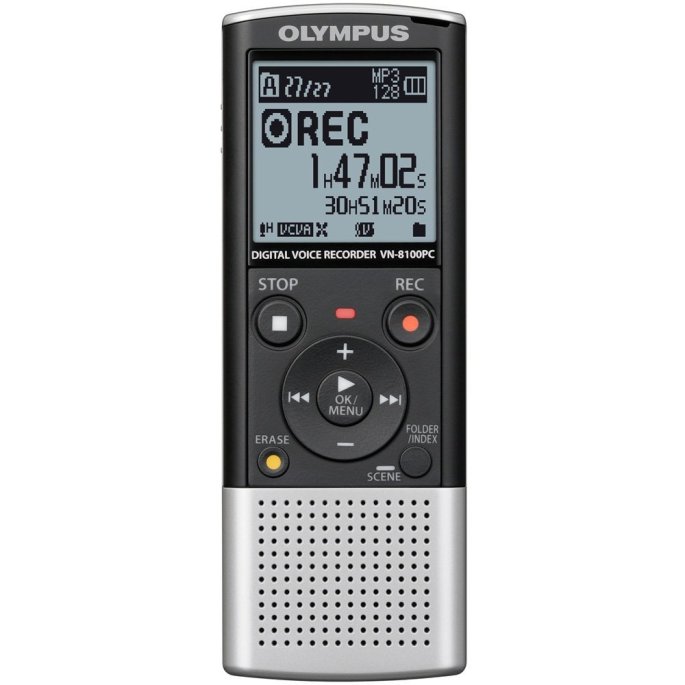
If you’re using an Olympus digital audio recorder and would like to erase all recordings, follow these instructions.
  1. Power on the recorder by sliding the hold switch to the on position.
  2. Press the Folder/Index button until you see the folder icon with the letter A appear in the display.
  3. If Folder A is empty, you’ll see 00/00 recordings indicated. So, press the Folder/Index button again and advance to any folder with recordings in it.
  4. Once you arrive at a folder with recordings, you’ll see that listed in the display as recording number / total recordings in folder (such as 01/03 for recording 1 of 3).
  5. Press the Erase button once. This will indicate you want to erase the current audio recording. You’ll see Erase: Cancel displayed. Press the Erase button again to indicate you’d like to erase all recordings in the folder. You’ll see the word ALL in the display, and Erase: Cancel below it.
  6. Press the Right arrow. You’ll see Erase: Start below the word ALL.
  7. Press the Play button. This will begin the process of erasing all recordings in the current folder.

AeroMobil: The Automobile Airplane is a Car that can Fly

About

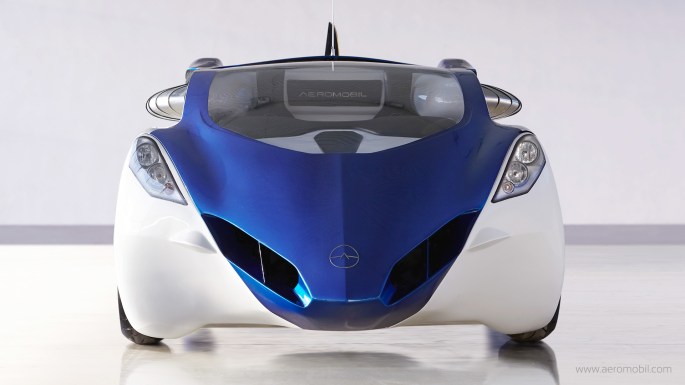
AeroMobil. Beautiful flying car. Beautifully integrated. Transforms in seconds from an automobile to an airplane. Gives you freedom to move.

AeroMobil is a flying car that perfectly makes use of existing infrastructure created for automobiles and planes, and opens doors to real door-to-door travel. As a car it fits into any standard parking space, uses regular gasoline, and can be used in road traffic just like any other car. As a plane it can use any airport in the world, but can also take off and land using any grass strip or paved surface just a few hundred meters long.

The current flying car prototype AeroMobil 3.0 incorporates significant improvements and upgrades to the previous pre-prototype AeroMobil 2.5. It is now finalised and has been in regular flight-testing program in real flight conditions since October 2014.

The AeroMobil 3.0 is predominantly built from advanced composite material. That includes its body shell, wings, and wheels. It also contains all the main features that are likely to be incorporated into the final product, such as avionics equipment, autopilot and an advanced parachute deployment system.

AeroMobil 3.0 also implements a number of other advanced technologies, such as a variable angle of attack of the wings that significantly shortens the take-off requirements, and sturdy suspension that enables it to take-off and land even at relatively rough terrain.

Image Gallery

Video

About the Video

Originally Published to YouTube on Oct 29, 2014

The current flying car prototype AeroMobil 3.0 incorporates significant improvements and upgrades. It is now being tested in real flight conditions since October 2014. Initially certified by the Slovak Federation of Ultra-Light Flying, it now entered a regular flight-testing program.

The AeroMobil 3.0 prototype is very close to the final product. It is predominantly built from the same materials as the final product, such as advanced composite materials for the body shell, wings, and wheels. It also contains all the main features that will be incorporated into the final product, such as avionics equipment, autopilot and an advanced parachute deployment system.

Credits AeroMobil 3.0 video

Produced by Protos Productions http://www.protos.sk
Director: Jonáš Karásek
DOP: Tomáš Juríček
Producer: Michal Hlavačka
2nd DOP: Peter Bencsik, Ivo Miko
Editor: Michal Kondrla
Music: Michal Novinski

Camera equipment: Reproduction
Lighting crew: Shining
Grip: RSR, Majo Tardík, Palo Bachňa
Aerial photography: SkyEye
Production crew: Michal Torma, Samuel Vojtek Marek Tóth
Online postproduction: Ekran, Peter Koštál, Paľo Durák
Sound mix: Soundline
Making of: Juraj Valica, Juraj Ondáš, Lukáš Terén

Credits AeroMobil Photography

Photographer: Miro Minarovych
Photographer: Róbert Kňažko

Contact

For more information, contact AeroMobil at:

__________

Thanks to Alex for letting us know about the AeroMobil.

You Can’t Copyright Your Facebook Content

Contrary to urban legend, you can’t copyright your Facebook content or otherwise unilaterally change your user agreement. This applies to other similar services, software, and agreements. The following excerpt from Snopes elaborates on this.

Messages about protecting your copyright or privacy rights on Facebook by posting a particular legal notice to your Facebook wall are similar to an item which circulated several years ago positing that posting a similar notice on a web site would protect that site’s operators from prosecution for piracy.

In both cases the claims were erroneous, an expression of the mistaken belief the use of some simple legal talisman — knowing enough to ask the right question or post a pertinent disclaimer — will immunize one from some undesirable legal consequence. The law just doesn’t work that way.

Facebook users cannot retroactively negate any of the privacy or copyright terms they agreed to when they signed up for their accounts, nor can they unilaterally alter or contradict any new privacy or copyright terms instituted by Facebook, simply by posting a contrary legal notice on their Facebook walls.

Moreover, that Facebook is now a publicly traded company (i.e., a company that has issued stocks which are traded on the open market) or an “open capital entity” has nothing to do with copyright protection or privacy rights.

Any copyright or privacy agreements users of Facebook have entered into with that company prior to its becoming a publicly traded company or changing its policies remain in effect: they are neither diminished nor enhanced by Facebook’s public status.

Further, the concerns about copyright ownership which these types of notices are intended to address are unfounded.

Click here to read more.

20140930tu-facebook-share-with-my-friends-and-the-nsa