News Feed

Square: Here’s Why You Need a Credit / Debit Card Reader (Videos)

Having the ability to receive credit card payments is very helpful — not just for those running a small business, but for anyone wanting to receive a payment from someone. These days people are less likely to carry cash or a checkbook. Cards and smartphones are becoming a more common currency tool.

Merchants sometimes issue refunds, rebates, or rewards on prepaid non-reloadable debit/credit cards. If you’d rather cash out the money, you can use a credit card processing device to get the money into your bank account.

There are several providers of credit/debit card processing readers: PayPalSquareUp, and Intuit (the QuickBooks people).

Square Card Readers

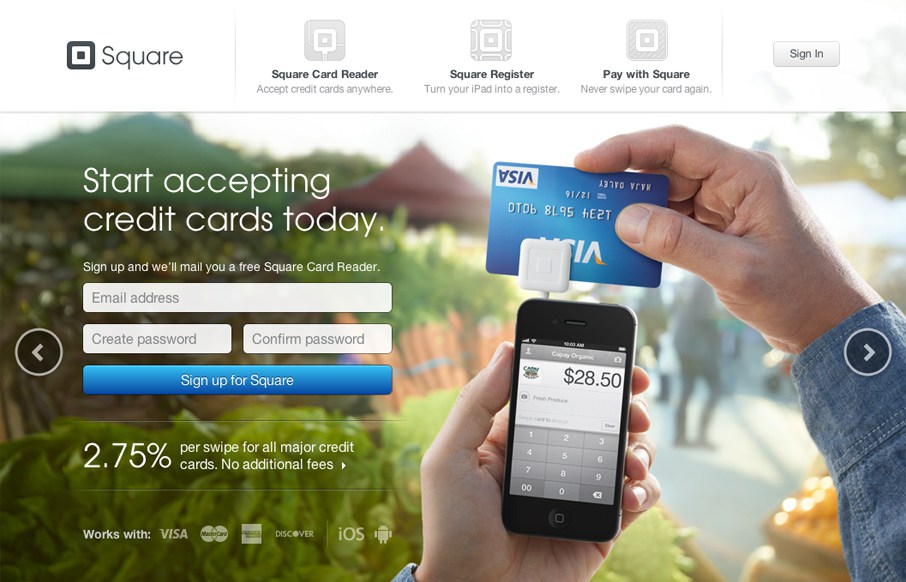
SquareUp (Square) is one of the most popular services and offers a very elegant retail ‘cash register’  with card reader that holds an iPad. There is also a bluetooth reader available for Apple Pay and cards with chips.

Learn More

20160131su-square-squareup-credit-card-processing

SquareUp Videos

The Barbershop Club


Register Overview


Accepting Chip Card Payments with the Square Contactless and Chip Reader


Getting Started with the Square Contactless and Chip Reader


Everything you need to know about EMV (Chip Cards)

Apple Tip: Video Settings to Save Power and Increase Performance

20160401fr0954-special-thanks-to-makur-310x150The default video settings for Apple computers are intended to result in an elegant visual presentation.

Transparency and a range of smooth grayscale graphics are designed to enhance the user experience.

However, these features use more power and can slow down your computer.

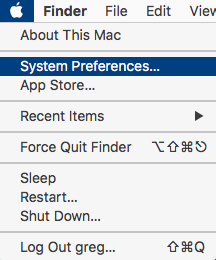
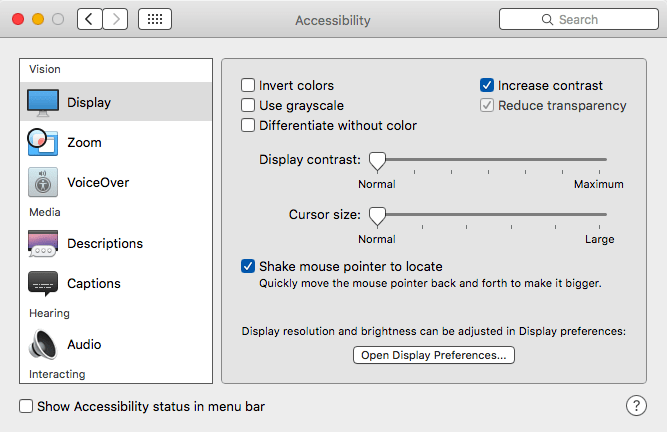
To change the contrast and transparency settings, go to System Preferences and choose Accessibility. Then enable Reduce Transparency and Increase Contrast.

  • Transparency. The transparency feature uses significant video processing power. This can slow down the computer and use more power.
  • Contrast. When you increased contrast, needed icons and critical visual elements stand out more. This makes it possible to reduce your display brightness slightly without losing visual clarity.

Instructions

See the steps below to make the adjustments.

STEP #1 – System Preferences

20160401fr0942-apple-mac-osx-choose-system-preferences

STEP #2 – Accessibility

20160401fr0944-apple-mac-osx-system-preferences-window

STEP #3 – Reduce Transparency & Increase Contrast

20160401fr0858-apple-mac-osx-video-settings-power-performance-transparency-contrast

Network Solutions Webmail Login Not Working

If try accessing your email by going to the web portal either at mail.yourwebsite.com or at http://www.networksolutionsemail.com you may find that these don’t work.

Instead try this email web portal login link which is based on the NetworkSolutionsEmail.com address but has the additional required URL statements for the login to work.

Here’s the full URL for what seems to be the only working login:

https://www.networksolutionsemail.com/edgedesk/cgi-bin/login.exe?xsl=login.xsl&bind=&tpl=mg_netsol&nodetect=1


Moto G First Time Setup with Motorola Migrate

If you’re setting up a Moto G (2nd Generation) phone for the first time, after entering your language preferences, connecting to a wireless network, and logging into your Google account, you’ll be given an option to migrate all your files and settings from a previous phone to the new phone using the Motorola Migrate app available on the Google Play store.

Here are some general instructions:

  1. Stop Migration First. The Motorola Migrate app will start during the initial setup of the phone. You can actually skip this step for now, and go to the main applications screen.
  2. Update Motorola Migrate. You may need to update the Motorola Migrate program on your recently purchased device. Go to the Google Play store, search for Motorola Migrate, and choose update. The version that ships with your device may be an older version.
  3. Use Local WiFi. The Motorola Migrate application uses your local wireless network to transfer information directly between the phones. So, you will need a local WiFi network — preferably your own personal home network. Connect to your local wireless network.
    • Note: If you’re in an Enterprise environment, or using some other business or WiFi network, it’s likely the migration will fail since firewall and business network switch/router settings may limit this kind of activity.
  4. Migrate Data. Follow the on-screen instructions to migrate your data.


Universal Wireless Keyboards for iOS, Android, Windows, Tablets and Computers

Summary

As people are increasingly using a variety of computing devices, it’s often necessary to switch between different devices while working. Universal keyboards save space by letting you have a single keyboard at your desk, and switch between devices. So, with one keyboard you can work on your smart phone, tablet, and desktop. Using a single keyboard is helpful because it takes up less space, and you can learn one keyboard rather than three or more. Not all keyboards feature easy switching, so you’ll need to look specifically for that feature.

Typing Efficiency

Laptop keyboards generally have a non-standard placement for arrow keys as well as the CTRL, ALT, Option, Fn (function), and Windows Start key (or Apple Command key). Variations between laptop keyboards, desktop keyboard, and Windows vs. Apple can limit your ability to have high familiarity and efficiency when moving from one computing device to another. Having a single standard keyboard that works on all devices (home, office, mobile) can help.

Keyboard Models

  • Anker® T320 Ultrathin Keyboard – Compatible across Android, iOS, and Windows, enabling you to mix and match with devices.
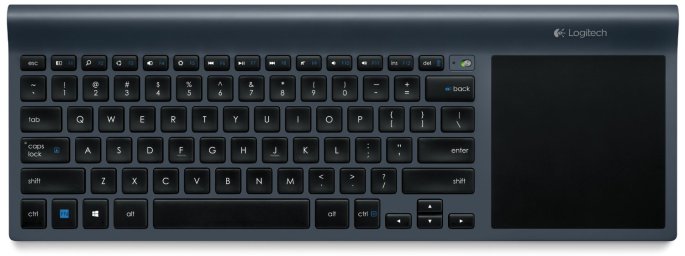
  • Logitech Wireless All-In-One Keyboard TK820 with Built-In Touchpad – This innovative keyboard seamlessly integrates typing, touch and gestures. So now you have everything you need to control and navigate your computer in one device. With a large, built-in touch pad, you can type and swipe comfortably together. It’s a new way to navigate—especially in Windows 8.
  • Logitech Bluetooth Illuminated Keyboard K810 – Type in style with this elegantly designed, Bluetooth illuminated keyboard for Windows 8. Press one button to instantly switch between typing an email on your Windows PC, taking notes on your Apple iPad or replying to a text on your Android smartphone. With sharp, bright, backlit characters, this keyboard lets you create and communicate more easily on more devices—even in the dark.
  • Microsoft Universal Mobile Keyboard – For iPad, iPhone, Android devices, and Windows tablets. Operating system switch allows you to easily switch between devices.
  • Microsoft Wedge Mobile Keyboard for Windows Tablets – This is a nicely styled keyboard, but primarily for Windows Tablet computers.
  • Minisuit BluBoard – BluBoard supports devices running Bluetooth 3.0 on iOS, Android, Blackberry, Kindle, and Windows. Acer, Blackberry Playbook, Google Nexus, iPad, Mini 2nd Gen, Kindle Fire HD/HDx, Microsoft Surface, Motorola, Samsung Galaxy Note, Tab, and many more!

Photo Gallery

Below are images of the keyboards mentioned above.

Wi-Fi Phone With Free Unlimited National Calling

Introduction

Wi-Fi calling is the ability to make phone calls from your mobile phone when there is little or no mobile signal. Until recently, people living in areas with poor mobile signal strength had to purchase micro-cell devices at a cost of about $150. These devices would plug into Ethernet and work like a small cell tower in your home. With Wi-Fi calling, it’s possible to make phone calls anywhere there’s a wireless Internet connection, even if no carrier signal is present — like basements or office buildings.

Skype Phone Number – $6 / mo.

Wi-Fi calling has been available for a while in various forms. The Skype app for mobile phones was an early offering that was initially blocked by carriers for use over cellular data because it was seen as a way of circumventing the mobile phone packages that limited the monthly calling minutes. You could still use Skype wherever wireless Internet was available, just not while away from wireless. Eventually, mobile phone carriers began offering unlimited nation-wide calling so cellular data use by VoIP apps was permitted. Skype continues to be a favorite solution for video calling.

A drawback to setting up a Skype phone number is that the available area codes are limited. For example, in Iowa, only 712 (Sioux City) is available. Unless you live in that calling area, people calling from landlines will need to pay long distance fees.

Republic Wireless – $10 / mo.

One of the first innovators to offer wireless calling included in their phone service was Republic Wireless. Initially the cost was $5 per month. That’s now up to $10 per month. With phones starting at about $130, you can have wireless calling as well as a pay-as-you-go cellular phone service.

Google Voice – $0 / mo.

Google Voice is available at no cost for every person who has a free Google account. If you setup an Android phone with the Google Voice app for Android or an iPhone with the Google App for iOS, you get a free phone number in just about any area code you choose. You can then receive and make calls from that number. The phone service includes voicemail and SMS text messaging.

If you’d like to activate the phone with a carrier, you can, but you don’t need to. So, essentially, you can have free phone service, and a free phone number, forever. It will work anytime you’re in range of a wireless Internet connection.

NOTE: Incoming calls can only go to voicemail or be routed to a working phone line. So, if you’re using your Google Voice phone as your only phone, then you’ll need to have people leave a message and then call them back using Google Hangouts.

Making Calls with Google Hangouts.

The instructions below explain how to make a call with the Google Hangouts App. Click this image for a larger view.

20160326sa0559-google-hangouts-voice-placing-making-outgoing-call-app

Best Phones for Google Voice

If you plan to save money by using a mobile phone with or without carrier service activated, here are some great models to choose from. It’s best to choose a model with 16GB or more memory so the phone isn’t running out of room frequently.

  • Motorola Moto G 16GB Global Phone 3rd Generation – $219 on Amazon. This phone looks great and sounds great with dual front facing speakers. It has a fast quad-core processor and includes an FM radio. The smooth design all around is very comfortable to hold. The 5″ screen is an ideal size — not too big, and not too small. The display is super colorful, crisp and bright. As a global phone, it has maximum compatibility and resale value.
  •  Motorola Moto G 8GB 2nd Generation – $99 to $165 on Amazon. The 2nd Generation Moto G is available in 8GB only, but it will save you some money. It has many of the same benefits and features as the 3G. The US model is $99 and the Global model is $165.
  • Unlocked Android Phones on Amazon. There are a variety of unlocked Android phones on Amazon. Unlocked phones have the greatest flexibility and need not be bound to a contract with a particular carrier. Android phones offer the ability to use the Google Play store for apps.
  • Unlocked Apple Phones on Amazon. There are a variety of unlocked Apple phones on Amazon. Unlocked phones have the greatest flexibility and need not be bound to a contract with a particular carrier. The Apple iPhone offer the ability to use the Apple App store which may have more elaborate features than their Android counterparts. Newer models of Apple iPhones have one-touch fingerprint readers which help secure your phone.

Consider an iPod Touch $199

If you’re planning on exclusively using Wi-Fi calling you might consider using an iPod Touch starting at $199 for the 16GB model. The iPod touch offers many great features and it’s super slim and light.

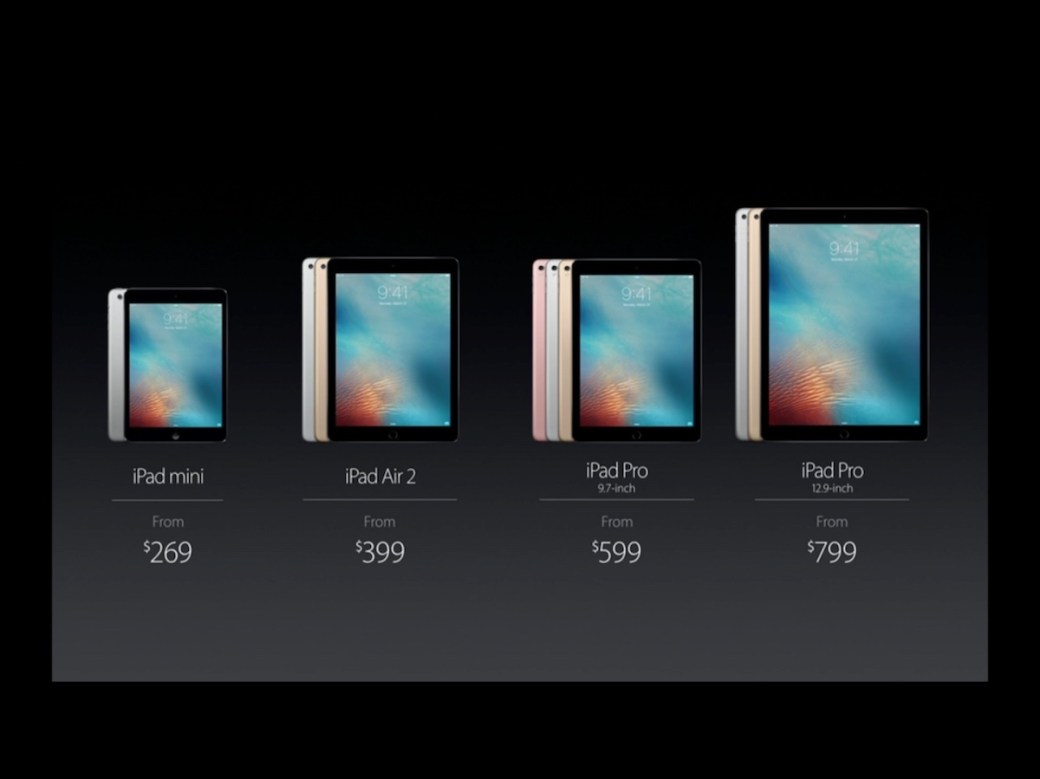
Consider an iPad $269 – $1,400

Like the iPod touch, an iPad would also serve as an excellent phone system with the added advantage of having great computing features for other work. Using cloud storage with Dropbox or Box turns the iPad into a desktop-class file storage system.

AT&T Wi-Fi Calling

Recently AT&T partnered with Apple to allow Wi-Fi calling on new iPhones. This is great news for people who had very poor signal quality in their homes or offices.

20160324th2058-att-wifi-calling-wireless-internet-microcell-mobile-iphone-android

Apple Special Event – 21 March 2016

Introduction

This page offers live commentary on the Apple Special Announcement on 21 March 2016 beginning at 10:00 AM Pacific Time.

Privacy

Tim Cook began the event with a historic announcement about the urgency of defending our national privacy infrastructure. Apple has been in a high profile battle with the Federal Government as they have held their ground in demanding that the national digital infrastructure of devices remain private and secure. Learn more at Apple.com/privacy.

Sustainability

Apple’s operations in Singapore are powered by 100% renewable energy, and 100% of the data centers are powered by sun, wind, water power. Apple as a company is currently powered by 93% renewable energy. The biggest news is a new robot called Liam (shown below) that takes apart old mobile devices, separating parts for repurposing, recycling, or proper disposal. Learn more at Apple.com/environment.

20160321mo1313-apple-special-event-21-march-2016-cupertino-017

Health

Apple Research Kit is a big data health initiative pioneered by Apple. Effective data gathering can lead to meaningful analysis that offers actionable analysis which leads to positive health outcomes. Learn more at Apple.com/ios/health.

20160321mo1313-apple-special-event-21-march-2016-cupertino-021

Apple Watch

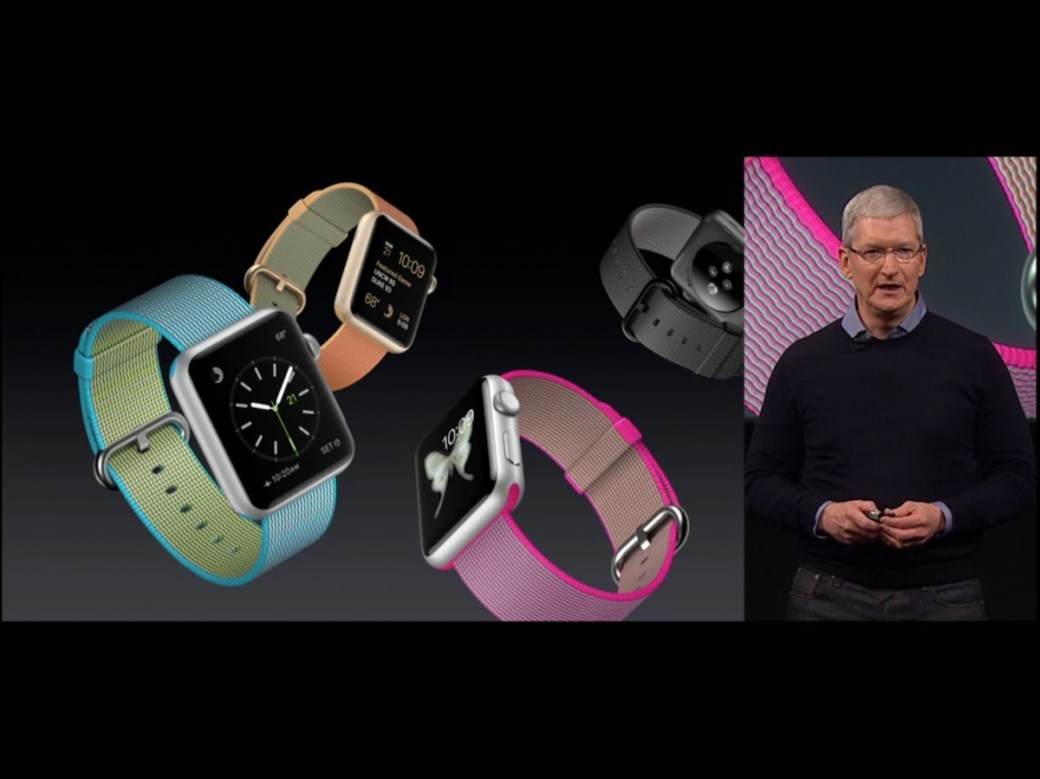
New colorful nylon mesh watch bands are now available. Learn more at Apple.com/watch.

20160321mo1313-apple-special-event-21-march-2016-cupertino-010

Apple TV

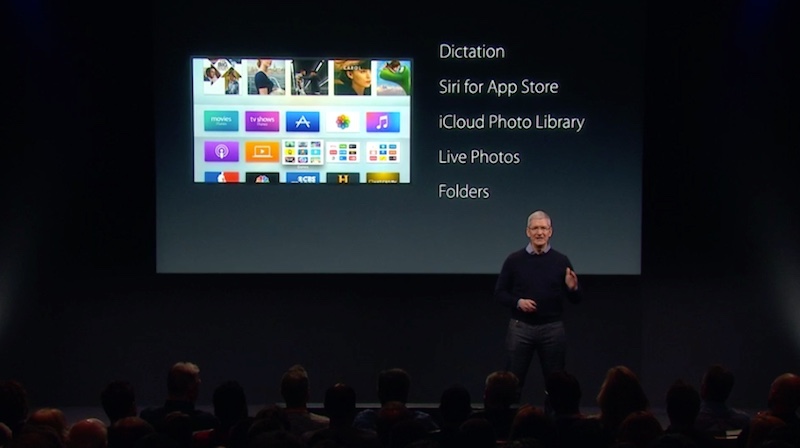
Tim Cook announced that apps are the future of television. There are now 5,000 Apps available for Apple TV. Sporting event apps let you watch multiple events at once. You can play games on the Apple TV and organize . The new TVOS will have folders to organize apps, similar to the iOS on iPhone and iPad. Learn more at Apple.com/tv.

20160321mo1313-apple-special-event-21-march-2016-cupertino-025

iPhone SE 4-Inch Phone

The iPhone SE will be available to order on March 24 and available in stores by the end of the month. Over 30 Million 4-inch iPhone were sold in 2015. So, they are brining the 4-inch phones back. Learn more at Apple.com/iphone-se.

20160321mo1313-apple-special-event-21-march-2016-cupertino-011

iOS 9.3

The iOS 9.3 release offers many new features. Here are a few.

  • The latest version of the mobile operating system is updated.
  • Notes Now Password Protected
  • Health app updates
  • News is used by 50 million people
  • Car Play is a safer smarter way to use iPhone in the car.
  • New features for education and iPad use in classrooms are available.

Night Vision Display Technology

20160321mo1313-apple-special-event-21-march-2016-cupertino-028

Car Play Display Interface

20160321mo1313-apple-special-event-21-march-2016-cupertino-032

iPad Pro with 9.7-inch Display

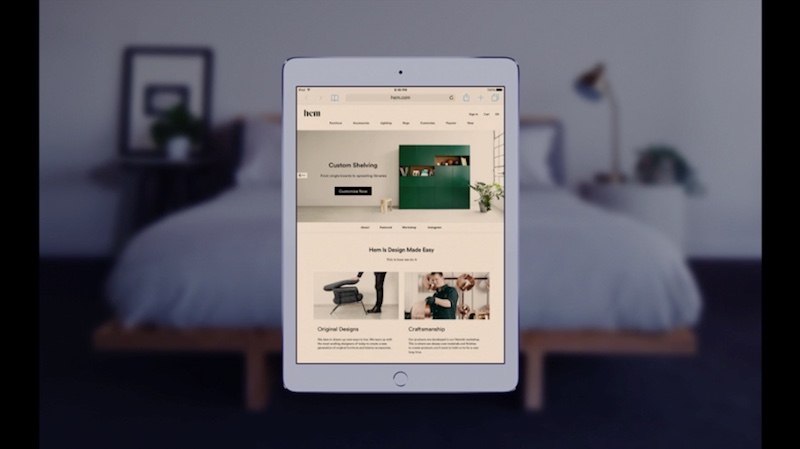
A new smaller iPad pro is being announced. It’s a more powerful iPad in a smaller form factor at a lower price. The new iPad incorporates 4-channel ambient light sensors that adjust the light for better nighttime viewing. The pricing will be $599 (32GB), $749 (128GB), $899 (256GB). Learn more at Apple.com/ipad-pro.

20160321mo1313-apple-special-event-21-march-2016-cupertino-007

New Event Location

In 2017 the new campus will be opened, so today’s special event was the last event to be held at the historic Apple auditorium where so many important announcements have been made. A rendition of the new campus is below.

20160321mo1313-apple-special-event-21-march-2016-cupertino-014

20160321mo1313-apple-special-event-21-march-2016-cupertino-015


[Updated: 1:32 PM. There are no additional updates planned for this article.]

Apple iPad Pro Email Signature Duplication Problem

There’s presently an issue that seems to only be happening on the Apple iPad Pro where email signature is duplicated at the bottom of emails when changing the From sending address.

Here’s how to reproduce the error:

  1. Setup multiple send from addresses following the instructions found here: “Using Multiple Send From Email Addresses in Apple iOS.” Keep in mind that this has only been tested for people who have generic IMAP or POP3 email services (like those provided by a website hosting company).
  2. Create a new email message or reply to an existing message.
  3. For the From address, choose an account, and then choose another account. Each time you choose a new account, the signature won’t be replaced (as is normally the case), but instead an additional signature will be placed at the bottom of your message.
  4. If you switch to another app, and return to your in-progress draft email, another email signature will be added again each time you switch away and come back.

If a solution is found, it will be posted here.

Using Multiple Send From Email Addresses in Apple iOS

Introduction

The Apple iOS platform (the operating system for iPhone, iPad, and iPod Touch) let’s you have multiple send from email addresses. This document explains why you’d want to do that, and how to set it up.

Why Multiple Send From Addresses are Helpful

If you have a website, and the website hosting package comes with email service, and if you use a ‘catch all’ email account, you can setup various alias email addresses that forward to a central mail account. Email messages sent to sales@yourwebsite.com or service@yourwebsite.com or billing@yourwebsite.com will all go to the main ‘catch all’ account. Here are some of the benefits:

  • Save Time. A ‘catch-all’ account eliminates having to manage multiple email accounts.
  • Be Spontaneous. You can create an email address in an instant, from anywhere, and know it will work immediately. This is very helpful when standing in line at a store, and wanting to provide an email address that is unique for that vendor.
  • Sort Efficiently. You can setup email rules based on the address a message was sent to.
  • Manage Spam. If you start getting spam at an email address that is unique for a specific vendor, then it may be they are selling your email address to third parties.
  • Keep Organized. If you have several areas of expertise and services you provide, you can have an email for each of them.

How to Setup Multiple Send From Addresses

In the iOS platform (used for iPhone, iPad, and iPod Touch), it’s possible to setup multiple sending addresses. Here’s how this is done:

  • Go to Settings > Mail, Contacts, Calendars > Mail > and selecting an email account.
  • Tap on Account
  • Tap on Email (found below Name)
  • Tap on Add Another Email to create an additional email address you can send from under this same account.
  • You must press the enter/return key after typing the email address to save it. Then you can return back to the main Settings screen, saving as you go.

Tavi Gevinson and IBM Watson on Trendspotting (Video)